Answered
Color Picker Not Selecting Color
The eye dropper is not picking up (selecting) any colors when I try to change the color of shapes or text.
Anyone know how to fix this? Its very frustrating to have to input hex codes every time.

The eye dropper is not picking up (selecting) any colors when I try to change the color of shapes or text.
Anyone know how to fix this? Its very frustrating to have to input hex codes every time.
Hi
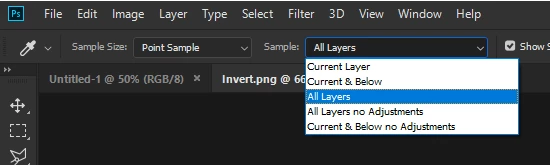
With the Color Picker selected from the Toolbar try setting it to Sample All Layers
Already have an account? Login
Enter your E-mail address. We'll send you an e-mail with instructions to reset your password.
 AdChoices