
Participant
October 26, 2023
Answered

color picker tool and the color gradient box don't align

  • October 26, 2023
  • 4 replies
  • 740 views

I opened photoshop today and went about drawing on my piece from yesterday.  I then realized when I used the color picking tool and selected a color, I can paint with that color but it doesnt show up on the gradient box
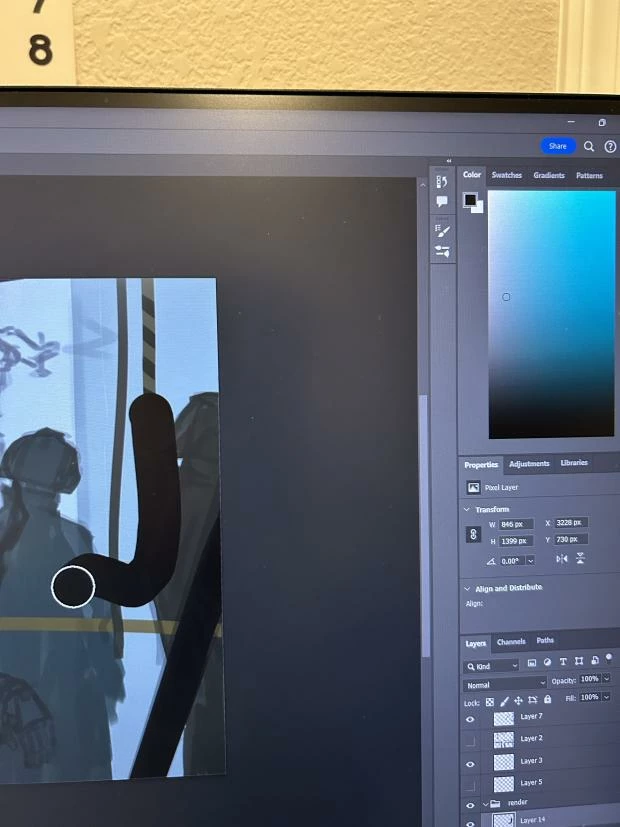


as you can see above im painting with a black color that I got by using color picker but on the gradient color scale it doesnt show black it shows a light blue gray.  This might not be an issue for other photoshop users but for any illustrators this makes it impossible to judge colors


This topic has been closed for replies.
Correct answer Hoi Yeung331788629i5r

hey everyone I figured it out.  I Found another person with the same issue, they installed an older version of photoshop and the issue fixed.  I did that but it didnt work.  When I tried it again what I did was deleting a photoshop (I have 2 versions of photoshop downloaded 24.7 and 25.1 the new version)  I deleted the newest version leaving with only the older photoshop version on my computer and the bug was gone.  

4 replies

Hoi Yeung331788629i5rAuthorCorrect answer
Participant
October 27, 2023

hey everyone I figured it out.  I Found another person with the same issue, they installed an older version of photoshop and the issue fixed.  I did that but it didnt work.  When I tried it again what I did was deleting a photoshop (I have 2 versions of photoshop downloaded 24.7 and 25.1 the new version)  I deleted the newest version leaving with only the older photoshop version on my computer and the bug was gone.  

Participant
November 3, 2023

Still not a 'fix' for the bug in the 25.1 version though.

jane-e
Community Expert
Community Expert
November 3, 2023
quote

Still not a 'fix' for the bug in the 25.1 version though.

By @Ross299500279ox4


It was a fix for the OP (Author). You might want to start a new thread.


Jane

Participant
October 26, 2023

Same problem here.

Earth Oliver
Legend
October 26, 2023

yes, it's broken. 

jane-e
Community Expert
Community Expert
October 26, 2023

@Hoi Yeung331788629i5r 


I've moved your post from Using the Community to Photoshop for you.


Can you take a screenshot for us of your entire workspace — not a photo with your phone? Here's how:

https://www.take-a-screenshot.org/windows.html

(Choose the tab for your OS)


Jane