
Known Participant
August 17, 2023
Answered

Color Profile Questions

  • August 17, 2023
  • 1 reply
  • 1833 views

I downloaded the ICC profile provided by Adobe. The download address is shown below.

https://www.adobe.com/support/downloads/iccprofiles/iccprofiles_win.html


After downloading, when you open the file, the names of the color profiles are listed in the Profile Information.pdf

There are US Web Coated (SWOP) v2 and US Web Uncoated v2.


However, when I open the CMYK folder, the file names are USWebCoatedSWOP.icc and USWebUncoated.icc.

That's why v2 is missing at the end .  

Note that when you launch Photoshop, you have US Web Coated (SWOP) v2 .icc installed.


The file name should be US Web Coated (SWOP) v2 .icc, but it is USWebCoatedSWOP.icc.

I think Adobe accidentally uploaded the wrong file, is that correct?

I would be very grateful if you could give me the link to download the correct color profile.


If not, what's the difference between US Web Coated (SWOP) v2 .icc and USWebCoatedSWOP.icc?
This topic has been closed for replies.
Correct answer Stephen Marsh

@이98A6 


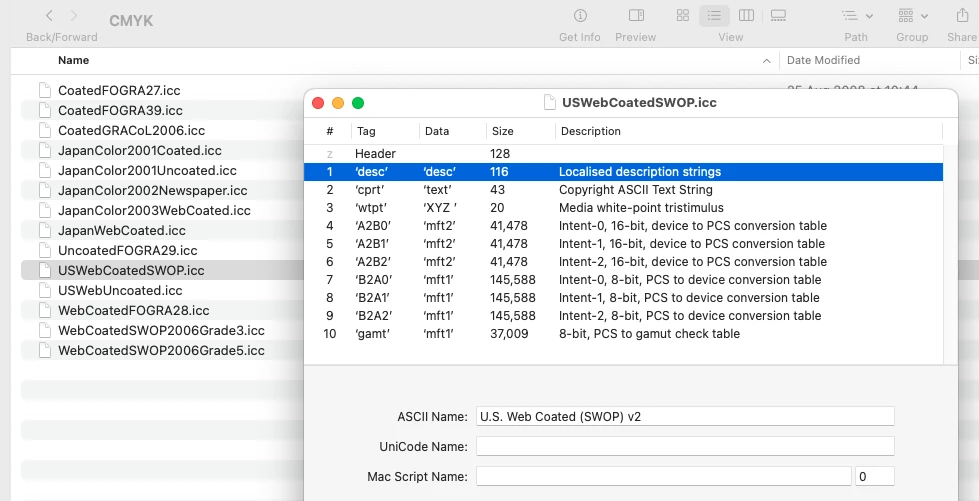
ICC profiles have an “external name" = the file name, and also an "internal profile name" = the profile name displayed in many applications in the GUI.


As you can see from the image above, they are one and the same.

1 reply

Stephen Marsh
Community Expert
Stephen MarshCommunity ExpertCorrect answer
Community Expert
August 17, 2023

@이98A6 


ICC profiles have an “external name" = the file name, and also an "internal profile name" = the profile name displayed in many applications in the GUI.


As you can see from the image above, they are one and the same.

NB, colourmanagement
Community Expert
Community Expert
August 25, 2023

@Stephen Marsh you beat me to it';~}

why the hell do profile makers do this! I've seen some REALLY misleading internal names!


neil barstow, colourmanagement net - adobe forum volunteer - co-author: 'getting colour right'
google me "neil barstow colourmanagement" for lots of free articles on colour management

Stephen Marsh
Community Expert
Community Expert
August 25, 2023

@NB, colourmanagement 


Agreed, however, in this particular case, all Adobe needed to do is use  v2 in the filename so that it was clear what it was. The internal profile name was correct, it was just that the filename was missing the key matching info.