Exit
  • Global community
    • Language:
      • Deutsch
      • English
      • Español
      • Français
      • Português
  • 日本語コミュニティ
  • 한국 커뮤니티
0

Color settings issue

Participant ,
May 02, 2021 May 02, 2021

After upgrading from Photoshop CS6 to Photoshop CC, I now get this message each time I launch the app.


How can I fix this issue?


Thanks. 


color_settings_issue.jpg

1.7K
Translate
Report
Community guidelines
Be kind and respectful, give credit to the original source of content, and search for duplicates before posting. Learn more
community guidelines
Adobe
Community Expert ,
May 02, 2021 May 02, 2021

What is your OS? 

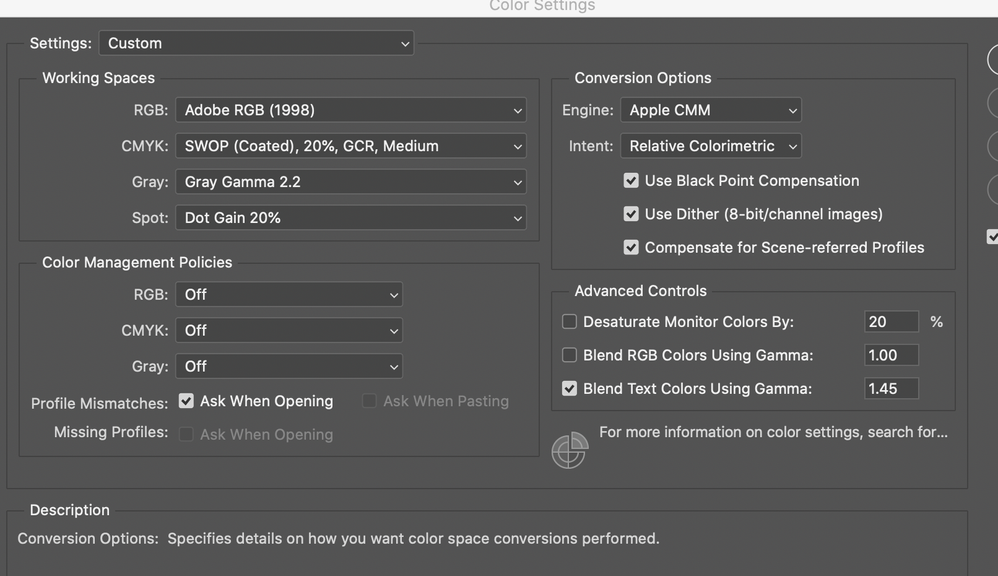
What are Photoshop’s Edit > Color Settings? 

Translate
Report
Community guidelines
Be kind and respectful, give credit to the original source of content, and search for duplicates before posting. Learn more
community guidelines
Participant ,
May 03, 2021 May 03, 2021

Thanks for responding.


OS Catalina


I changed the RGB workspace to Adobe RGB (1998) and that resolved the message issue.


I also changed the engine to Apple CMM, as that is the color setting I use with Corel Painter--I trust that would be correct. 


workspace.png

Translate
Report
Community guidelines
Be kind and respectful, give credit to the original source of content, and search for duplicates before posting. Learn more
community guidelines
Community Expert ,
May 03, 2021 May 03, 2021

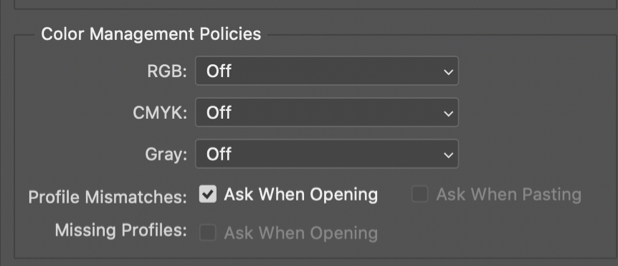
Setting the Color Management Policies to »Off« is highly discouraged! 

If you do so you should carefully evaluate whether you fully appreciate the consequences. 

Screenshot 2021-05-04 at 08.00.47.png

Translate
Report
Community guidelines
Be kind and respectful, give credit to the original source of content, and search for duplicates before posting. Learn more
community guidelines
Participant ,
May 04, 2021 May 04, 2021

Hello:


Color Management policies were toggled off, apparently as default by Photoshop CC. 


What exactly do these policies control?


So, should I turn them all on?


Thanks.

Translate
Report
Community guidelines
Be kind and respectful, give credit to the original source of content, and search for duplicates before posting. Learn more
community guidelines
LEGEND ,
May 04, 2021 May 04, 2021


See: http://digitaldog.net/files/PhotoshopColorSettings.mp4

Photoshop CC Color Settings and Assign/Convert to Profile video

Author “Color Management for Photographers" & "Photoshop CC Color Management/pluralsight"
Translate
Report
Community guidelines
Be kind and respectful, give credit to the original source of content, and search for duplicates before posting. Learn more
community guidelines
Participant ,
May 04, 2021 May 04, 2021
LATEST

Excellent tutorial


Thank you. 

Translate
Report
Community guidelines
Be kind and respectful, give credit to the original source of content, and search for duplicates before posting. Learn more
community guidelines
Community Expert ,
May 04, 2021 May 04, 2021

This is very simple: Color management policies in Photoshop should always be "preserve embedded profiles". It's the only sensible setting, and it's how Photoshop is designed to work. "Off" is just a disaster waiting to happen.


What's "SWOP (Coated), 20%, GCR, Medium"? Where does it come from? That sounds like a very non-standard profile, and the likely reason for the original message.



Translate
Report
Community guidelines
Be kind and respectful, give credit to the original source of content, and search for duplicates before posting. Learn more
community guidelines