

peterb86513089
Inspiring
July 31, 2017
Question

Color shift between Br, ACR, and Ps.
  • July 31, 2017
  • 4 replies
  • 2716 views

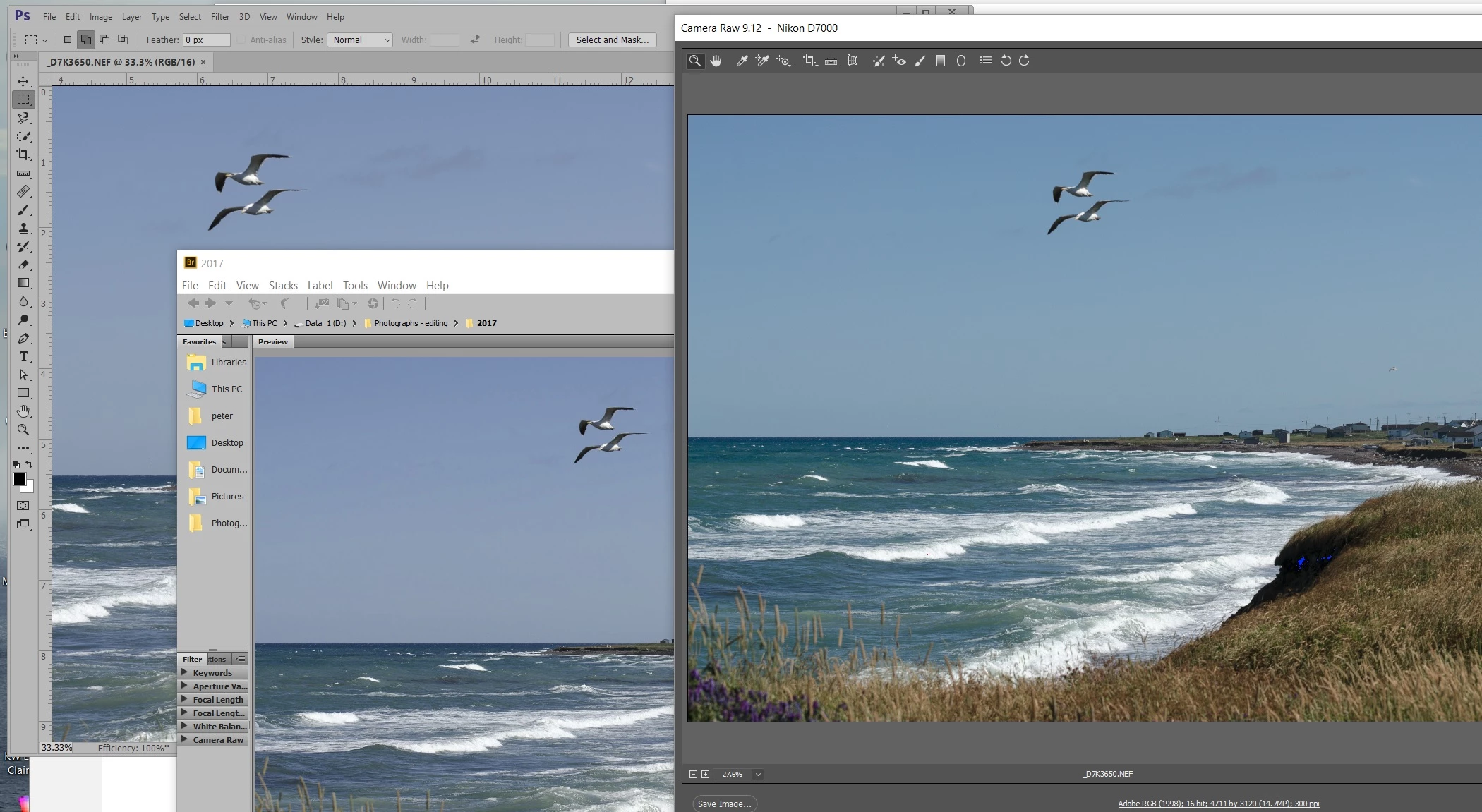
Not sure what's going on. Just came back from a week on vacation and uploaded a lot of picture data. As I review them in bridge (Br) and then clean them up in Camera Raw (ACR) I noticed a pronounced color shift. And then if I open them in Photoshop (Ps) I see that Br and Ps seem to agree on the color but ACR is out of wack. Has anyone else noticed this?

Versions:     Br          7.0.0.93 x64

                    Ps CC    20170425.r.252 x64

                    ACR     9.12

Peter

    This topic has been closed for replies.

    4 replies

    PECourtejoie
    Community Expert
    Community Expert
    August 30, 2017

    I see what might be the installer for ACR 9.9 at the very bottom of this page :  https://helpx.adobe.com/photoshop/kb/legacy-version-updates.html

    PECourtejoie
    Community Expert
    Community Expert
    August 30, 2017

    And once again, ProDesignTools​ comes to the rescue: you will find all links to previous versions here: http://prodesigntools.com/adobe-cc-2015-updates-links-windows.html

    peterb86513089
    Inspiring
    September 9, 2017

    Hey Pierre-Etienne. Thank you for the link. I will try an older version of ACR and see if this makes any impact on the problem.

    In the meantime, my workaround has been to use the profile for the BENQ monitor on both monitors. This week I installed the latest version of ACR to see whether maybe the issue had been corrected (assuming that the issue was related to ACR), but it made no difference.

    Once I have a chance to try older versions of ACR I will post the results here.

    Thanks again,

    Peter

    Participating Frequently
    August 30, 2017

    I had the same problem. My machine has 2 display adapters. One intel on the motherboard and one NVidia.

    After reading a lot of blogs and facing the same problem and trying many things last month, I disabled the intel graphic card from my windows device manager and the colors are now perfect in bridge, Ps CC and Camera raw.

    Apparently Camera raw is selecting the default graphic card for profile.

    Not sure what will happen on restart but for now sorted.

    Using CC 2017

    Camera raw 9.12.0.784

    Alienware laptop with an EIZO monitor CG247

    Hope that helps.

    D Fosse
    Community Expert
    Community Expert
    July 31, 2017

    Actually choice of color spaces/profiles shouldn't matter here. They should all display identically regardless.

    This looks like a monitor profile problem. It could be corrupt/defective - but I have a feeling it's another case of ACR using the wrong profile in a dual display setup. We've seen quite a few cases of this lately.

    So Peter - do you have two displays? If so, try to switch main/primary display assignments in the OS, or move PS+ACR to the primary display and check again.

    peterb86513089
    Inspiring
    July 31, 2017

    Yes, I do have a dual monitor setup. The larger one that I use to view and edit images is a BENQ SW2700PT, and the smaller, which is where I have placed my palettes, is a DELL P1917S. Both are driven by the same video card, a PNY NVIDIA Quadro M2000; both are connected via display port connectors. I use the XRITE iProfiler to calibrate both monitors, but the DELL is nowhere as accurate as the BENQ.

    On July 20, just before heading off for vacation, I had updated both Lightroom and ACR to the newly released versions. Before that I did not notice this color shift. I suspected the ACR update immediately when did notice the problem yesterday. Now that you mention it, It does looks like it is using the DELL profile on the BENQ, but only for ACR. I will try some more testing today.

    In the meantime, is there anyway to revert to the previous version of ACR? I need to get back to work and can't use ACR the way it is now. I am using a CC subscription and updates/installs seem to be managed from the Adobe Create Cloud application.

    Thanks,

    Peter

    PS I will post results from further testing as/when I have them.

    peterb86513089
    Inspiring
    August 1, 2017

    No comments from anyone?

    I haven't said anything because the primary<>secondary swap has always worked in the previous threads about this.

    I'm also unsure about your screenshots. Judging by the first one, ACR is the odd one out. But the second screenshot actually suggests that ACR was right all the time, and PS/Br were wrong. In that case it could be a general display profile assignment issue with the OS, and the ACR bug corrected it by mistake, as it were.

    Bob Hallam mentioned LUT (table-based) profiles. I don't know if that's the default in iProfiler, but if it is there should be a policy setting to change that to matrix-based profiles. That's always considered safer, table-based profiles are known to cause problems in some scenarios. While you're at it, set it to version 2, not version 4.

    And just to cover all potential causes, try to uncheck GPU in Camera Raw preferences.


    I just redid the swap primary/secondary again, with original profiles assigned as they were, i.e. BENQ profile to BENQ monitor, DELL profile to DELL monitor. I logged off and then back on again. Now Start menu etc. are over on the DELL. I launched Br, Ps, and ACR and dragged them to the BENQ monitor. Here is what it looks like on the BENQ monitor. To me it seems that Br is wrong now.

    As a comparison, here a similar shot taken from the BENQ without the primary/secondary swap, but with the BENQ profile assigned to both monitors. To me it seems that all three agree.

    And, w.r.t. your comments about LUT etc. (I have the most rudimentary understanding of color management) here is from the i1Profile program. As you can see the default is "Matrix based" and "version 4". And, I have not reprofiled (is that a word) either monitor recently, so the profiles have not changed over the course of this issues appearance.

    To me, the best result seems to be when I used the BENQ profile for both monitors. I am going to use that until the next release of ACR comes out. I don't want to run with the DELL as my primary monitor as that messes up a lot of other things, and I think it still leaves Br out of whack.

    If I could revert to the prior version of ACR, then I would try that too, to see what impact that might have. My gut feeling is that ACR 9.12 broke something.

    Thanks for your time and comments.

    Peter

    c.pfaffenbichler
    Community Expert
    Community Expert
    July 31, 2017

    Please set the Status Bar in Photoshop to Document Profile an post a screenshot.

    What are Photoshop’s Edit > Colour Settings?

    peterb86513089
    Inspiring
    July 31, 2017

    Peter