
Participant
May 6, 2017
Answered

Colors are off

  • May 6, 2017
  • 1 reply
  • 566 views

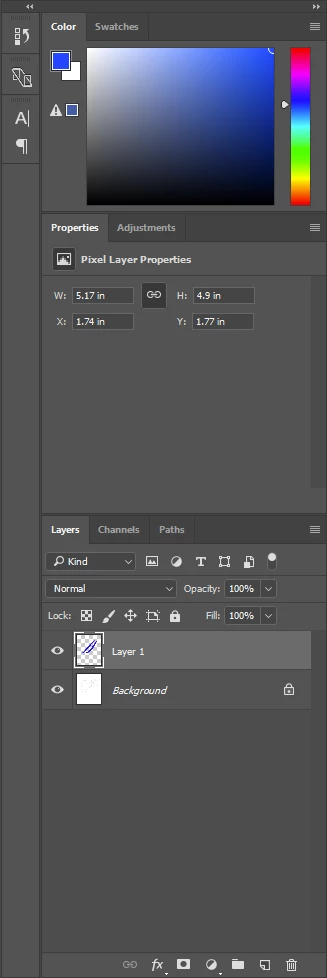
I am having problems with my colors. They appear different in the workspace then what I chose in the swatches. It was just working before but I'm not sure what I did. Also, see attached photo for what the sidepanel looks like, its giving an error of some sort. I am choosing the color I want but it appears like the color by the error triangle.  thanks.
    This topic has been closed for replies.
    Correct answer davescm

    The triangle is warning that the colour you have chosen is out of gamut for the CMYK working space. So you may have trouble on converting it.

    If you are seeing that on screen are you:

    a. Working in CMYK mode (Check Image -Mode) ?

    or

    b. Working in RGB mode but with Proof Colours checked in View -Proof Colours? If so -uncheck it.

    Dave

    1 reply

    JJMack
    Community Expert
    Community Expert
    May 6, 2017

    I often see little warning triangle like that in Photoshop Panels.  I the normally is means the panel or contents need to refreshed or updated. Try clicking in the panel in the little square next to the triangle. See if the panel updates,  color perhaps change and triangle go away.

    JJMack
    Participant
    May 6, 2017

    When I click in the square then the hue cube updates to that color. but when I try put it back to the color I want then the triangle pops up again.

    davescm
    Community Expert
    davescmCommunity ExpertCorrect answer
    Community Expert
    May 6, 2017

    The triangle is warning that the colour you have chosen is out of gamut for the CMYK working space. So you may have trouble on converting it.

    If you are seeing that on screen are you:

    a. Working in CMYK mode (Check Image -Mode) ?

    or

    b. Working in RGB mode but with Proof Colours checked in View -Proof Colours? If so -uncheck it.

    Dave