Participant
January 16, 2021
解決済み

Colors between Adobe Color Picker and Adobe Color Themes doesn't look the same (Photoshop)

  • January 16, 2021
  • 返信数 4.
  • 8398 ビュー

Hello,

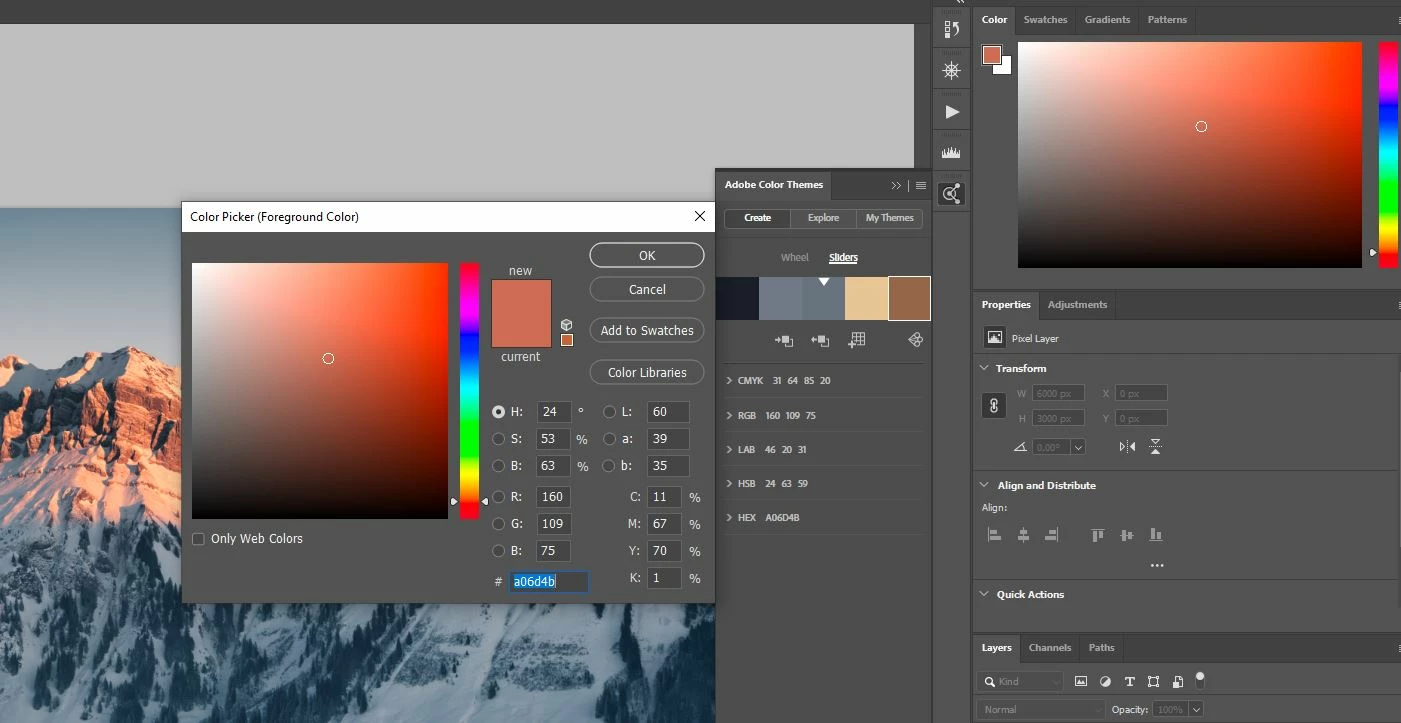
on the picture i attatched you can see that the color on my color picker with hex code "a06d4b" looks very different than the same color, with same hex code, on my adobe color theme(last square on picture). Actually i just imported the color i picked into adobe color themes, but why it is looking so different? 

If you can see the picture, you see that the color from my color picker is orange-red while the same color imported to color themes looks brown. 

Someone could help? 

Thanks in advance
このトピックへの返信は締め切られました。
解決に役立った回答 rob day

If you want to color manage your themes make sure the color mode is set to Lab when you edit the theme at color.adobe.com, and then make your conversions to the desired space in Photoshop. The CMYK values listed at color.adobe.com are not color managed and would not be reliable. The RGB values assume the profile is sRGB.


To change a theme to Lab, select the theme from Adobe Color Themes panel>My Themes>...>View Online. From the web page double-click the theme, and choose Edit Theme from the sidebar. Change the Color Mode to Lab, and update the theme.


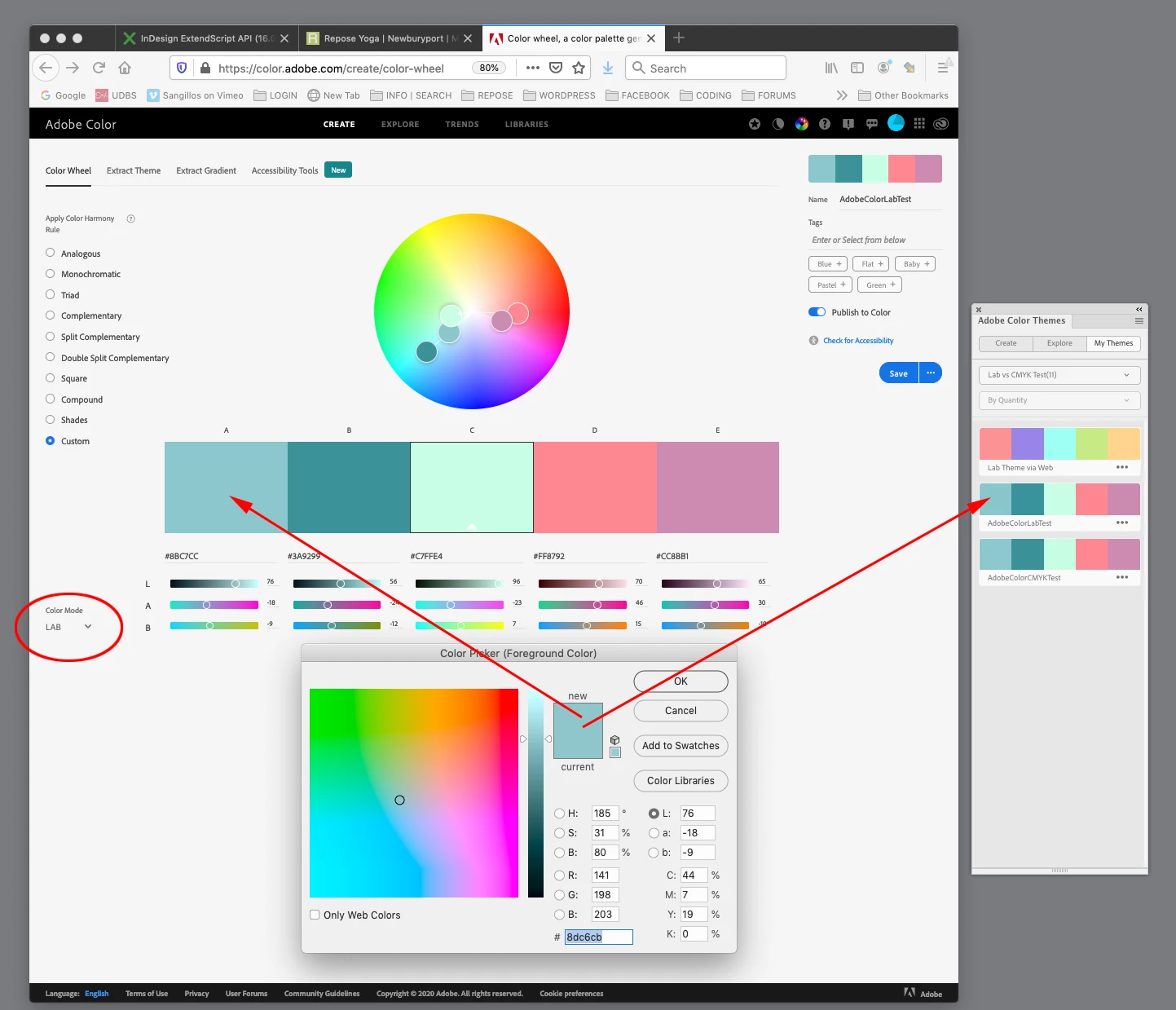
Here the mode for my AdobeColorLabTest theme is set to Lab, and I get a match when I select the color with Photoshop’s Color Picker. I can convert this color to any RGB or CMYK space as needed.


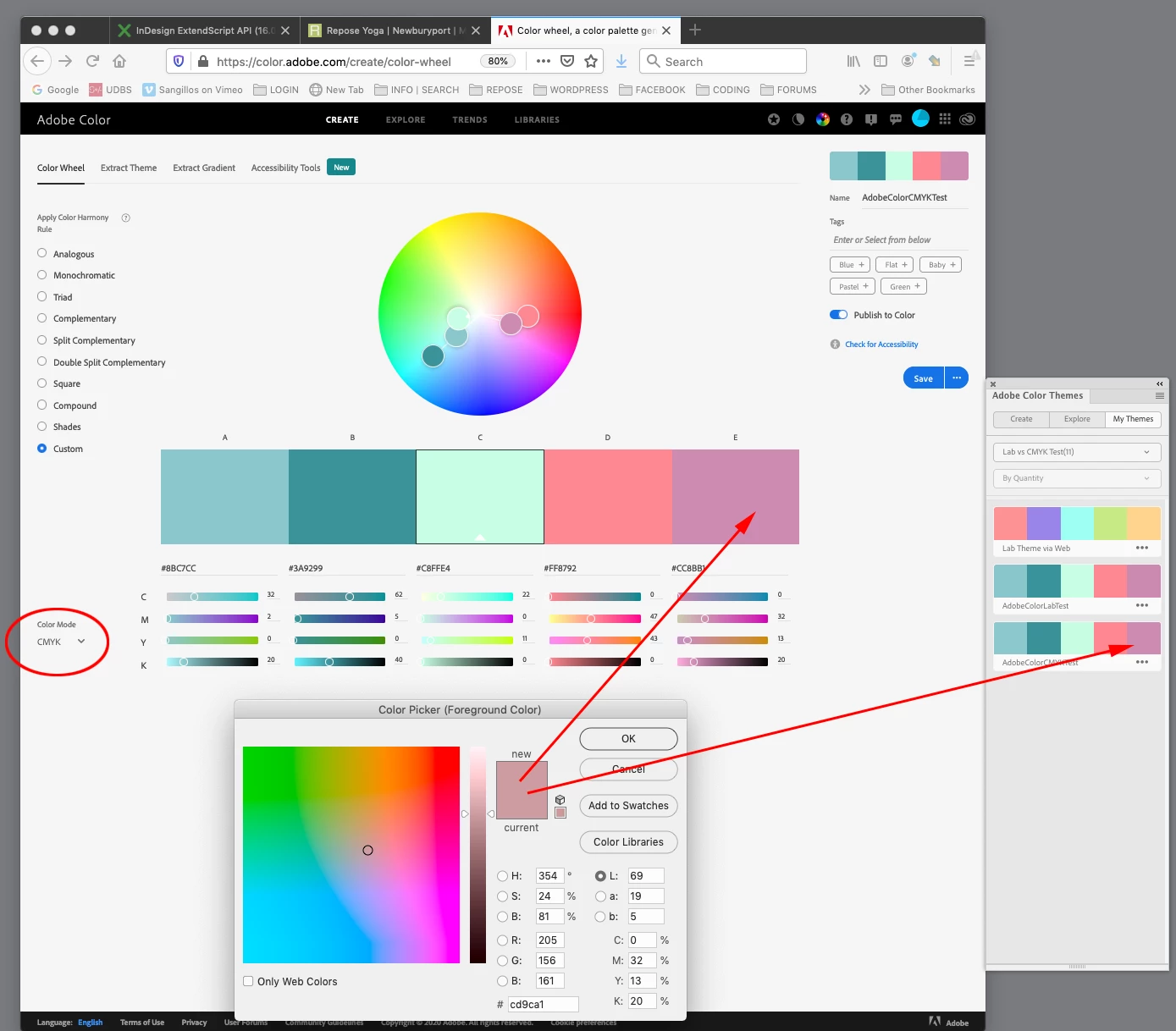
If I create a theme with the mode as CMYK, the color can not be reliably color managed and the color appearance and CMYK values are wrong for my current Working CMYK space:


返信数 4

rob day
Community Expert
rob dayCommunity Expert解決!
Community Expert
January 16, 2021

If you want to color manage your themes make sure the color mode is set to Lab when you edit the theme at color.adobe.com, and then make your conversions to the desired space in Photoshop. The CMYK values listed at color.adobe.com are not color managed and would not be reliable. The RGB values assume the profile is sRGB.


To change a theme to Lab, select the theme from Adobe Color Themes panel>My Themes>...>View Online. From the web page double-click the theme, and choose Edit Theme from the sidebar. Change the Color Mode to Lab, and update the theme.


Here the mode for my AdobeColorLabTest theme is set to Lab, and I get a match when I select the color with Photoshop’s Color Picker. I can convert this color to any RGB or CMYK space as needed.


If I create a theme with the mode as CMYK, the color can not be reliably color managed and the color appearance and CMYK values are wrong for my current Working CMYK space:


c.pfaffenbichler
Community Expert
Community Expert
January 17, 2021

Good one! 


But that still kinda leaves the question: When one creates a Color Theme in the Panel in Photoshop what is actually happening? How are the RGB, CMYK etc. values created, what is their relationship? 

rob day
Community Expert
Community Expert
January 17, 2021

When creating from Photoshop it looks to me like it is always sRGB.


The Color Theme panel is a web app—if I don’t have an internet connection the panel displays a 404 web error—so the color management problem is an HTML limitation. There are no color management properties with CSS coding—you can’t code a hex or RGB HTML value to display in a specified color space.


I made this theme in Photoshop and if my active document is sRGB; the Color Picker, theme swatch, and fill color match:


I don’t get a match if the document has a different profile assignment:


So, if the theme usage isn’t going to be restricted to sRGB documents, then I have to set the theme’s color space to device independent Lab in the web app:


D Fosse
Community Expert
Community Expert
January 16, 2021

No, wait. Strike everything I wrote above!


Adobe Color Themes doesn't seem to have the slightest hint of color profile awareness on any level. Same color, same numbers, whatever color space the document is in.


And the mode conversion tables are a joke. They don't relate to any known set of icc profiles.


This is pretty ridiculous, and utterly useless. My advice would be to ignore the whole thing. This isn't a tool worthy of a supposedly professional application.

c.pfaffenbichler
Community Expert
Community Expert
January 16, 2021

I guess the only set-up in which the Color Themes would make sense would be when working on Lab-images? 

rob day
Community Expert
Community Expert
January 16, 2021

If the theme’s color mode is set to Lab, the swatches’ color appearance will be maintained as long as it is in the gamut of the document you are applying it to. So I can use the Lab swatches on a GRACol CMYK image or a ProPhoto RGB image and get the same appearance—the color matches in the Themes panel, the Color Picker and the two images:


D Fosse
Community Expert
Community Expert
January 16, 2021

Adobe Color Themes is swatch-based. It just records the numbers, that's all it does. It doesn't care about the color space. This is also how the color picker works, so there's nothing special there.


However, and this is the significant point: the document color space determines how those colors are represented, how they look.


But there's nothing new to this. Numbers are color space specific. 135-10-186 is not the same color in sRGB as it is in Adobe RGB. This is why you convert between color spaces - the numbers need to be recalculated to produce the same color.


So what I'm getting at is this: if you see inconsistencies, it's because two different color spaces are involved.


It follows that all this is fine for working within the same file. Open another file in a different color space, however, and the swatches can't be used. The color has changed.

D Fosse
Community Expert
Community Expert
January 16, 2021

This is also why any conversions between color models are meaningless using these swatch-based methods. Converting to Lab from what? Converting into which CMYK from what RGB? HSB in which color space? It's all utterly meaningless. It doesn't make any sense as fixed tables, and that's apparently what you get here. Just ignore that bit.

c.pfaffenbichler
Community Expert
Community Expert
January 16, 2021

But what RGB (or CMYK) Space is being used to begin with? (The Color Space of the active image at the time of creation of a theme does not seem to make a difference.) 

And like I mentioned I see no match in the most popular RGB Spaces between the RGB values and the Lab values as given in the Panel. 

c.pfaffenbichler
Community Expert
Community Expert
January 16, 2021

What is the image’s Color Space? Please set the Status Bar to »Document Profile« and post a screenshot. 

What is the color field’s definition as represented under »Sliders«? Edit: I apologize, your screenshot included that anyway. 

Is the color possibly out-of-gamut for the image’s Color Space? 


And you may do yourself a favour by disregarding the hex-codes altogether and sticking with a meaningful combination of RGB numbers and Color Space. 

Win-Visuals作成者
Participant
January 16, 2021

The color space is ProPhoto RGB. But i think wathever color space i'm in, it should be the same color between color picker and color themes when i work on the same file, exept if i could change the color space of adobe color themes separately.

If you watch the picture you can see the RGB numbers if you prefer. 

c.pfaffenbichler
Community Expert
Community Expert
January 16, 2021

In a quick test changing the image’s Color Space would not result in a change of RGB, HSB, Hex, CMYK numbers. 

And as picking the colors would take the useless RGB values the Lab values would seem to be the only meaningful numbers in the display. 


»exept if i could change the color space of adobe color themes separately.«

Interesting; how can one do that?