

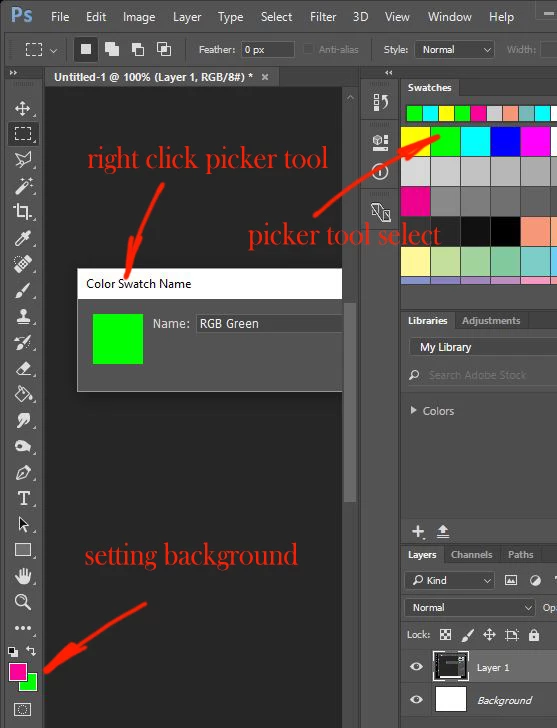
Colour picker tool setting background
As I scroll over the colour swatches the picker tool will set the background colour.
Also ALT over an image to select a colour sets the background colour.
As stands I have to X to or arrow between backround foreground to reverse foreground/background before using paintbrush, flood tool etc.
I believe I might have inadvertently set the background as the active layer? or have I somehow toggled the picker to set background?
How do I get the picker to revert to setting Foreground colour?
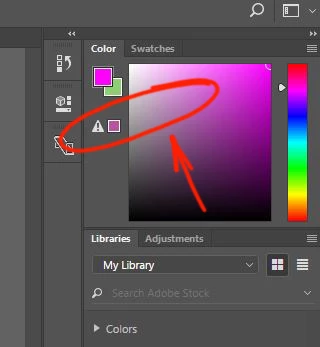
I have jiggled around in the colour palate and found a warning triangle.
I dont know what I did but the picker tool reverted to setting the foreground layer.... or made the foreground active so the picker wrote to that?
So I have blundered out of the problem but I'm completely clueless and there is probably a simple process that I should understand.
I use a lot of SHIFT and CTRL-a,s,d,z,x,c,v, a lot of ALT select and do it pretty quickly. I think I probably ham fingered something.
I would really appreciate an explanation.
Thanks
 AdChoices