
Participant
April 24, 2020
Answered

Colour sampling not available through colour picker

  • April 24, 2020
  • 1 reply
  • 295 views

My photoshop recently upgraded to 2020 and since the upgrade, my colour picker looks like this

instead of what it used to be
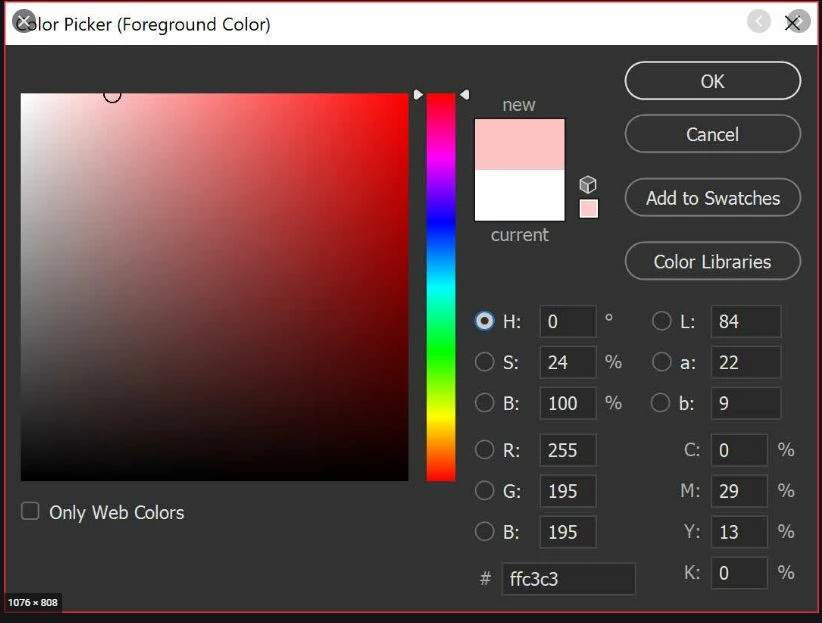
and I am now unable to sample colours through it. I can't for the life of me find the setting to change this. Anyone else experiencing a similar problem?

This topic has been closed for replies.
Correct answer c.pfaffenbichler

What is the Photoshop > Preferences > General > Color Picker setting? 

Might you be confusing the Color Picker and the Color Panel? 


What have you done for trouble-shooting so far? 

Restoring Preferences after making sure all customized presets like Actions, Patterns, Brushes etc. have been saved might be a good starting point:

https://helpx.adobe.com/photoshop/kb/basic-trouble-shooting-steps.html

1 reply

c.pfaffenbichler
Community Expert
c.pfaffenbichlerCommunity ExpertCorrect answer
Community Expert
April 24, 2020

What is the Photoshop > Preferences > General > Color Picker setting? 

Might you be confusing the Color Picker and the Color Panel? 


What have you done for trouble-shooting so far? 

Restoring Preferences after making sure all customized presets like Actions, Patterns, Brushes etc. have been saved might be a good starting point:

https://helpx.adobe.com/photoshop/kb/basic-trouble-shooting-steps.html

Participant
April 24, 2020

Thanks, it was the colour picker but something had clearly gone wrong. Restoring preferences has sorted it out.