Exit
  • Global community
    • Language:
      • Deutsch
      • English
      • Español
      • Français
      • Português
  • 日本語コミュニティ
  • 한국 커뮤니티
0

Combine ungrouped layers

Explorer ,
Nov 18, 2025 Nov 18, 2025

How can I combine layers that are out of group using scripts? Thanks.

TOPICS
Actions and scripting , iPadOS , macOS , Phone , SDK , Web , Windows
312
Translate
Report
Community guidelines
Be kind and respectful, give credit to the original source of content, and search for duplicates before posting. Learn more
community guidelines

correct answers 2 Correct answers

Community Expert , Nov 19, 2025 Nov 19, 2025

@Delta2487 - Try this, no layers need to be selected, it works just as your screenshot:


/*
Merge Continuous Ungrouped Bottom Layers.jsx
Stephen Marsh
v1.0 - 19th November 2025: Initial release
https://community.adobe.com/t5/photoshop-ecosystem-discussions/select-and-combine-layers-outside-of-group/td-p/15597925
*/

#target photoshop

app.activeDocument.suspendHistory("Merge Continuous Ungrouped Bottom Layers", "processLayers()");

function processLayers() {

    if (!app.documents.length) {
  
...
Translate
Community Expert , Nov 19, 2025 Nov 19, 2025
quote

@Stephen Marsh 

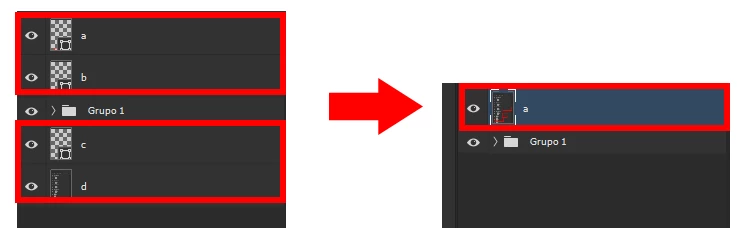
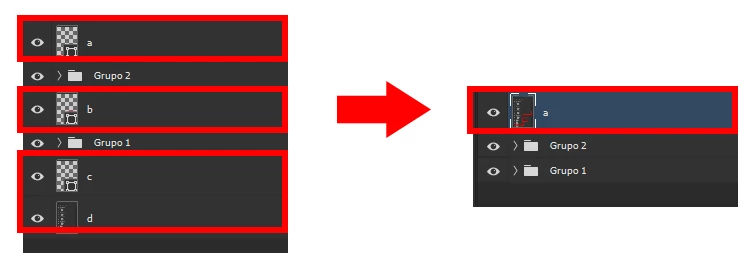
Thanks for the script, it does what I want, but what I really want is for it to combine all the layers that don't belong to a group, regardless of whether they are before or after any group.

SELECT AND MERGE: CASE 1SELECT AND MERGE: CASE 1


SELECT AND MERGE: CASE 2SELECT AND MERGE: CASE 2


By @Delta2487


¯\_(ツ)_/¯


EDIT: This is what you were really wanting but didn't properly describe:


1) Turn visibility of all layers off

2) Turn visibility on for all layers EXCEPT layer groups

3) Merge visible layers

4) Turn visibi

...
Translate
Adobe
Community Expert ,
Nov 19, 2025 Nov 19, 2025

@Delta2487 


The layers aren't highlighted/selected, so it's not exactly clear what the rules/expectations are.


Do you wish to select the layers? Or always merge 2 or more consecutive ungrouped layers at the bottom of the layer stack, regardless of layer selection? Or...

Translate
Report
Community guidelines
Be kind and respectful, give credit to the original source of content, and search for duplicates before posting. Learn more
community guidelines
Community Expert ,
Nov 19, 2025 Nov 19, 2025

@Delta2487 - Try this, no layers need to be selected, it works just as your screenshot:


/*
Merge Continuous Ungrouped Bottom Layers.jsx
Stephen Marsh
v1.0 - 19th November 2025: Initial release
https://community.adobe.com/t5/photoshop-ecosystem-discussions/select-and-combine-layers-outside-of-group/td-p/15597925
*/

#target photoshop

app.activeDocument.suspendHistory("Merge Continuous Ungrouped Bottom Layers", "processLayers()");

function processLayers() {

    if (!app.documents.length) {
        alert("A document must be open to run this script!");
        return;
    }

    var doc = app.activeDocument;
    var rootLayers = doc.layers;

    if (rootLayers.length === 0) return;

    var bottomIndex = rootLayers.length - 1;
    var layersToSelect = [];

    for (var i = bottomIndex; i >= 0; i--) {
        var lyr = rootLayers[i];
        if (lyr.typename === "LayerSet") break;
        if (lyr.parent !== doc) break;
        layersToSelect.push(lyr);
    }

    if (layersToSelect.length === 0) {
        alert("No continuous bottom layers found.");
        return;
    }

    /*
    // Reverse so the top-most of the contiguous layers
    layersToSelect.reverse();
    // Get the name of the top selected layer
    var topSelectedName = layersToSelect[0].name;
    */

    // Select the layers
    selectByID(layersToSelect[0].id);
    for (var j = 1; j < layersToSelect.length; j++) {
        addToSelection(layersToSelect[j].id);
    }

    // Convert selected layers to a smart object
    executeAction(stringIDToTypeID("newPlacedLayer"), undefined, DialogModes.NO);

    // Rasterize the smart object
    var idrasterizeLayer = stringIDToTypeID("rasterizeLayer");
    var desc449 = new ActionDescriptor();
    var idnull = charIDToTypeID("null");
    var ref57 = new ActionReference();
    var idLyr = charIDToTypeID("Lyr ");
    var idOrdn = charIDToTypeID("Ordn");
    var idTrgt = charIDToTypeID("Trgt");
    ref57.putEnumerated(idLyr, idOrdn, idTrgt);
    desc449.putReference(idnull, ref57);
    executeAction(idrasterizeLayer, desc449, DialogModes.NO);

    // Deselect the layer
    app.runMenuItem(stringIDToTypeID('selectNoLayers'));

    
    ///// Helper functions /////

    function selectByID(id) {
        var ref = new ActionReference();
        ref.putIdentifier(stringIDToTypeID("layer"), id);
        var desc = new ActionDescriptor();
        desc.putReference(stringIDToTypeID("null"), ref);
        executeAction(stringIDToTypeID("select"), desc, DialogModes.NO);
    }

    function addToSelection(id) {
        var ref = new ActionReference();
        ref.putIdentifier(stringIDToTypeID("layer"), id);
        var desc = new ActionDescriptor();
        desc.putReference(stringIDToTypeID("null"), ref);
        desc.putEnumerated(stringIDToTypeID("selectionModifier"),
                           stringIDToTypeID("selectionModifierType"),
                           stringIDToTypeID("addToSelection"));
        executeAction(stringIDToTypeID("select"), desc, DialogModes.NO);
    }
}
Translate
Report
Community guidelines
Be kind and respectful, give credit to the original source of content, and search for duplicates before posting. Learn more
community guidelines
Explorer ,
Nov 19, 2025 Nov 19, 2025

@Stephen Marsh 

Thanks for the script, it does what I want, but what I really want is for it to combine all the layers that don't belong to a group, regardless of whether they are before or after any group.

SELECT AND MERGE: CASE 1SELECT AND MERGE: CASE 1


SELECT AND MERGE: CASE 2SELECT AND MERGE: CASE 2


Translate
Report
Community guidelines
Be kind and respectful, give credit to the original source of content, and search for duplicates before posting. Learn more
community guidelines
Community Expert ,
Nov 19, 2025 Nov 19, 2025
quote

@Stephen Marsh 

Thanks for the script, it does what I want, but what I really want is for it to combine all the layers that don't belong to a group, regardless of whether they are before or after any group.

SELECT AND MERGE: CASE 1SELECT AND MERGE: CASE 1


SELECT AND MERGE: CASE 2SELECT AND MERGE: CASE 2


By @Delta2487


¯\_(ツ)_/¯


EDIT: This is what you were really wanting but didn't properly describe:


1) Turn visibility of all layers off

2) Turn visibility on for all layers EXCEPT layer groups

3) Merge visible layers

4) Turn visibility of all layers on

5) Deselect all layers


/*
Merge Ungrouped Layers.jsx
Stephen Marsh
v1.0 - 20th November 2025: Initial release
https://community.adobe.com/t5/photoshop-ecosystem-discussions/select-and-combine-layers-outside-of-group/td-p/15597925
*/

#target photoshop

app.activeDocument.suspendHistory("Merge Ungrouped Layers", "processLayers()");

function processLayers() {

    if (!app.documents.length) {
        alert("A document must be open to run this script!");
        return;
    }

    var doc = app.activeDocument;

    // Get the top ungrouped layer name
    var rootLayers = doc.layers;
    var topArtLayer = null;
    for (var i = 0; i < rootLayers.length; i++) {
        if (rootLayers[i].typename === "ArtLayer") {
            topArtLayer = rootLayers[i];
            break;
        }
    }
    var targetLayerName = topArtLayer.name;

    // Add a new dummy layer to the top of the stack
    doc.artLayers.add()

    // Deselect all layers
    app.runMenuItem(stringIDToTypeID('selectNoLayers'));

    // Turn visibility of all layers off
    setAllVisibility(doc.layers, false);

    // Turn visibility on for layers EXCEPT LayerSet groups
    showNonGroupLayers(doc.layers);

    // Merge visible layers
    doc.mergeVisibleLayers();

    // Rename the layer
    doc.activeLayer.name = targetLayerName;

    // Turn visibility of all layers on
    setAllVisibility(doc.layers, true);

    // Deselect all layers
    app.runMenuItem(stringIDToTypeID('selectNoLayers'));


    ///// Helper functions /////

    // Recursively toggle visibility for all layers
    function setAllVisibility(layers, state) {
        for (var j = 0; j < layers.length; j++) {
            try {
                layers[j].visible = state;
            } catch (e) {}
            if (layers[j].typename === "LayerSet") {
                setAllVisibility(layers[j].layers, state);
            }
        }
    }

    // Turn visibility ON for non-group layers
    function showNonGroupLayers(layers) {
        for (var k = 0; k < layers.length; k++) {
            var lyr = layers[k];
            if (lyr.typename === "ArtLayer") {
                try { lyr.visible = true; } catch (e) {}
            } else if (lyr.typename === "LayerSet") {
                // leave group visibility OFF
                showNonGroupLayers(lyr.layers);
            }
        }
    }
}


Translate
Report
Community guidelines
Be kind and respectful, give credit to the original source of content, and search for duplicates before posting. Learn more
community guidelines
Explorer ,
Nov 20, 2025 Nov 20, 2025

Thanks for the script, and sorry if I wasn't clear.

Translate
Report
Community guidelines
Be kind and respectful, give credit to the original source of content, and search for duplicates before posting. Learn more
community guidelines
Community Expert ,
Nov 20, 2025 Nov 20, 2025
LATEST
quote

Thanks for the script, and sorry if I wasn't clear.


By @Delta2487


All good, it's hard to know when a screenshot that looks specific should be general.


That second script may be a bit slow when working with a large layer stack... You can try this 1.1 version which might be quicker as it only loops over the layers once:


/*
Merge Ungrouped Layers v1-1.jsx
Stephen Marsh
v1.0 - 20th November 2025: Initial release
v1.1 - 21st November 2025: Updated to run faster on large layer stacks (single recurse over all layers)
https://community.adobe.com/t5/photoshop-ecosystem-discussions/select-and-combine-layers-outside-of-group/td-p/15597925
*/

#target photoshop

app.activeDocument.suspendHistory("Merge Ungrouped Layers", "processLayers()");

function processLayers() {

    if (!app.documents.length) {
        alert("A document must be open to run this script!");
        return;
    }

    var doc = app.activeDocument;

    // Find the top-level ArtLayer name
    var rootLayers = doc.layers;
    var topArtLayer = null;
    for (var i = 0; i < rootLayers.length; i++) {
        if (rootLayers[i].typename === "ArtLayer") {
            topArtLayer = rootLayers[i];
            break;
        }
    }
    if (!topArtLayer) {
        alert("No ungrouped ArtLayer found.");
        return;
    }
    var targetLayerName = topArtLayer.name;

    // Add dummy ArtLayer
    doc.artLayers.add();

    // Deselect everything
    app.runMenuItem(stringIDToTypeID('selectNoLayers'));

    // Only root/top-level ArtLayers visible
    setVisibilityRootOnly(doc.layers, true);

    // Merge visible layers
    doc.mergeVisibleLayers();

    // Rename merged result
    doc.activeLayer.name = targetLayerName;

    // Restore full visibility
    setAllVisibility(doc.layers, true);

    // Deselect everything
    app.runMenuItem(stringIDToTypeID('selectNoLayers'));


    ///// Helper functions /////

    /*
     Set visibility so that:
     Root-level ArtLayers → visible
     LayerSets → invisible
     All children of LayerSets → forced invisible
     */
    function setVisibilityRootOnly(layers, isRoot) {
        for (var i = 0; i < layers.length; i++) {
            var lyr = layers[i];

            if (lyr.typename === "ArtLayer") {
                if (isRoot) {
                    // At root level → visible
                    try { lyr.visible = true; } catch (e) {}
                } else {
                    // Inside a group → force hidden
                    try { lyr.visible = false; } catch (e) {}
                }
            }
            else if (lyr.typename === "LayerSet") {
                // Always hide groups
                try { lyr.visible = false; } catch (e) {}

                // Recurse children — but now treated as non-root
                setVisibilityRootOnly(lyr.layers, false);
            }
            else {
                // Anything else → hidden
                try { lyr.visible = false; } catch (e) {}
            }
        }
    }

    // Restore visibility fully
    function setAllVisibility(layers, state) {
        for (var j = 0; j < layers.length; j++) {
            try { layers[j].visible = state; } catch (e) {}

            if (layers[j].typename === "LayerSet") {
                setAllVisibility(layers[j].layers, state);
            }
        }
    }

}


Translate
Report
Community guidelines
Be kind and respectful, give credit to the original source of content, and search for duplicates before posting. Learn more
community guidelines