
KeeganS
Participant
July 17, 2019
Answered

Command-0 issue

  • July 17, 2019
  • 2 replies
  • 463 views

Hello,

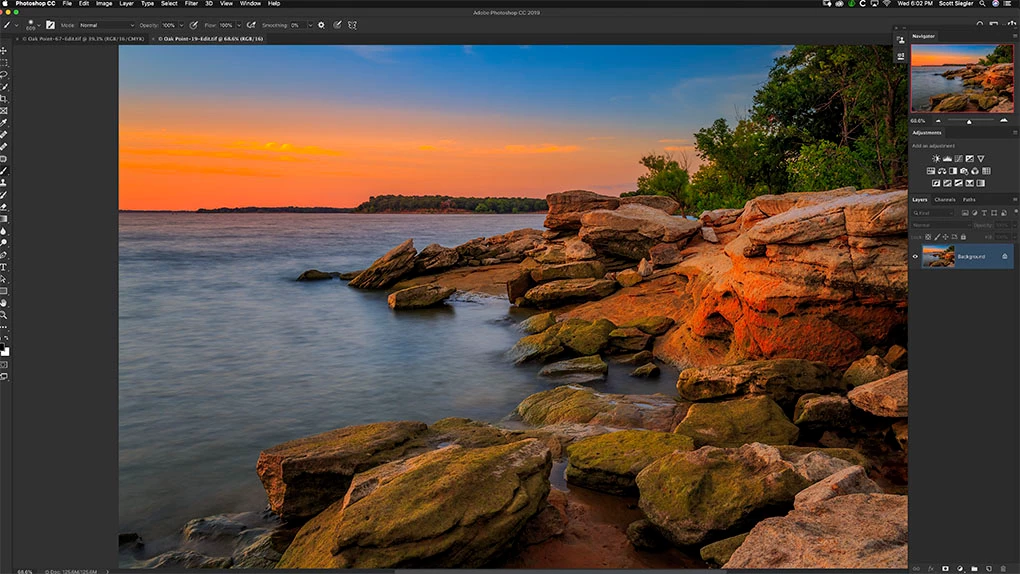
I am having an issue with command-0.  When I hit command-0 it is filling the edge of the image up to the edge of the layers panel.  However, stacked vertically connected to the layers panel I have clone source, properties, brush settings etc.  The problem is that filling the screen is now being covered up by these other windows (they are minimized).  I don't believe the behavior used to do this.  I must have changed some setting.

Does anybody have any idea on what I can do.  The expected behavior for command 0, to fill the edge of the photo up to that vertically stacked bar of minimized windows?  see image below

Thanks!
    This topic has been closed for replies.
    Correct answer jane-e

    Hi Keegan,

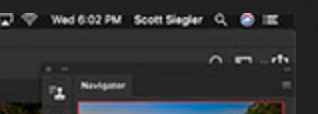
    The right hand panels are floating, not docked. Here's closeup. Drag them down and to the right until you see the blue drop zone or reset your panels from the Window menu.

    ~ Jane

    2 replies

    jane-e
    Community Expert
    jane-eCommunity ExpertCorrect answer
    Community Expert
    July 17, 2019

    Hi Keegan,

    The right hand panels are floating, not docked. Here's closeup. Drag them down and to the right until you see the blue drop zone or reset your panels from the Window menu.

    ~ Jane

    KeeganS
    KeeganSAuthor
    Participant
    July 18, 2019

    That solved it.  Thank you!

    Community Expert
    July 18, 2019

    Glad people were able to help you, feel free to let us know if you have any more issues

    gener7
    Community Expert
    Community Expert
    July 17, 2019

    Reset your workspace.