
Known Participant
June 5, 2023
Question

Compatibility Of Photoshop Beta with Brushbox and Brusherator.

  • June 5, 2023
  • 4 replies
  • 2141 views

In December I downloaded Photoshop Beta.  Immediately encountered a major issue.  Error messages that Photoshop could not sync the Brusherator brushes and the Brushbox brushes.  All were deleted.  Not good.  


I closed Beta and opened that latest version of Photoshop (2022 or 2023).  Since each version of Photoshop shares some common files and directories, all of the Brushbox and Brusherator brushes, groupings, etc were also gone.  I posted this problem on the Beta forum specificately about BrushBox since it is my goto brush manager. A tech immediately blamed Derrick Barth.  Of course.


I am now interested in trying Beta again.  But I do NOT want to loose all of my BrushBox brushes and grouping again.  Too much work is involved configuring everything from scratch.  I looked at a user file on my c drive.  
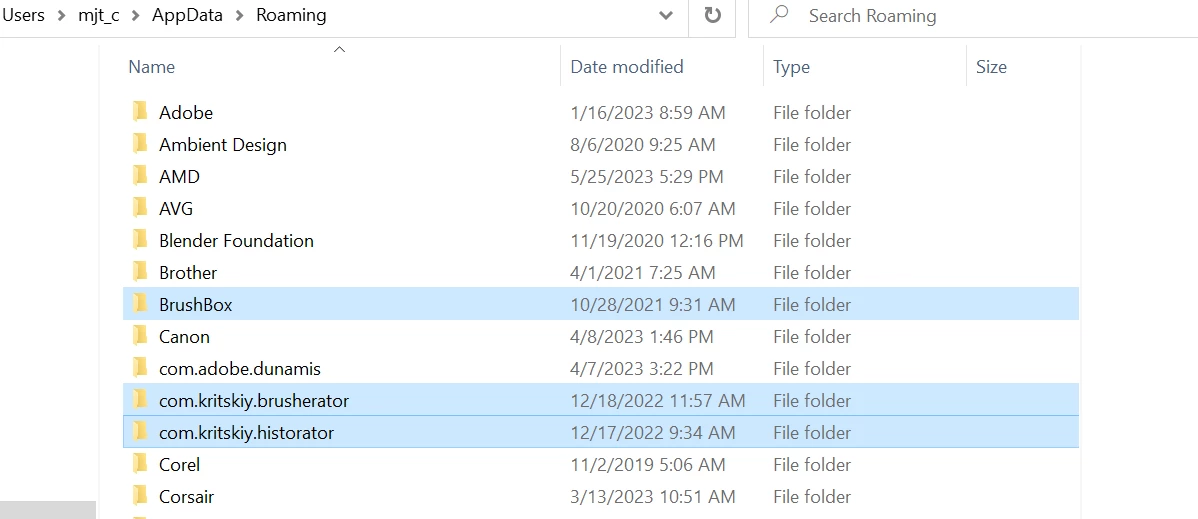
 I will copy the directories in "Blue" to a backup drive. Assuming that  Beta crashes everything again, can I copy these directories back into their original directories so that Brushbox and Brusherator will be back to the correct configuration when I start Photoshop CC 2023?  Are there any other directories is should backup?


Thanks.


This topic has been closed for replies.

4 replies

Participant
August 16, 2023

I experienced exactly the same issue. I was able to recover the last-but-one build of my BrushBox and re-install it into my standard PS version and in PS Beta. However, Brushbox does not seem to work in PS Beta -- the tool selections seem to work, but the tool is not taken over by Photoshop. Only if you select brushes in the standard Photoshop brush panel can you actually change the brush. 
For me this means, unfortunately, that I cannot test PS Beta. I rely too heavily on BrushBox to keep my brushes organized and my favorite brushes at the ready, and I cannot waste the time it takes to reconfigure all the brushes from scratch in PS Beta (not to mention managing them). 
I'm eagerly awating for Derek to release a BrushBox update compatible with Beta.

Trevor.Dennis
Community Expert
Community Expert
June 5, 2023

Reading your first post again, this is not strictly a beta issue, so you could try Derrick again and only ask about lost presets with the full release version.  You'll have read the attached User Guide I'm sure, so will be familiar with exporting and importing the Brushbox config (page 9&10).


I have said much about Brusherator because I never really liked it, so I wrote off the cost of the license and uninstalled it.  From memory, I am not so sure that you could use both Brushbox and Brusherator on the same system.  Yes, it says this in the FAQ.

lvartistAuthor
Known Participant
June 6, 2023

I have Brushbox, Brusherator and the CC default brush mgr running at the same time.  See the screenshots from CC 2023.


And yes exporting brushes from BrushBox is simple.  However, abr and tpl brushes are exported separately.  I can then create a group at the saved location. For instance My favs.  The abr and tpl brushes can go into that group.  Then I must go into every group in BB and do 2 saves....abr and tpl.  Then label that location with the groupl from which they were exported.  


But. back to my original question that surely someone from Adobe can answer.  If I save the files at the beginning of this post, can I copy them back assuming that BETA corrupts everything again, and expect that I am back to "normal" defined as befor Beta?  Someone must know the answer.

Trevor.Dennis
Community Expert
Community Expert
June 5, 2023

Have you asked Derrick (the Brushbox creator)? @Derrick Barth 

the above ID link will tag Derrick, so he might respond directly.


BTW, If you search this forum, you'll find several similar threads, so it appears to be and issue for other people, and I'd be surprised if he is not aware and already working on it.  Same thing applies for Sergey the Brusherator man.

lvartistAuthor
Known Participant
June 5, 2023

I contacted Derrick in Feb.  He indicated no interest in dealing with a Beta app. Same with Sergey.

Trevor.Dennis
Community Expert
Community Expert
June 5, 2023

I did wonder, but there is every chance that the issue persists into the full release.  I have licenses for both Brushbox and Brusherator, but have not used them since Adobe made a major update to Photoshop's brush engine and brush management.  My gut tells me that no fix or work around is coming for the beta version.  Major Photoshop updates usually happen during MAX, which is October 12th, so you'll probably have to live without those apps till then.  I will install Brushbox at least (if my license key still works) and will try to remember to let you know how I get on.

Kevin Stohlmeyer
Community Expert
Community Expert
June 5, 2023

Hi @lvartist you should consult the developer for support. Given that the last version released was in 2021 and they do not support ARM configs, I'm dubious these will work with newer Photoshop builds.


lvartistAuthor
Known Participant
June 5, 2023

Brushbox 2.5 was released Feb 2023.