
laras1130030
Participant
June 23, 2018
Answered

Composite a Necklace - easy task?

  • June 23, 2018
  • 2 replies
  • 1070 views

you might laugh hard because this should be the easiest task, believe it or not i tried to make ther necklace look realistic for two hours and didnt succeed, i used everything hue sturation curves othing worked, still looks photoshoped

could you help do it an explain how to do it so i can improve and grow,

thank you very much!
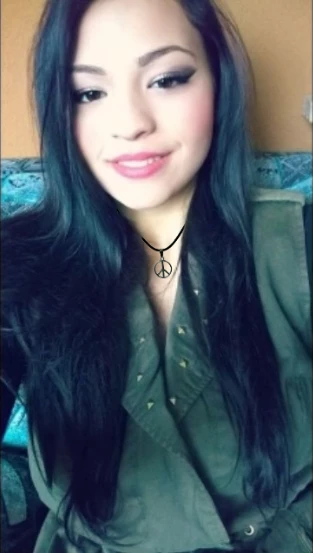
this is the work in progress file where you can see what i did till now thank you!

https://ufile.io/ly973

    This topic has been closed for replies.
    Correct answer Chuck Uebele

    Hard to tell from this low res image you posted, but the overall image seems to have a blue cast to the shadows, so the necklace seems too black. Also there is really no shadow on the neck from the necklace, and over all the image is soft, so the necklace needs to be softer.

    2 replies

    Trevor.Dennis
    Community Expert
    Community Expert
    June 24, 2018

    As Chuck says.  Shadows make things look like they belong, and the human eye is good at perceiving issues like this even without realising what is wrong.  We just know that 'something is wrong.  The necklace below has no shadow.  It's outline is much to sharp, even compared to the lady whose portrait is much sharper than your example image.

    The shadows below are tiny, but as the necklace is so close to the skin, they are about right.  There is also a tiny bevel & emboss which has put highlights about where they should be.

    Chuck Uebele
    Community Expert
    Chuck UebeleCommunity ExpertCorrect answer
    Community Expert
    June 23, 2018

    Hard to tell from this low res image you posted, but the overall image seems to have a blue cast to the shadows, so the necklace seems too black. Also there is really no shadow on the neck from the necklace, and over all the image is soft, so the necklace needs to be softer.

    laras1130030
    Participant
    June 24, 2018

    @check uebele the image is low resolution on purpose, i just need to make the necklace look realistic, the picture has to stay low resolution

    @trevor.dennis how where you able to add that soft almost invisible shadow? It looks like you didnt do anything, the only way i know you added a shadow is that it looks more realistic!

    i went on blending moded and added external shadow and went on filter-guasian blur and worked with that to make the necklace fit in, to me it still looks not very realisitc and the shadow looks too much, what do you think?

    thank you very much

    laras1130030
    Participant
    June 25, 2018

    It's always easier to work on a high res file, when compositing, then reduce the resolution for the final output. You have more control that way.


    i wasent able to make the first image more realistic so i tried another one with higher resolution

    what do you think?

    This is the file so you can see what i did

    https://ufile.io/jeg34