Participant
December 10, 2022
Answered

Compositing Problems

  • December 10, 2022
  • 1 reply
  • 811 views

Hi,

I am desperatly trying to composit something here, but cannot get it to look realistic. I want to edit a somewhat blurred red flag into a dark blue sky, but in the areas of mixed alpha/partial transparency I get these dark borders which make it look absolutly unrealistic. Makes sense because red and blue mixed together result in some purple color which ends up being darker, but can I prevent that somehow?

Here you can see a picture that visualizes my problem.

This topic has been closed for replies.
Correct answer D Fosse

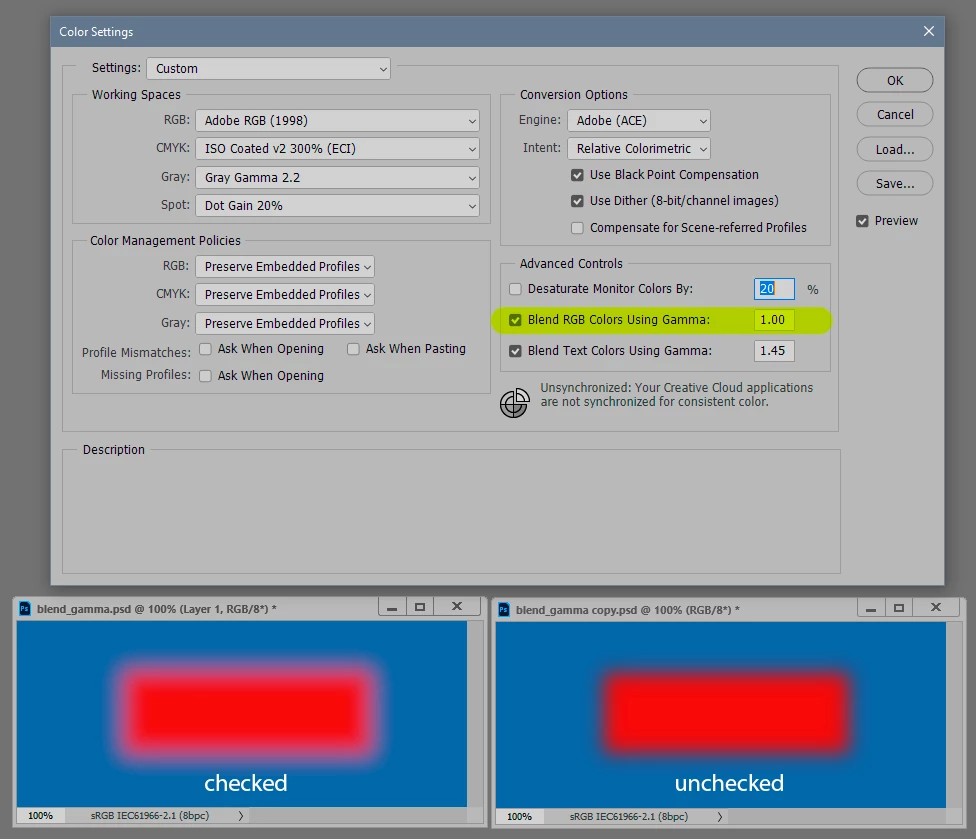
This is one of those instances where you might want to go into Color Settings and check "Blend RGB colors using gamma":


Note that this will only work if you have them on separate layers so that they are actually blending. If you do it in a single layer it will all blend in the document color space, as it does when unchecked.


Unchecked is the default and you should normally keep it as such.

1 reply

D Fosse
Community Expert
D FosseCommunity ExpertCorrect answer
Community Expert
December 10, 2022

This is one of those instances where you might want to go into Color Settings and check "Blend RGB colors using gamma":


Note that this will only work if you have them on separate layers so that they are actually blending. If you do it in a single layer it will all blend in the document color space, as it does when unchecked.


Unchecked is the default and you should normally keep it as such.

Participant
December 10, 2022

Omg thank you soo much this is what I spent hours searching for!!

D Fosse
Community Expert
Community Expert
December 10, 2022

You can also do it in Lab, and here even in a single layer. But for some reason I don't think it looks quite as good there, the transition looks a bit dirtier. I don't know why.