Participant
January 15, 2017
Answered

Compressing Large PSD File When Saving Very Slow

  • January 15, 2017
  • 1 reply
  • 1886 views

Hello,

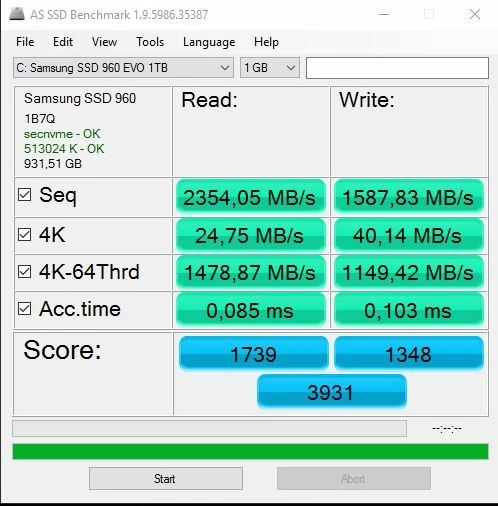
I have a powerful system, i7 6800k, 64 GB ram, 1070 GTX and the aforementioned ssd. The samsung driver is installed. I ran benchmarks, and everything works as expected. It is a little slower, because a few programms a open in the background. But it can get over 3000 Mb/s.

I am opening 32bit exr and saving as a psd. the files are around 1gb big. Evo 960 can do 3GB per second.

It takes over a minute... why is that? That should not be? My hdd was faster...

    This topic has been closed for replies.
    Correct answer Trevor.Dennis

    Any solution? Or are there plans to change it in the future?


    This time last year, we might of got a heads up on your question from Photoshop Development Team member Chris Cox, who used to post in this forum, but alas, Chris is no longer with Adobe.  Your best chance of an informed opinion would to ask the same question on the Feedback site, where Jeff Tranberry hangs out. 

    I just had a look and found this discussion over there.

    Photoshop CC 2017: Very slow to open even small PSD files | Photoshop Family Customer Community

    Do you absolutely need to have PSD/PSB compression turned on?

    What are your space limitations?

    How many drives do you have?

    I don't have uber fast M.2 drives on my five year old system, but with 15 drives, I have a pair of Samsung 256Gb Pro, and a Samsung 1Tb EVO.   I planed to use the 1Tb SSD as a Projects drive, and bump older files to archive on the mechanical HDDs, but it has turned out that I still have space on that 1Tb SSD four years later.  I just checked and it only has 200Gb free.

    The point I am making again here, is do you really need to use compression with your PSD files when they have such a negative affect on overall performance?

    1 reply

    Trevor.Dennis
    Community Expert
    Community Expert
    January 15, 2017

    What are your Scratch space settings?  If that is using a different, slower, drive then that might be what is going on, but a minute still sounds way too long.  Something is definitely not right IMO.

    What operating system are you using?  If Windows 10, open up Resource Monitor and see if you can see where the bottleneck is.

    bildform.Author
    Participant
    January 16, 2017

    I am using Windows 10 and all drivers are up to date.

    The task manager shows writing speeds of around 0 to 10 mb/s. If just I copy 5 1Gb files it is done in a few seconds... why cannot photoshop do that?

    I did some testing. I turned on "disable compression of psd and psb files"  >>> So now I have a 11 GB file that saved in 10 seconds :-)

    At least the speed is how it is supposed to be. But 11 GB is just to big.

    When compression is working/on I would expect the cpu to start doing some work but it is not. So I guess Photoshop is writing as fast as it can compress the psd file, which is not much because the cpu is not being utilized correctly.

    Trevor.Dennis
    Community Expert
    Community Expert
    January 16, 2017

    I'm off to my bed, so can you have a look at these threads while waiting for someone else to join the thread.  This would have been a perfect question Chris Cox, but alas, he no longer works for Adobe. 

    I forgot the link :-(

    https://forums.adobe.com/search.jspa?q=psd+compression+very+slow

    We know that issue is not with your M.2 drive, but rather with PSD compression being slow, so I am going to change your subject line. Shout if you'd rather it said something else, and one of the other mods will fix it for you.

    Incidentally, you have mentioned PSD files, but I assume you are actually talking about PSB files?  AFAIK it is completely automatic and I don't think you even get the option to use PSD over 4Gb.  I am not about to test it though

    Good luck.