
Exit
  • Global community
    • Language:
      • Deutsch
      • English
      • Español
      • Français
      • Português
  • 日本語コミュニティ
  • 한국 커뮤니티
0

Computer Path Can't access in Photoshop

Participant ,
Jul 23, 2021 Jul 23, 2021

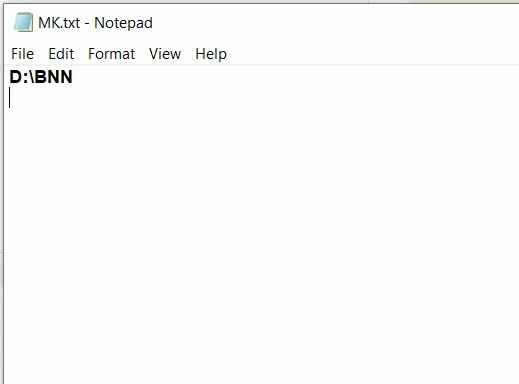
I have MK.txt File in "D" Drive, 

Inside Of MK.txt :- D:\BNN


I want to Open the Path in Photoshop :- "D:\BNN"
uu.JPG


var testtextfile = new File("D:/MK.txt");

testtextfile.open('r');

var fileContentsString = testtextfile.readln();

alert(fileContentsString);

//I want open the path "fileContentsString" in Photoshop


TOPICS
Actions and scripting
541
Translate
Report
Community guidelines
Be kind and respectful, give credit to the original source of content, and search for duplicates before posting. Learn more
community guidelines

correct answers 1 Correct answer

LEGEND , Jul 23, 2021 Jul 23, 2021
testtextfile.close(), File(fileContentsString).openDlg()
Translate
Adobe
LEGEND ,
Jul 23, 2021 Jul 23, 2021
testtextfile.close(), File(fileContentsString).openDlg()
Translate
Report
Community guidelines
Be kind and respectful, give credit to the original source of content, and search for duplicates before posting. Learn more
community guidelines
Participant ,
Jul 23, 2021 Jul 23, 2021

Ok @Kukurykus  I will try it...

Translate
Report
Community guidelines
Be kind and respectful, give credit to the original source of content, and search for duplicates before posting. Learn more
community guidelines
Participant ,
Jul 25, 2021 Jul 25, 2021

Very well @Kukurykus 

Translate
Report
Community guidelines
Be kind and respectful, give credit to the original source of content, and search for duplicates before posting. Learn more
community guidelines
LEGEND ,
Jul 25, 2021 Jul 25, 2021

Badge.jpg


Translate
Report
Community guidelines
Be kind and respectful, give credit to the original source of content, and search for duplicates before posting. Learn more
community guidelines
Participant ,
Jul 25, 2021 Jul 25, 2021
LATEST

Haa haa haa

Translate
Report
Community guidelines
Be kind and respectful, give credit to the original source of content, and search for duplicates before posting. Learn more
community guidelines