
Geppetto Luis
Legend
May 7, 2021
Answered

Configure mixer brush tool

  • May 7, 2021
  • 2 replies
  • 5091 views

I have seen on the forum and have not found anything about it
I would like to configure the mixer brush tool with a script 


I wish I could set all these parameters
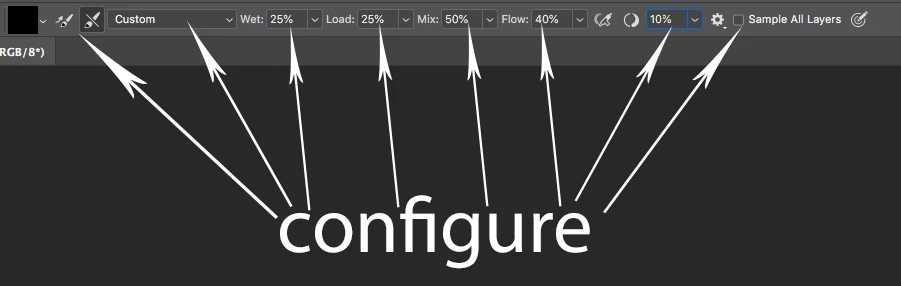

I hope it can be done since I use this tool a lot

 

Correct answer r-bin

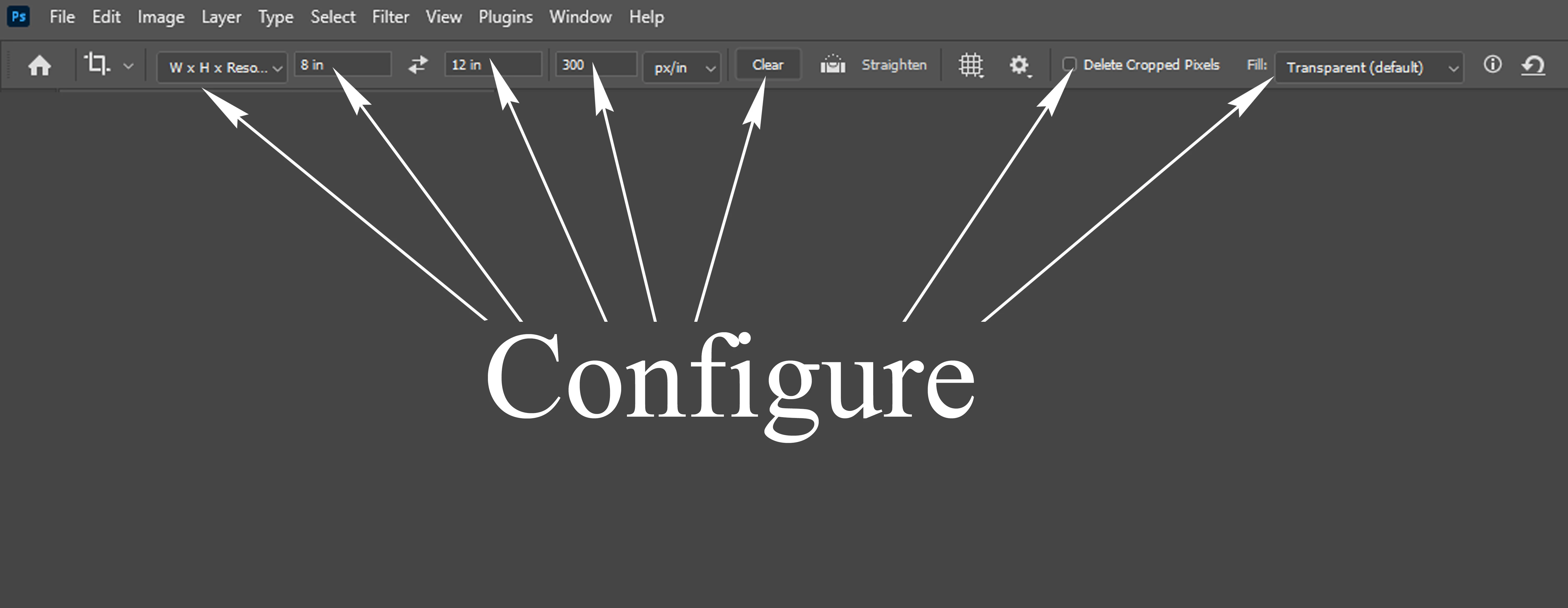
I would like to configure the Crop tool with a script. 

I wish I could set all these parameters. . . Thank You Sir @c.pfaffenbichler 


var options = new ActionDescriptor(); 
var options2 = new ActionDescriptor();

options2.putEnumerated(stringIDToTypeID("cropAspectRatioModeClass"), stringIDToTypeID("cropAspectRatioModeClass"), stringIDToTypeID("pureAspectRatio")); //targetSize, originalProportions, etc...
options2.putDouble(stringIDToTypeID("aspectWidth"),  0);
options2.putDouble(stringIDToTypeID("aspectHeight"), 0);
options2.putDouble(charIDToTypeID("CrWV"),  0);
options2.putDouble(charIDToTypeID("CrHV"),  0);
options2.putInteger(charIDToTypeID("CrWS"), 0);
options2.putInteger(charIDToTypeID("CrHS"), 0);
options2.putInteger(charIDToTypeID("CrRV"), 0);
options2.putInteger(charIDToTypeID("CrRS"), 1);
options2.putInteger(stringIDToTypeID("cropOverlay"), 2);
options2.putInteger(stringIDToTypeID("CropOptionsShowOverlay"), 1);
options2.putInteger(stringIDToTypeID("orientation"), 0);

options2.putInteger(stringIDToTypeID("cropShieldColorMode"), 1);

var c = new ActionDescriptor();
c.putDouble(stringIDToTypeID("red"),  200);
c.putDouble(stringIDToTypeID("green"),  0);
c.putDouble(stringIDToTypeID("blue"),   0);
options2.putObject(stringIDToTypeID("cropColor"), stringIDToTypeID("RGBColor"), c);

options2.putInteger(stringIDToTypeID("cropOpacity"), 75);

options2.putBoolean(stringIDToTypeID("cropAutoLightenShield"), true);
options2.putBoolean(stringIDToTypeID("cropShowShield"), true);
options2.putBoolean(stringIDToTypeID("preview"), false);
options2.putBoolean(stringIDToTypeID("cropAutoCenterCropBox"), true);
options2.putBoolean(stringIDToTypeID("cropShowCroppedArea"), true);
options2.putBoolean(stringIDToTypeID("AutoFillOnCrop"), true);
options2.putBoolean(stringIDToTypeID("hides"), false);

options.putObject(charIDToTypeID("CrpO"), charIDToTypeID("CrOC"), options2);

var r = new ActionReference();
r.putClass(stringIDToTypeID("cropTool"));

var d = new ActionDescriptor();
d.putReference(stringIDToTypeID("null"), r);
d.putObject(stringIDToTypeID("to"), stringIDToTypeID("null"), options);

executeAction(stringIDToTypeID("set"), d, DialogModes.NO);

2 replies

Legend
May 7, 2021


#target photoshop;

var s2t = stringIDToTypeID,
options = {
    flow: 99,
    wetness: 99,
    dryness: 99,
    mix: 99,
    smooth: 99,
    autoFill: true,
    autoClean: true,
    sampleAllLayers: true
};

(r = new ActionReference()).putClass(s2t("wetBrushTool"));
(d = new ActionDescriptor()).putReference(s2t("target"), r);
d.putObject(s2t("to"), s2t("target"), objToDesc(options));
executeAction(s2t("set"), d, DialogModes.NO);


function objToDesc(o) {
    var d = new ActionDescriptor();
    for (var k in o) {
        var v = o[k];
        switch (typeof (v)) {
            case "boolean": d.putBoolean(s2t(k), v); break;
            case "string": d.putString(s2t(k), v); break;
            case "number": d.putInteger(s2t(k), v); break;
        }
    }
    return d;
}


This is a list of presetsIf you change any value using a scriptit will always be "custom" 

Known Participant
April 23, 2025

Hi, about the “Load Solid Colors Only” script, is it easy to get the relevant code, I've been integrating my own painting script recently, but it's still hard to gather information about some of the functions, including the "Load Solid Colors I'm trying my best, maybe you can give me some tips, thanks!

Known Participant
April 23, 2025

Edit: You should include a check for the intended Tool, though. 

// based on code by michael l hale and oleksii hirlin;
// 2025, use it at your own risk;
if (app.documents.length > 0) {
var ref = new ActionReference();
ref.putEnumerated( charIDToTypeID("capp"), charIDToTypeID("Ordn"), charIDToTypeID("Trgt") ); 
var applicationDesc = executeActionGet(ref);
var currenToolOpt = applicationDesc.getObjectValue(stringIDToTypeID("currentToolOptions"));
var solidColorOnly = currenToolOpt.getBoolean(stringIDToTypeID("loadSolidColorOnly"));
if (solidColorOnly == false) {setCTO([["loadSolidColorOnly", true]], true)}
else {setCTO([["loadSolidColorOnly", false]], true)};
};
// Oleksii Hirlin 2021
function getCTO(){
var ref = new ActionReference();
ref.putProperty(stringIDToTypeID("property"), stringIDToTypeID("currentToolOptions"));
ref.putEnumerated(stringIDToTypeID("application"), stringIDToTypeID("ordinal"), stringIDToTypeID("targetEnum"));
return executeActionGet(ref).getObjectValue(stringIDToTypeID("currentToolOptions"));
};
// setting currentToolOptions with options array
function setCTO( options, isIdTypeString ){
var desc = new ActionDescriptor();
var ref = new ActionReference();
ref.putClass( stringIDToTypeID( app.currentTool ) );
desc.putReference( stringIDToTypeID( "target" ), ref );
// getting current tool options so that they do not get reset
var ctoObj = getCTO();
// check if we are setting the eyedropper tool
if ( app.currentTool=="eyedropperTool" ){
ctoObj.putInteger( stringIDToTypeID( options[0][0] ), options[0][1] );
} else {
// iteration through options array and putting booleans into cto descriptor
for (var i=0; i < options.length; i++){
if (isIdTypeString==true){
ctoObj.putBoolean( stringIDToTypeID( options[i][0] ), options[i][1] );
} else {
ctoObj.putBoolean( charIDToTypeID( options[i][0] ), options[i][1] );
}
}
}
desc.putObject( stringIDToTypeID( "to" ), stringIDToTypeID( "currentToolOptions" ), ctoObj );
executeAction( stringIDToTypeID( "set" ), desc, DialogModes.NO );
};

Thank you very much! He can run and I try to read him as much as I can but it's too hard, I'm currently learning JavaScript before learning ps scripting, thanks again in the end!

c.pfaffenbichler
Community Expert
Community Expert
May 7, 2021

You should be able to create Presets and select the Presets via Script. 

Geppetto Luis
Legend
May 7, 2021

i tried with scriptenlistener but it's not good.

c.pfaffenbichler
Community Expert
Community Expert
May 7, 2021

Applying a Tool Preset?