
Answered
Contact Sheet Blank [Photoshop 2018]
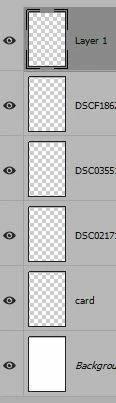
I need help with something that I have not found in the forum. The instructions for making a contact sheet are quite clear, but I end up with nothing but a blank frame on screen, no matter which options I choose. I have placed copies of all the photos in one folder, making sure that it contains nothing else, like thumbs.db, etc. After File | Automate | Contact Sheet | OK, the Layers Panel shows the names of all the photos as being loaded, but the icons all show as transparent layers, while the resulting Contact Sheet II in the Work Area, is blank/white.
I tried saving this as a .psd & reopening -- still blank. PS 19.1.5. Windows 10.
 AdChoices