
October 9, 2018
Answered

Contact Sheet without layer mask

  • October 9, 2018
  • 2 replies
  • 6037 views

I am new to photoshop and trying to use contact sheet II from automate in order create a mosaic in Photoshop CS5 (Windows 7 64 bit). I have downloaded the optional plugins and installed them successfully.

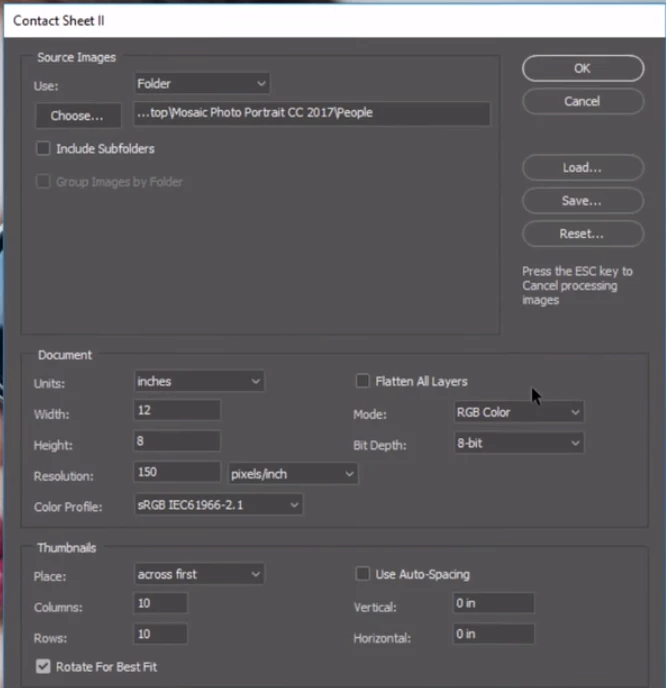
When I try to generate the contact sheet with below settings, I am not seeing layer mask attached to each image. Do I need to enable any other settings to get layer mask for each image?
This topic has been closed for replies.
Correct answer JJMack

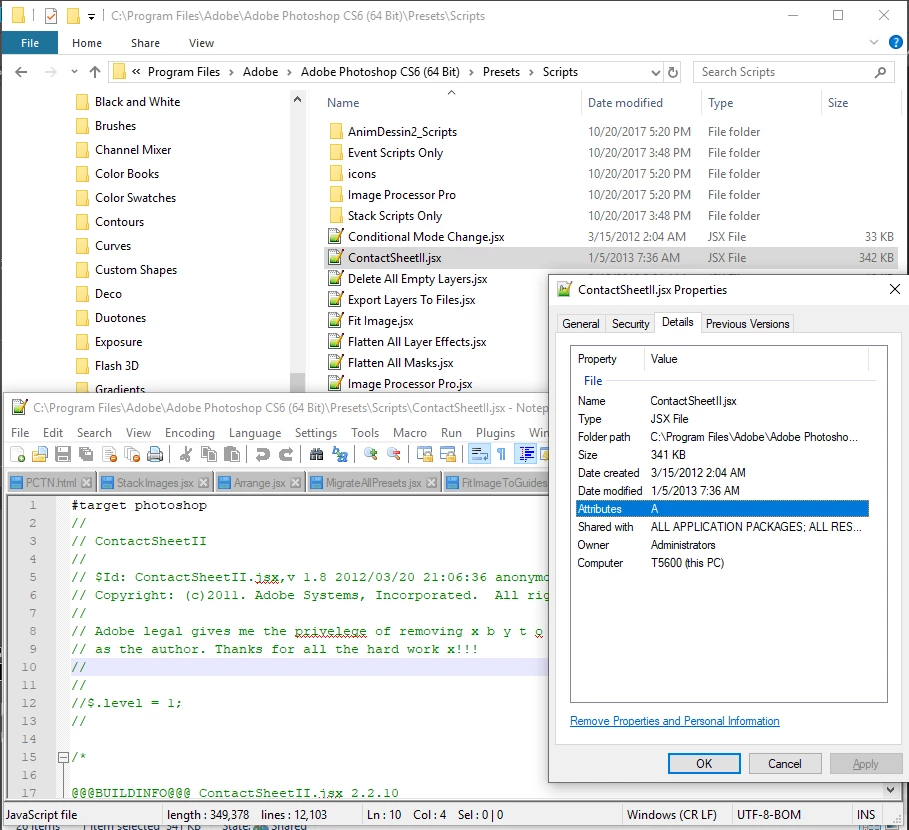
Scripting did not change much between CS5 and CS6.   Try downloading a CS6 trial and copy the CS6 contact shee II script to you CS5 Scripts presets

2 replies

JJMack
Community Expert
Community Expert
October 9, 2018

If you do not use Contact sheet II Flatten option, auto spacing and labeling options you may get the  mosaic you want. However, if you did not first process all your image to be the same size and aspect ratio. The mosaic produced may not be what you want.  Contac sheet II is design to preserve your images aspect ration and  resize them to fit within the rows and columns you set on the paper size  and print resolution you specify.

My Paste Image Roll script is designed to resize you image to print a particular size on roll paper.  Image are resize for the print Tile size and mask to the tile size specified for mismatch aspect ratios,  Once created images composition can be tweaked y moving the layers content within its unlinked layer mask.  Compare these two mosaics.

JJMack
October 9, 2018

Thanks for the resize idea JJMack I am facing the problem with the layer mask. I am not sure why there is no layer mask created for each image when they're added. If the layer mask is added to each image then my problem is solved. Seems like contact sheet II does not create layer mask on CS5.

JJMack
Community Expert
JJMackCommunity ExpertCorrect answer
Community Expert
October 9, 2018

Scripting did not change much between CS5 and CS6.   Try downloading a CS6 trial and copy the CS6 contact shee II script to you CS5 Scripts presets

JJMack
Muqqarib Hassan
Inspiring
October 9, 2018

Hi, Check this video.

You might get help from this.

How to make a contact sheet in Adobe Photoshop CS6 - YouTube

Or Check this video for more details.

Creating a Contact Sheet in Photoshop CS6 - YouTube

Thanks.

October 9, 2018

Thanks for your prompt response Muqqarib Hassan

I am following similar settings if you check the image but still, there are no layer masks created for each image. It just adds the image without layer mask. Not sure why only images are loading.

Muqqarib Hassan
Inspiring
October 9, 2018

Hi, I appreciate it. If I am not wrong. I think we cannot create the contact sheet with layer mask.