
Known Participant
November 14, 2017
Question

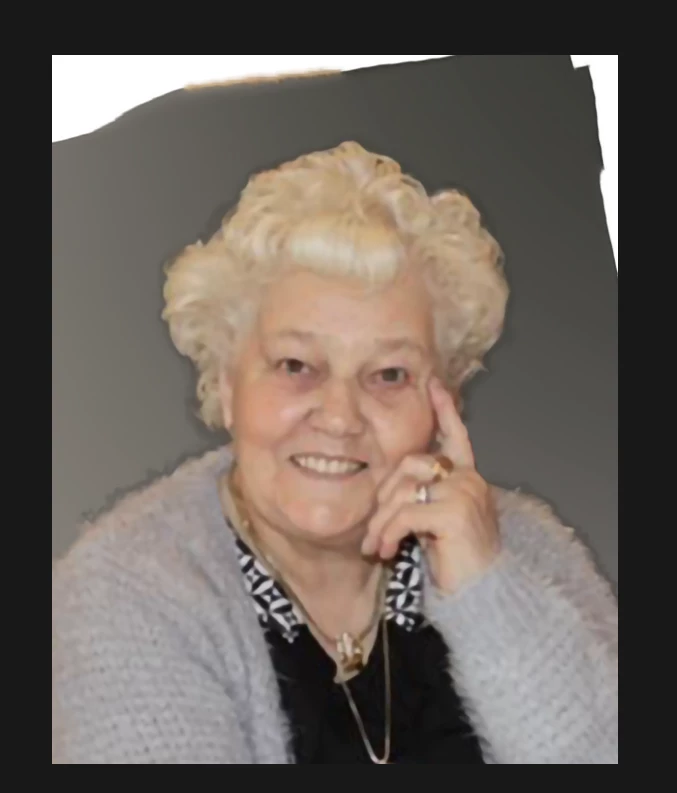
Content aware fill doesn't fill entire selection.

  • November 14, 2017
  • 2 replies
  • 1207 views

I use content aware fill a lot. In CS 5 there was no problem.

I recently upgraded to CC 2018. Unfortunately CAF doesn't fill entire selection.

I can't find any solution.

See picture before CAF en after CAF.

.

This topic has been closed for replies.

2 replies

TheBritAlex
Participating Frequently
November 14, 2017

Hi TomWeyts,

Either of these options may not work, although I wanted to chip in to see if I could help in any way.

My first suggestions which I am fairly sure you will have already tried is to select a much larger selection, although if this doesn't work do the complete reverse and make smaller selections at a time then content-aware fill that way. This way will obviously take much longer, although the desired effect may look much better. 

If you decide to content-aware fill in much smaller areas, I would suggest duplicating your layer then creating a mask and painting out all of the areas you don't want to be seen in your content aware such as skin and hair tones.

I hope this helps in some way, any questions I'll hope to respond ASAP.

Cheers,Alex

TomWeytsAuthor
Known Participant
November 14, 2017

Also tried smaller selections. Same problem.

In CS5 I just had to select the white parts and CAF and done.

Quick and easy.

TomWeytsAuthor
Known Participant
November 14, 2017

I have the feeling it's some kind of preference...

davescm
Community Expert
Community Expert
November 14, 2017

Hi

I tried with your image and did not get as bad a result - although the hair crept into the fill so:

1. Start with a selection around the top - missing the person and copy that to a new layer (Ctrl+J)

2. On the new layer - select the triangles leaving some overlap

3. Shift +F5 and choose content aware

4. Ctrl+D to deselect (and in my example, then turn back on the original layer)

Dave

TomWeytsAuthor
Known Participant
November 14, 2017

I tried this, but no better result.

In CS5 I just had to select the white parts and CAF and done.

Quick and easy.