Inspiring
October 22, 2018
Answered

Content Aware Fill no shown in menu bar

  • October 22, 2018
  • 3 replies
  • 3800 views

After the latest update 19.1.6, the new Content Aware fill is not listed in my Menu Bar.

    This topic has been closed for replies.
    Correct answer Barb Binder

    Hi Cypress:

    The latest update is actually 20.0 (version 2019). 19.1.6 is Photoshop 2018.

    2019 has a new Content Aware Fill command in the Edit menu, but it is not available in 2018.
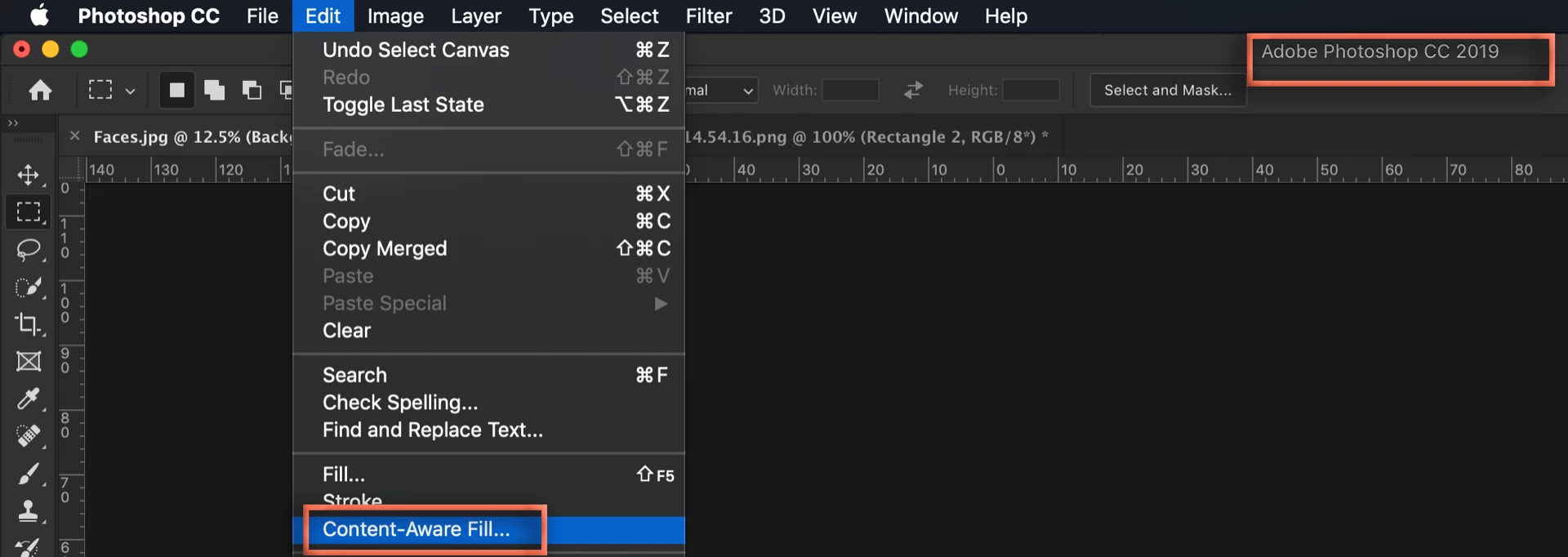
    ~Barb

    3 replies

    johng33153084
    Inspiring
    October 25, 2018

    Mine is not there

    Barb Binder
    Community Expert
    Community Expert
    October 28, 2018

    Hi John:

    What version—exactly—are you using?

    On a Mac: Photoshop CC > About Photoshop CC

    On Windows: Help > About Photoshop CC

    Please check and let us know. This feature is only available on version 20.0.0 (and eventually, later).

    ~Barb

    ~Barb at Rocky Mountain Training
    Barb Binder
    Community Expert
    Barb BinderCommunity ExpertCorrect answer
    Community Expert
    October 22, 2018

    Hi Cypress:

    The latest update is actually 20.0 (version 2019). 19.1.6 is Photoshop 2018.

    2019 has a new Content Aware Fill command in the Edit menu, but it is not available in 2018.

    ~Barb

    ~Barb at Rocky Mountain Training
    dianer_macperson
    Inspiring
    October 22, 2018

    The latest update is 20.0

    The new one is "content aware scale".

    it's under edit menu.

    shift f6 still gets you to content aware fill. It's also under the edit menu.