
Participant
November 15, 2019
Answered

Content Aware Fill Panel Disappeared

  • November 15, 2019
  • 2 replies
  • 2782 views

I am sure there is a valid reason and I just need to hit a button that I inadvertently tapped. I was using content-aware fill and accidentally closed the control panel that allows you to change specifications about your selected area... and can't seem to get it to come back. I have closed out of Photoshop altogether and restarted but still no panel. Does anybody have any ideas? I did update to Photoshop 2020, not sure if that is part of the issue or not. Thank you.
This topic has been closed for replies.
Correct answer silk-m

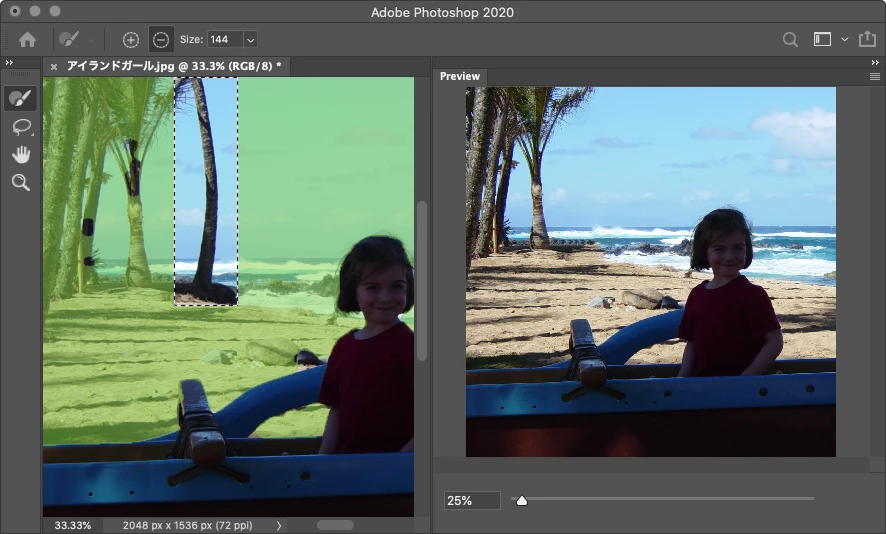
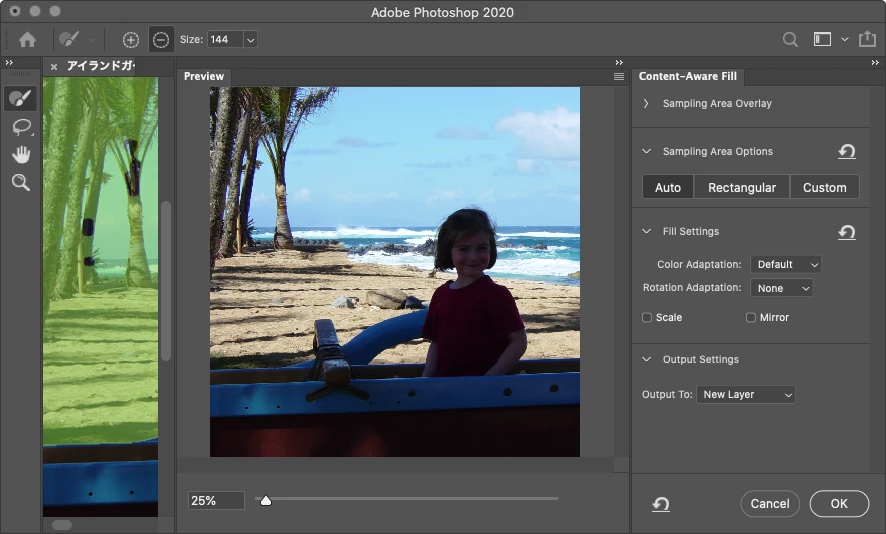
HI, Did it look like this?


Then "Window / Workspace / Reset Content-Aware Fill"


2 replies

davescm
Community Expert
Community Expert
November 15, 2019

Hi

Are you using it the same way? You will only get the content ware fill workspace when you use Edit > Content Aware Fill not when you use Edit > Fill > Content Aware


Dave


Dave


J E L
Community Expert
Community Expert
September 13, 2021

@davescm Is there a way for the Edit > Fill panel to stay open after one application? I'm fairly certain it won't (too bad) but thought I'd ask to be sure. Thanks! (And by this, I mean specifically for the Content-Aware action.)


davescm
Community Expert
Community Expert
September 13, 2021

@J E L I don't know any way to keep that dialogue open. Of course Shift+F5 should reopen it with the same settings as previously used.

Dave

silk-m
Community Expert
silk-mCommunity ExpertCorrect answer
Community Expert
November 15, 2019

HI, Did it look like this?


Then "Window / Workspace / Reset Content-Aware Fill"


--Susumu Iwasaki
AFisher2Author
Participant
November 15, 2019

You are a damn genius. Thank you so much. I'm back in commission. 🙂