
Known Participant
February 7, 2018
Answered

Conversion from RGB to CMYK press ready of a problematic image

  • February 7, 2018
  • 9 replies
  • 7446 views

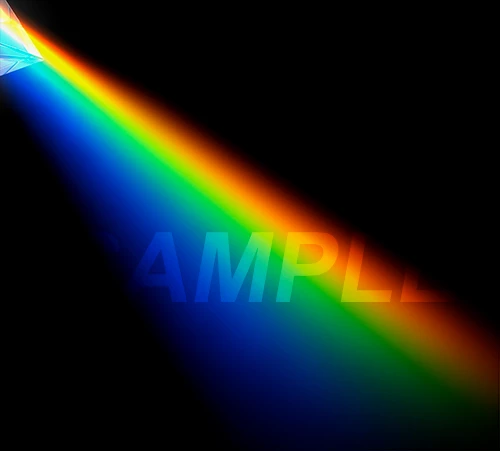
I'm trying to convert an image from RGB to CMYK for press.
The conversion has some troubles as image use a lot of colours out of gamut, and also i need to convert to a 300% total ink CMYK profile (such as ISO coated v2 300).

I'm not satisfied with Photoshop conversion from Adobe RGB to Iso coated v2 300 (this is the common profile used by some media partners)... do you have any hints or suggestion?
I know that is quite impossibile to obtain the same vivid and brilliant colours.

I attach the "problematic" piece of image.
This topic has been closed for replies.
Correct answer D Fosse

First make sure the RGB file is max neutral black 0-0-0. That converts into ISO Coated 78-68-58-94 - that's the blackest black you will ever get in ISO Coated (ECI) 300%. That is 300% coverage, that's a brick wall you can bang your head on.

The spectral colors, from Adobe RGB, will be partly out of gamut in ISO Coated - mostly the yellow-greens and the deep blues. You really need to soft proof this and make the appropriate adjustments. The greens will show blocking-up and banding, and the deep blues will very likely turn purple.

Don't worry so much about total saturation. This won't be seen side by side with the RGB version. Just get it to look good with smooth, even gradients. That's much more important.

9 replies

Legend
February 8, 2018

Technical details aside, you need to set expectations with your client. As long as the client is satisfied with the finished results, you are golden. Do your best, bill accordingly, and let them know that simpler artwork will give better results next time.

D Fosse
Community Expert
Community Expert
February 8, 2018

Yes, I would normally advise RGB master > convert to CMYK, partly to avoid exceeding max ink (and partly to repurpose for different processes).

However, the spectral colors here is a special case, because of the smooth transition required between them. Remapping this from Adobe RGB into ISO Coated without banding is very tricky. I didn't fully realize just how tricky until I tried. It can be done, but it takes a good deal of time and effort. It might save some labor to do it in ISO Coated to begin with, picking colors that are already within gamut.

Yes, Channel Mixer can be very effective to control gamut clipping - but in that case it should be used in combination with "Blend If", to target the range where the clipping actually occurs. If the clipping is at the low end of any given channel, there's no reason to desaturate the high end unnecessarily.

Known Participant
February 8, 2018

https://forums.adobe.com/people/D+Fosse  ha scritto

Yes, I would normally advise RGB master > convert to CMYK, partly to avoid exceeding max ink (and partly to repurpose for different processes).

However, the spectral colors here is a special case, because of the smooth transition required between them. Remapping this from Adobe RGB into ISO Coated without banding is very tricky. I didn't fully realize just how tricky until I tried.

Yes i can confirm that this is not an easy job, and require time... but... in this SPECIAL case i think that there are no other way to do that and get a smooth transition... i have tried a lot of combination in conversion, but nothing give me an easy solution...

chanaart
Community Expert
Community Expert
February 8, 2018

Best to place the image in Indesign. InDesign converts RGB to CMYK better than Photoshop.

Chana

c.pfaffenbichler
Community Expert
Community Expert
February 8, 2018
InDesign converts RGB to CMYK better than Photoshop.

How do you figure that?

Legend
February 7, 2018

Honestly, I would do two things:

1. Talk to the printer about how they want the file prepared. They may want the ID file and do the separations themselves.

2. Go back to the client and tell them that four-color on cheap paper is going to look awful.

This is going to be out of gamut unless you do six-color and decent coated paper.

As for proofing, do several variations tiled in one pdf and see what looks best.

Known Participant
February 7, 2018

File has to be sent to main stream media print services which have strict tech speciments (PDF/X-1a, iso coated v2 300 CMYK profile, only process colours CMYK).

I have no choice about paper (maybe grade 5 o 3 coated paper, but i'm not sure), no additional inks, etc...

I will try with some tweaking as suggested... but you are wright... this is going to look quite awful...

D Fosse
Community Expert
Community Expert
February 7, 2018

GaudiumMagnum  wrote

this is going to look quite awful...

That's the wrong attitude. It will not look awful if you do it right. It will look consistent with the nature of the medium. As I said, this will not be compared with anything else. It will stand on its own.

I live in this world. I just finished preparing 250 files for a book, in ISO Coated 300%. Each file is custom prepared for the paper that will be used - bringing out what can be brought out, and compensated for what can't. I had my monitor white point set to that paper color, and the black point set to max ink density for that paper. Then I proofed. I know what'll come out of the press.

People get all hung up on total saturation. It's not important. Good color is about color relationships, not total saturation. Get a color to work with the others, and it'll look good.

D Fosse
Community Expert
D FosseCommunity ExpertCorrect answer
Community Expert
February 7, 2018

First make sure the RGB file is max neutral black 0-0-0. That converts into ISO Coated 78-68-58-94 - that's the blackest black you will ever get in ISO Coated (ECI) 300%. That is 300% coverage, that's a brick wall you can bang your head on.

The spectral colors, from Adobe RGB, will be partly out of gamut in ISO Coated - mostly the yellow-greens and the deep blues. You really need to soft proof this and make the appropriate adjustments. The greens will show blocking-up and banding, and the deep blues will very likely turn purple.

Don't worry so much about total saturation. This won't be seen side by side with the RGB version. Just get it to look good with smooth, even gradients. That's much more important.

Norman Sanders
Legend
February 7, 2018

Since you are constrained by a total ink % limit and not being able to use touch plates or (I assume) varnish, there is one other element that can have a significant effect on contrast, density range and color brilliance of the process colors: the paper stock. If a choice is available to you, inquire about very high gloss and cast coated paper availability. They will certainly help.

Known Participant
February 7, 2018

No ... unfortunately ... we are talking about ADV on magazines, this is the reason for 300% total ink limit. I cannot expect great quality in printing and paper.

c.pfaffenbichler
Community Expert
Community Expert
February 7, 2018

Watch out for banding.

Do you have the layered RGB File in 16 bit?

JonathanArias
Legend
February 7, 2018

are you doing a layout in indesign? why not just place your RBG image in the layout, and let indesign handle the color conversion when it created a .pdf for printing?

Known Participant
February 7, 2018

mmm... yes i'm working with InDesign.
I need to output a PDF/X-1a with ISO Coated v2 300... do you think InDesign works better on colour conversion than Photoshop directly? ... or Distiller from .ps file with an RGB image linked...
I have never tried...

JonathanArias
Legend
February 7, 2018

i let indesign doing all of my color conversion. i place RBG mode images from photoshop. or rbg mode vector art. select .pdf for print and have indesign handle the color conversion.

you can, in the output section, select "to desitination" and select what you want. but i rarely do that even. i just select .pdf for print and let indesign do its thing. 

Mylenium
Legend
February 7, 2018

You will probably have to split up the channels and re-compose them after tweaking them individually. And yeah, spot colors would definitely help.

Mylenium

Known Participant
February 7, 2018

Thanks

Unfortunately... i don't think spot colours should be available, as we are talking about standard offset print with simple process colours (at least 4-5 different media, so i have to think to the worst scenario)

Which kind of manipulation do you take into consideration for single channel tweaking?

D Fosse
Community Expert
Community Expert
February 7, 2018

There isn't a whole lot that you can do. Remember, you can't exceed 300% total ink!

Keep your info panel up, with a readout for total ink. Then try to push ink coverage as far as you can without going over.