
Inspiring
April 28, 2019
Answered

Convert Actions (ATN) to text file

  • April 28, 2019
  • 2 replies
  • 9346 views

Googling I saw it used to be possible to convert actions (ATN files) to text

It seems I add to select the action then hold opt+md on my Mac and in the Actions button I would receive a message telling me SAVE AS with text option

Is this still available and if not any ways to do  it?

Thanks
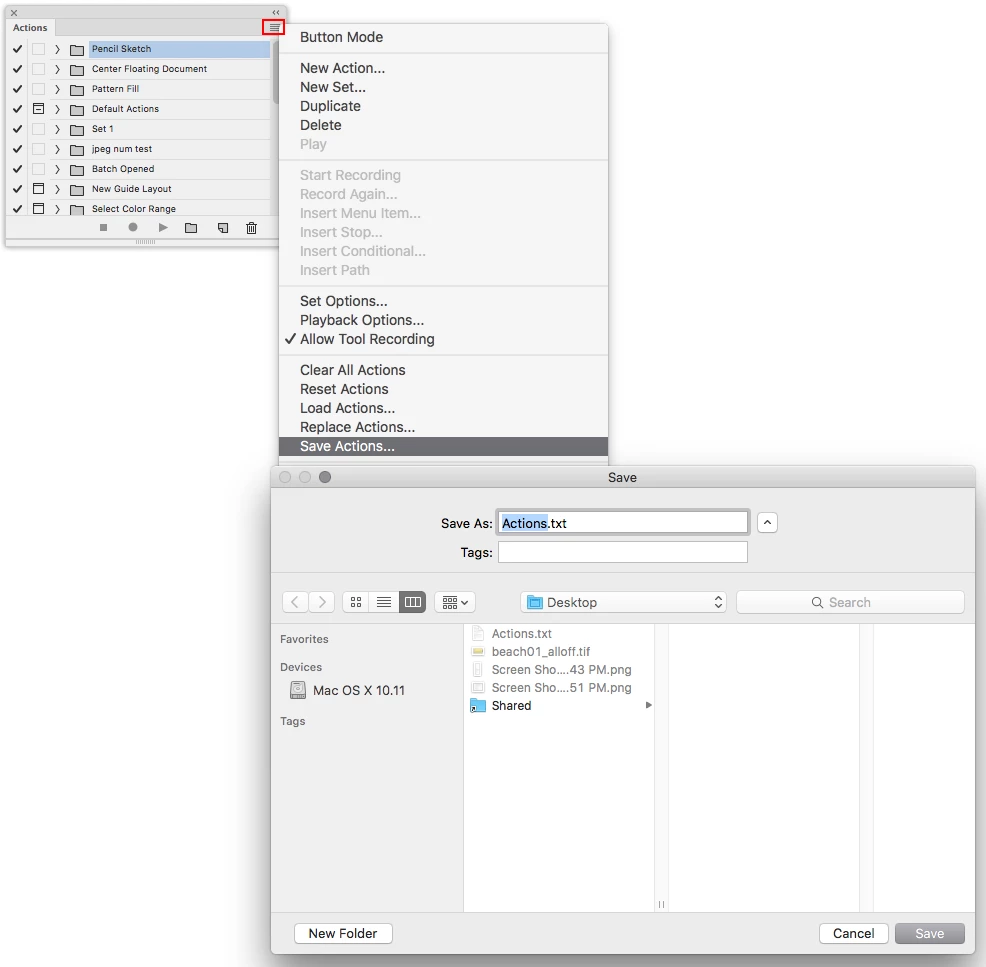
Correct answer Jeff Arola

Press Ctrl+Alt (Windows) or Command+Option (Mac OS) when you

choose the Save Actions command to save the actions in a text file.

2 replies

Jeff Arola
Community Expert
Jeff ArolaCommunity ExpertCorrect answer
Community Expert
April 28, 2019

Press Ctrl+Alt (Windows) or Command+Option (Mac OS) when you

choose the Save Actions command to save the actions in a text file.

Known Participant
October 31, 2019

It does not seem save as text is available in Adobe Photoshop Version: 20.0.7 20191017.r.87 2019/010/17: 1208010 x64 running on Windows 10.  Does it ?

Jeff Arola
Community Expert
Community Expert
November 1, 2019

Appears to work here with photoshop cc 2019 20.0.7 running under windows 10 x64 1903.


Make sure you click on one of the the action set folders before saving.


c.pfaffenbichler
Community Expert
Community Expert
April 28, 2019

I think xbytor provided a tool to convert atn-files to xml.

xtools

DantemAuthor
Inspiring
April 28, 2019

Sorry but it seems as if this tool is for Windows and Iam on a Mac .... thanks anyway