anonymust
Participant
October 15, 2012
Answered

Convert PNG to JPG

  • October 15, 2012
  • 9 replies
  • 33170 views

What's the easiest way to convert an image from PNG to JPG ..?

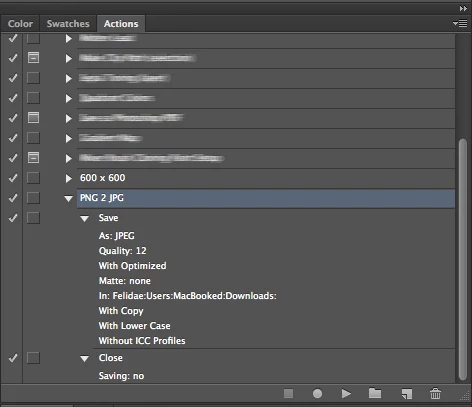
I've created an action for that (see attached image), but I'm not able to save the JPG version in the same directory as the original image.

Please help   thanks in advance.

This topic has been closed for replies.
Correct answer conroy

If the Action is run manually then it'll save the JPEG in the folder specified in the Action ("Downloads" in this case). The Action has to be run by Batch command for the destination folder to be overriden by the folder of an arbitrary original file.

9 replies

Mohammad Emon
Participant
July 30, 2021

This can be done on Photoshop. Just drag your PNG image to your Photoshop, then go to Export as, select JPG and click Export. Voila! You just converted it.

But you can also use online tools to [removed by moderator]

Participating Frequently
June 1, 2021

you can use a third party site but nothing beats learning how to do it in photoshop

yiliay66316563
Participant
March 23, 2018

You can use an online photo converter, like image.online-convert.com. It has different quality mode and let you change its size. Aside from this straightforward online solution, you can also try an offline workaround, which is safer. If you want to know which the most suitable [removed by moderator] tool is, you can try more!

miroslavp88816835
Participant
November 21, 2017

If the Action is run manually then it'll save the JPEG in the folder specified in the Action ("Downloads" in this case). The Action has to be run by Batch command for the destination folder to be overriden by the folder of an arbitrary original file, or you can use some online tool for example [removed by moderator]

Noel Carboni
Legend
October 16, 2012

Y'know, blurring stuff out just makes people want to test their forensics skills, and there are tools and techniques for revealing action names like "Molten Lead, Sepia Toning (layer)" and others. 

By the way, try out the Image Processor script (I think it's in the File - Automate menu).  For advanced stuff, Image Processor Pro is available from Russell Brown.

-Noel

Jeff Arola
Community Expert
Community Expert
October 15, 2012

Do you get any kind of error message when trying to save the jpegs to the path in your action?

What happens when you run the action?

conroy
conroyCorrect answer
Participating Frequently
October 15, 2012

If the Action is run manually then it'll save the JPEG in the folder specified in the Action ("Downloads" in this case). The Action has to be run by Batch command for the destination folder to be overriden by the folder of an arbitrary original file.

Jeff Arola
Community Expert
Community Expert
October 15, 2012

I was thinking if Anonna was saving jpegs to the folder that only had pngs and not already a jpeg version of the same file, that maybe either the folder is no longer there or some kind of permissions issue is

preventing the saving to that folder.

If a jpeg of the same name already exists, then it should still save because the jpeg action is set to With Copy which should still save with copy added to the file name.

If the jpeg on the same name with copy exists then the action should save over the copy version.

Anonna didn't say if they were using just the action or batch/image processor to save the files using the action.

conroy
Participating Frequently
October 15, 2012

Anonna, are you automating the conversion of files or just trying to make a shortcut for saving the currently open document to JPEG and closing the document?

anonymust
anonymustAuthor
Participant
October 17, 2012

Im trying to get the action to work on the current picture in view (the picture that is open in photoshop and im looking at it)

Im aware that if i did it as a batch process it would save in the location of the original picture.

But if its possible i'd like to have the Action convert the current open image from PNG to JPG... (and also delete the PNG version in the process, if possible)

Luanne Seymour
Adobe Employee
Adobe Employee
October 15, 2012

Hi. This forum is for beginners trying to learn the basics of Photoshop.  I'm moving your question to the Photoshop General Discussion forum for specialized attention to your situation.

PECourtejoie
Community Expert
Community Expert
October 15, 2012

Hello! the easiest way is to use File>Scripts>Image processor (or from Bridge: Tools>Photoshop>Image Processor)