
Participating Frequently
November 14, 2021
Question

Convert profile - wrong colours.

  • November 14, 2021
  • 3 replies
  • 1044 views

Hello everyone.


I'm been having a problem with the color profile conversion of some documents I've scanned. I'll try to detail it in images (sorry for my bad english).


I've created an .icc profile of my Epson scanner with a color calibration target. In Photoshop, I assign this profile to my raw .tif images, and it all works ok.
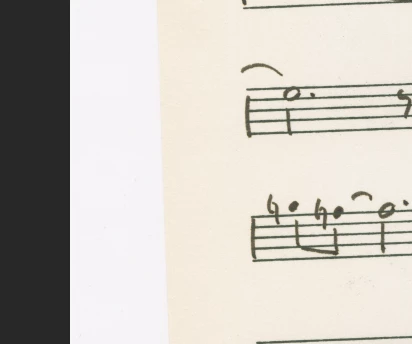


When i try to convert it to a common color profile (say, sRGB), although the colors are still similar in the preview...
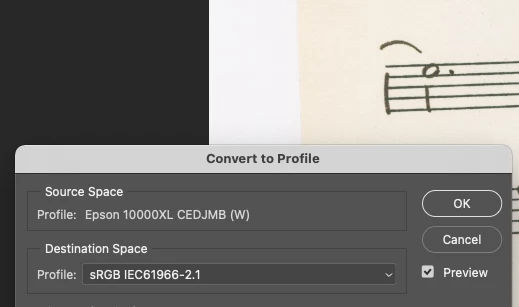
 

...they will turn reddish when I click OK. If I convert them to ProPhoto RGB, they will look OK on Photoshop, but also reddish on MacOS's Preview.
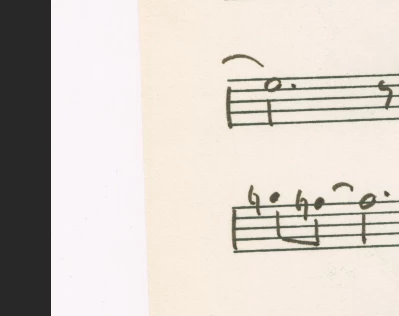
 

Any idea on how to solve this? It would be most apprecciated. 

Thanks in advance!


This topic has been closed for replies.

3 replies

NB, colourmanagement
Community Expert
Community Expert
November 16, 2021

DigitalDog makes some excellent points

You wrote: "I tried to create a profile with ArgyII, but I've been having the problems I mention above. Maybe I'm using ArgyII wrong. What do you suggest?"

I would contact Argyll customer support or forum if having issues with their software


I hope this helps neil barstow, colourmanagement net :: adobe forum volunteer google me "neil barstow colourmanagement" for lots of free articles on colour management [please only use the blue reply button at the top of the page, this maintains the original thread title and chronological order of posts]

TheDigitalDog
Inspiring
November 15, 2021

After a scan, you open the document in PS: it does or doesn't have an embedded profile? Make sure Color Prefs are set to notify you of this.

Author “Color Management for Photographers" & "Photoshop CC Color Management/pluralsight"
Participating Frequently
November 15, 2021

It doesn't.

TheDigitalDog
Inspiring
November 14, 2021

Odd, but maybe this will work. First, try disabling GPU in the preferences (Preformance tab). Any better?
If not, recalibrate and build a new ICC display profile, the old one might be corrupted.
If you are using software/hardware for this task, be sure the software is set to build a matrix not LUT profile, Version 2 not Version 4 profile.
If turning OFF GPU works, it's a GPU bug and you need to contact the manufacturer or find out if there's an updated driver for it. 
Also see: https://helpx.adobe.com/photoshop/kb/acr-gpu-faq.html

Author “Color Management for Photographers" & "Photoshop CC Color Management/pluralsight"
Participating Frequently
November 14, 2021

Disabling GPU didn't work. Any advice concerning the software to build a new profile?

Participating Frequently
November 15, 2021

I do, and I uploaded it in my previous post. Can you see if its anything wrong with the scan?


Previous comment, that is.