
Inspiring
September 13, 2011
Answered

convert rgb to color image?

  • September 13, 2011
  • 1 reply
  • 999 views

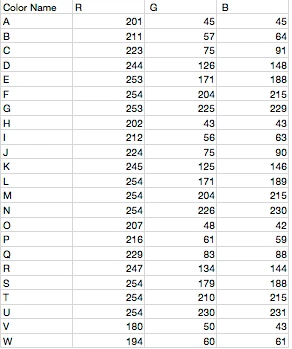
I have an excel doc with around 1,000 color names and their respective RGB values.  Is it possible to create a script that will read a csv and save each row as a 500px x 500px solid-color document?

I'm just looking for a quick way to convert a text-list of colors into actual jpg color files with the file name being column A (the color name) and the image representing the solid rgb color.  Any ideas?
This topic has been closed for replies.
Inspiring
September 13, 2011

Hey Paul,

Right now, the filename handles spaces (i.e. "Pink Cadillac") by inserting dashes instead (Pink-Cadillac).  Is it possible to have the file name retain the spaces found in the csv, or is that just how spaces are handled?

Paul Riggott
Inspiring
September 13, 2011

Hi Bret the - are inserted because of the way you have Save For Web setup it's the Filename Compatability screen, UNIX will be ticked and should be unticked.

Go to Save For Web and Devices

Select the menu...

Select Edit Output Settings

And keep on going next till you get this screen...

Hope this helps.