
masudr6167678
Inspiring
February 14, 2017
Answered

Convert TIFF to JPEG by batch include all sub-folders

  • February 14, 2017
  • 3 replies
  • 8687 views

I am a post production worker. I have 500 images with 250 sub-folders. I have to convert them TIFF to JPEG. I tried to convert by batch but always save in one location. But I want to save them separate location without creating any JPEG folders.

So, If anyone have any idea please tell me.
    This topic has been closed for replies.
    Correct answer Jeff Arola

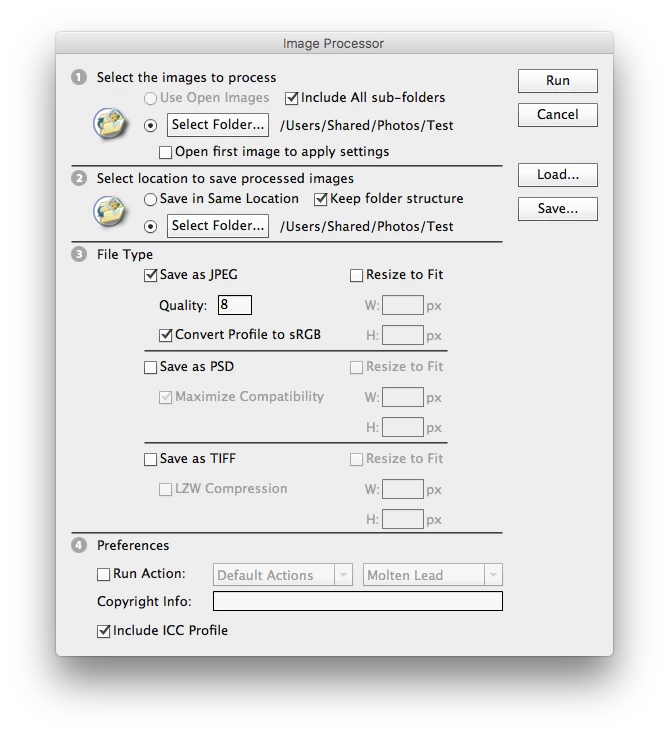
    Try File>Scripts>Image Processor

    and under Select Images to Process click Select Folder>Include all Sub Folders

    and under Select Location to Save Processed Images use the same location for Select Folder and check Keep folder structure

    3 replies

    masudr6167678
    Inspiring
    February 14, 2017

    Now it's works. Thank you very much for your help. You saved my much time.

    masudr6167678
    Inspiring
    February 14, 2017

    It's creates JPEG folder in all sub-folders. I want to convert without creating any JPEG folder.

    Jeff Arola
    Community Expert
    Community Expert
    February 14, 2017

    Did you try the settings exactly as explained above?

    Using those settings i don't get Jpeg folders but the jpegs are put in the same folders as the tif files.

    Jeff Arola
    Community Expert
    Jeff ArolaCommunity ExpertCorrect answer
    Community Expert
    February 14, 2017

    Try File>Scripts>Image Processor

    and under Select Images to Process click Select Folder>Include all Sub Folders

    and under Select Location to Save Processed Images use the same location for Select Folder and check Keep folder structure