


Copy link to clipboard
Copied
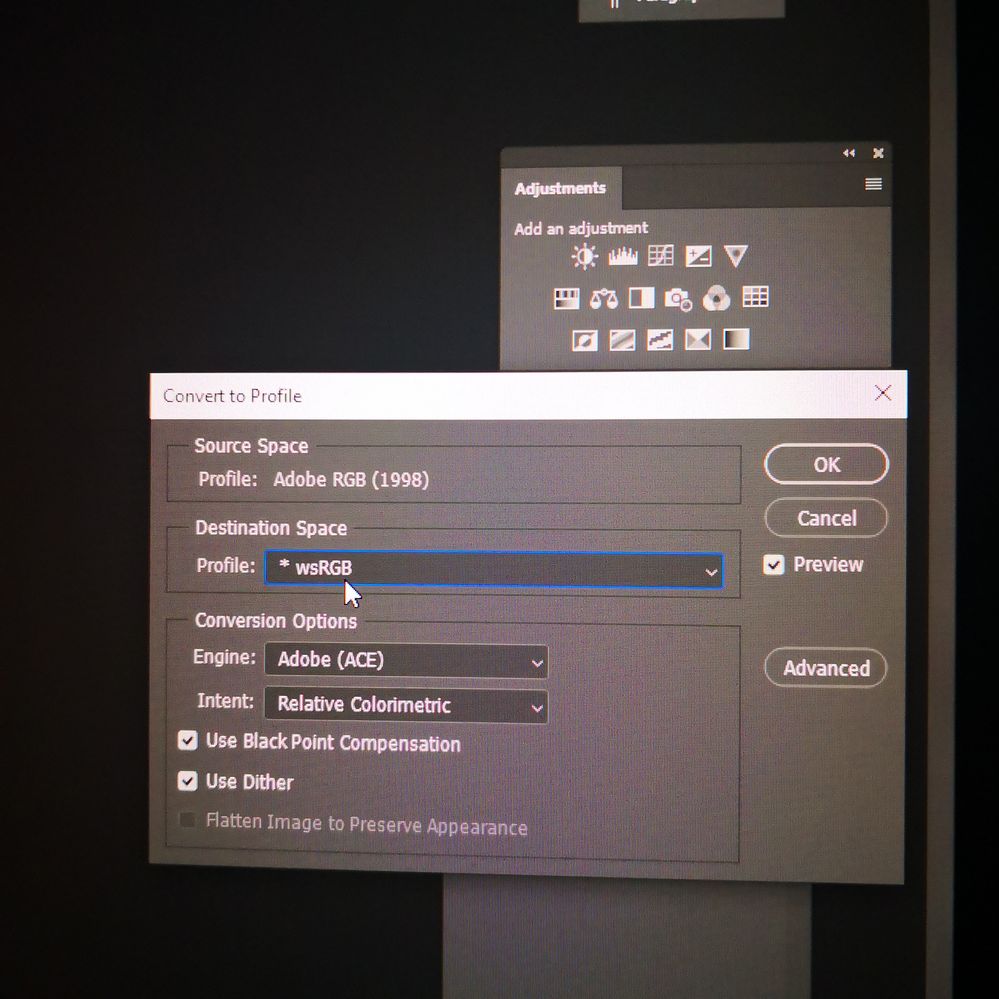
Hi all, just need to know what is the difference between esRGB and *wsRGB?? Thx


 1 Correct answer


Don't use either! The one you want is called sRGB IEC61966-2.1.
e-sRGB is an early, primitive and basically failed attempt at a wide gamut specification. It is long obsolete and today we use AdobeRGB or ProPhoto.
wsRGB is not an icc-specification profile at all. It is part of Windows Color System (which is a framework in development and presently not even fully implemented) and used for other purposes. It is not interchangeable with standard icc profiles.


Explore related tutorials & articles
 15
Replies
15
15
Replies
15

Copy link to clipboard
Copied

Copy link to clipboard
Copied
I wasn't familiar with e-sRGB, so I looked it up, too. As best I can tell, it's based on sRGB, with an extended gamut to allow encoding colors that fall outside the reproducible range on a standard computer monitor. My guess is that it's an effort to make sRGB a bit more print-friendly, but I don't know how it compares to Adobe RGB or ProPhoto RGB or why it might be preferable to either of those spaces in a color-managed system.
wsRGB seems to be based on the Windows Color System.
My advice is to steer clear of both and convert to sRGB-IEC61966-2.1 for online display or stay with Adobe RGB if going to print.
Copy link to clipboard
Copied
Thank you very much for your reply. Is just if I post any thing on Integram is chenging the colors. I'm no sure with profile should I use.
Copy link to clipboard
Copied
Copy link to clipboard
Copied
Duplicate

Copy link to clipboard
Copied
Please post the name of the program you use so a Moderator may move this message to that forum
Copy link to clipboard
Copied
Photoshop

Copy link to clipboard
Copied
What do you want to know about converting to profile?
Copy link to clipboard
Copied
Don't use either! The one you want is called sRGB IEC61966-2.1.
e-sRGB is an early, primitive and basically failed attempt at a wide gamut specification. It is long obsolete and today we use AdobeRGB or ProPhoto.
wsRGB is not an icc-specification profile at all. It is part of Windows Color System (which is a framework in development and presently not even fully implemented) and used for other purposes. It is not interchangeable with standard icc profiles.
Copy link to clipboard
Copied
Thank you very much much guys. Im so glad, I came here for help.
I have one more question 🙂 what about the print? What profile should I use for that? Adobe RGB?

Copy link to clipboard
Copied
For your document , use a document profile such as sRGB IEC61966 - 2.1 or Adobe RGB 1998.
For printing you select, in the print dialogue, the profile that represents your particular printer, ink, and paper combination. These are often supplied by the printer and paper manufacturers.
Dave
Copy link to clipboard
Copied
...in other words: the document profile is what it is. The document profile always stays with the document and you never need to change that. The conversion for print is carried out at the print stage, on the fly, as the file is sent to print.
Photoshop has two options in the Print dialog. One is called "Photoshop manages color", in which case you do it as Dave sketched above. Then Photoshop does the conversion, using the printer/paper/ink-specific print profiles, and sends the result to the printer. This is the preferred method for accuracy and flexibility, but requires that you have appropriate profiles available.
The other option is "Printer manages color". Then Photoshop sends the file, in its present document color space, directly to the printer - and the printer driver does the necessary conversion. This method is used if the printer does not come with dedicated profiles, as is often the case with inexpensive home printers.
In both cases you need to open the printer driver and pick the correct paper type, and turn printer color management on or off as the case may be.
Copy link to clipboard
Copied
Thank you very much for your help. All clear now 🙂

Copy link to clipboard
Copied
Hi,
Do you know the specific file name for the e-sRGB icc profile?

Copy link to clipboard
Copied
@Photodream there's more info here - might be helpful
The e-sRGB ICC profile is a standardized color profile for the sRGB color space, developed by the International Color Consortium (ICC). It is an extension of the original sRGB profile, designed to provide improved color accuracy and consistency across various devices and platforms.
Key Features
- Perceptual Rendering Intent: The e-sRGB profile uses the ICC’s Perceptual Rendering Intent (PRI) algorithm, which aims to preserve the visual appearance of the original image by mapping colors to the destination device’s color gamut.
- Improved Color Accuracy: The e-sRGB profile provides better color accuracy compared to the original sRGB profile, particularly in the mid-tones and shadows.
- Expanded Color Gamut: The e-sRGB profile has a slightly expanded color gamut compared to sRGB, allowing for more nuanced color representation.
- Compatibility: The e-sRGB profile is designed to be compatible with a wide range of devices and platforms, including monitors, printers, and digital cameras.
Use Cases
- Professional Photography: The e-sRGB profile is suitable for professional photographers who require high-quality color reproduction and accurate color representation.
- Graphic Design: Graphic designers can use the e-sRGB profile to ensure consistent color output across various devices and platforms.
- Digital Imaging: The e-sRGB profile is useful for digital imaging applications, such as image editing and manipulation, where accurate color representation is critical.
Comparison to Other Profiles
- sRGB v2: The original sRGB profile (v2) is still widely used, but it has limitations in terms of color accuracy and gamut.
- Adobe RGB: Adobe RGB is a wider-gamut color space, but it may not be compatible with all devices and platforms.
- iccMAX: iccMAX is a newer color management system that provides more advanced color profiling and rendering capabilities, but it may require additional software support.
Conclusion
The e-sRGB ICC profile offers improved color accuracy and consistency compared to the original sRGB profile, making it a suitable choice for professionals and applications requiring high-quality color reproduction. However, it’s essential to ensure compatibility with specific devices and platforms before adopting the e-sRGB profile.
I hope this helps neil barstow, colourmanagement net - adobe forum volunteer - co-author: 'getting colour right'
google me "neil barstow colourmanagement" for lots of free articles on colour management
Help others by clicking "Correct Answer" if the question is answered.
Found the answer elsewhere? Share it here. "Upvote" is for useful posts.


Find more inspiration, events, and resources on the new Adobe Community
Explore Now
 AdChoices