
jamesa15444502
Participant
June 9, 2017
Answered

Converting images from 32 bit to 16 bit

  • June 9, 2017
  • 2 replies
  • 54895 views

Hi,

I have an .EXR file that I want to render as a JPG or PNG. This requires it to be converted from a 32 bit to 16 bit, however when I do this, the image's color and saturation are edited and it looked terrible. How can I force the image to stay exactly the same when converting?

Thanks
This topic has been closed for replies.
Correct answer davescm

Hi

When viewing a 32 bit image on screen you are not seeing the full tonal range - it can't be displayed on an 8 or 10 bit monitor.

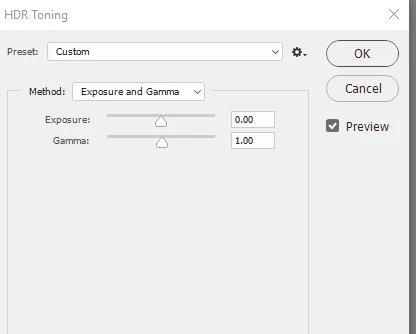
That aside, when you use Image Mode and change from 32bit to 16 bit you should get an HDR toning dialogue.

The nearest to seeing in 16 bit what you see currently see on screen is to choose the toning method "Exposure and Gamma" and set Exposure to 0 and Gamma to 1.0

Note : If you get Camera Raw instead of that dialogue you will need to go to Preferences File Handling and uncheck "Use Adobe Camera Raw to Convert Documents from 32 bit to 16/8 bit

Dave

2 replies

davescm
Community Expert
davescmCommunity ExpertCorrect answer
Community Expert
June 9, 2017

Hi

When viewing a 32 bit image on screen you are not seeing the full tonal range - it can't be displayed on an 8 or 10 bit monitor.

That aside, when you use Image Mode and change from 32bit to 16 bit you should get an HDR toning dialogue.

The nearest to seeing in 16 bit what you see currently see on screen is to choose the toning method "Exposure and Gamma" and set Exposure to 0 and Gamma to 1.0

Note : If you get Camera Raw instead of that dialogue you will need to go to Preferences File Handling and uncheck "Use Adobe Camera Raw to Convert Documents from 32 bit to 16/8 bit

Dave

Participant
March 4, 2021

Infact this just gives similar look only to look in photoshop. But when u take the converted 16 bit image to compositing software and compare with 32 bit image they vary largly even before any color correction. Any suggestion for avoiding that also?

davescm
Community Expert
Community Expert
March 22, 2021

Of course they vary, as neither can show the full 32 bit floating HDR depth on a monitor screen. Therefore, the applications must use a toning algorithm to choose how to display the file. That algorithm will vary by software application. Photoshop gives you a choice of algorithms.

Dave

tom attix
Adobe Employee
Adobe Employee
June 9, 2017

This may not be the answer you're looking for but if it looks good in 32bit, just take a screen shot and work with that. There's no way currently to directly translate 32 to 16 bit, but that is a good idea for a feature.

jamesa15444502
Participant
June 9, 2017

A screenshot would make the quality and resolution much worse I think. Do you know any way to render a 32 bit image to a common format?