Known Participant
March 27, 2023
Answered

Converting Linear images to sRGB

  • March 27, 2023
  • 2 replies
  • 9901 views

Let me start by saying I struggle to understand color profiling and such so this question may seem obvious to some of the more enlightend amongst you.

I am processing 3D renders that are coming to me as 16-bit TIFFs in Linear Color Space. When I assign sRGB to the images they get very dark.

For confidentiality reasons I cannot sure much more of the image I am afraid.

Is there a method to assign/convert to sRGB without this dramatic color shift?

  

This topic has been closed for replies.
Correct answer D Fosse

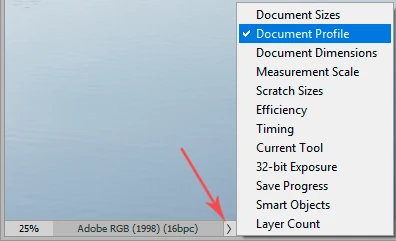
Is there an embedded icc profile in the file now? If there is, convert to sRGB. That remaps the tone curve and there won't be any visual change.


If there isn't, this is getting a bit more tricky. Then you first need to find a linear gamma profile with the right primaries and white point, and assign that. Then you can convert to sRGB.


I've never had any use for linear profiles, so I don't know where you'd find that.


What does it say here:

2 replies

NB, colourmanagement
Community Expert
Community Expert
March 28, 2023

If the file IS displaying correctly in PS, then I guess it can't be untagged (because untagged files are displayed as if in the default working colour space as per color settings, probably sRGB or Adobe RGB? please check that)

- I am guessing that a correct profile must be already assigned or current appearance would be wrong


1: your issue is that you are assigning sRGB I think.

D Fosse is correct, you need to convert from a suitable document profile to sRGB.


Assigning an alternative ICC profile simply leaves the data unchanged but re-labels the image and the [now embedded] profile is then used in any outgoing conversion - e.g. as a source for display - assigning almost inevitably leads to changes to appearance. 

SO you need to convert to the desired colour space.

FROM a profile that suits the data 


As D Fosse asked, what's showing in "document profile", that’s where we see the embedded profile? 


If its NOT a linear profile then maybe you can set the image origination app to embed an ICC profile?

Otherwise, if you can't get a hold of a linear ICC profile to match the image production environment, then maybe convert to sRGB and apply a curve, that should be straightforward. 


I hope this helps
neil barstow, colourmanagement net - adobe forum volunteer - co-author: 'getting colour right'
google me "neil barstow colourmanagement" for lots of free articles on colour management

D Fosse
Community Expert
D FosseCommunity ExpertCorrect answer
Community Expert
March 27, 2023

Is there an embedded icc profile in the file now? If there is, convert to sRGB. That remaps the tone curve and there won't be any visual change.


If there isn't, this is getting a bit more tricky. Then you first need to find a linear gamma profile with the right primaries and white point, and assign that. Then you can convert to sRGB.


I've never had any use for linear profiles, so I don't know where you'd find that.


What does it say here:

Known Participant
April 11, 2023

How can I tell if there is an embedded profile?
This is what the Document Profile currently displays:

Known Participant
April 12, 2023

Great tip, thanks Stephen and DigiDog. The screenshot you converted to GraCOL will not show a drastic shift because that is a flat image. In  my original image the Reflection and the Shadow are on layers. There is something about the layers which is casuing the shift.


So I tried the SoftProofing and did a side-by-side comparison with a conversion to CMYK/Assign GRACol. Weirdly the SoftProofing does not show the color shift.