
dawndesigning
Participant
July 24, 2017
Answered

Converting .webp back to usable format for InDesign?

  • July 24, 2017
  • 4 replies
  • 16449 views

Is there any way to convert .webp images back to .jpg or something usable in Creative Suite?

Advertisers often send us images from their websites (no matter how many times we explain best practices to them). Today, we got .webp images. I tried a few Chrome Extensions for Saving image as type but just got error messages. Photoshop plug-ins look like they only save to .webp.

Thanks

Dawn
    This topic has been closed for replies.
    Correct answer Jeff Arola

    If you download a photoshop plugin for WebP like this one

    http://telegraphics.com.au/sw/product/WebPFormat

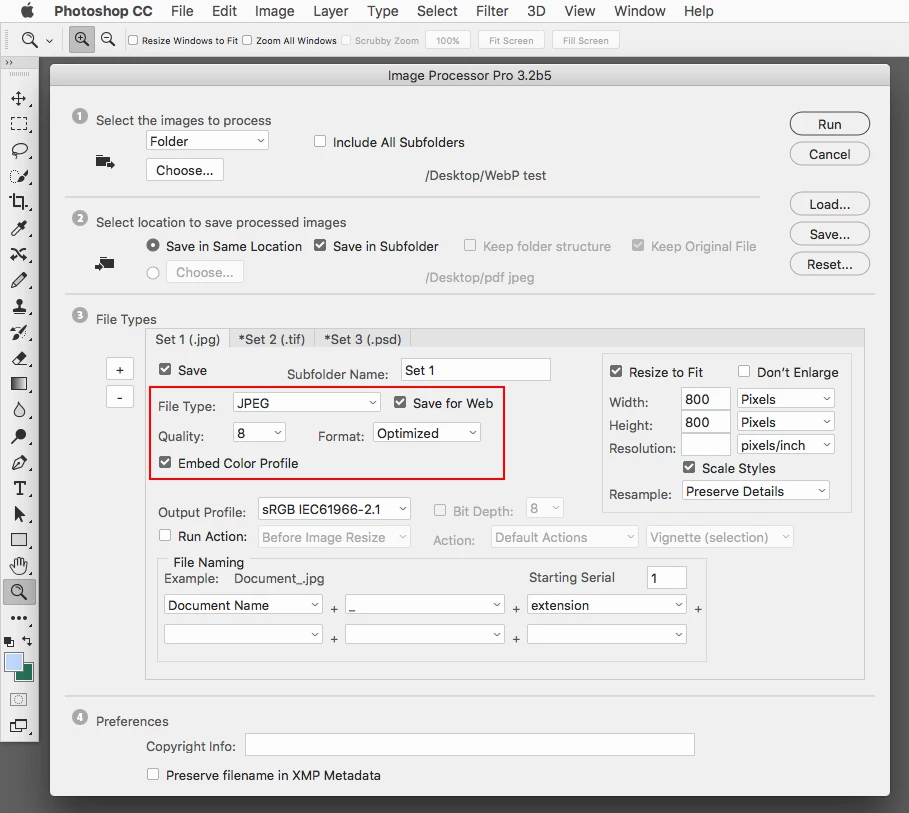
    then you should be able to use File>Scripts>Image Processor to batch the WebP files to a file format like Jpeg.

    If you want to have a smaller file like Save for Web produces then you could download the Image Processor Pro, which

    has a Save for Web setting.

    ps-scripts - Browse /Image Processor Pro/v3_2 betas at SourceForge.net

    4 replies

    robins8116726
    Participant
    January 28, 2021

    What I have been doing is opening the webp image in preview, then you can export as a jpeg, png, tiff, among other formats. 

    Tedious process but it works for me.

    Participant
    April 19, 2021

    I recommend GOOGLE is the author of webp format as you might know, so best placve to look for help is in google
    https://developers.google.com/speed/webp/docs/webpshop

    rayek.elfin
    Legend
    July 24, 2017

    It is quite ridiculous that Photoshop still does not support WebP completely. WebP is an excellent file format (in particular for mobile app development, for example), and not supporting opening WebP images directly in this day and age is, quite frankly, just plain silly.

    Anyway, if you are on Windows, download Irfanview to open WebP images, and convert to a Photoshop usable file format. Irfanview includes a very fast batch processor (which is by far quicker to process images than Photoshop).

    If you are on Mac, XnConvert is an alternative.

    Another option is PhotoLine, which opens and saves WebP on both Mac and Windows.

    Participant
    July 19, 2020

    .webp is a [foul language removed by moderator] format, literaly NOTHING supports it 

    i don't understand the point of it at all it's not compatible with  anything

    nobody should ever use it they should just get rid of it altogether because  literly no programs i use can open it ,it is completly worthless

    we have enough image formats alreayd we do not need anothe rone especially one that is not compatible with anyhting and  that causes nothign but headaches and problems i see no benefit at to this unsueable garbage format

    Jeff Arola
    Community Expert
    Jeff ArolaCommunity ExpertCorrect answer
    Community Expert
    July 24, 2017

    If you download a photoshop plugin for WebP like this one

    http://telegraphics.com.au/sw/product/WebPFormat

    then you should be able to use File>Scripts>Image Processor to batch the WebP files to a file format like Jpeg.

    If you want to have a smaller file like Save for Web produces then you could download the Image Processor Pro, which

    has a Save for Web setting.

    ps-scripts - Browse /Image Processor Pro/v3_2 betas at SourceForge.net

    War Unicorn
    Community Expert
    Community Expert
    July 24, 2017

    Not without doing what you've tried. Think there are some online converters too but if you have a lot of images...

    I just love "standards" like this format. They make everything so...standardy.