
Participant
June 12, 2019
Answered

Corrupted text on PDF export

  • June 12, 2019
  • 3 replies
  • 7560 views

Hello, I can't seem to find an answer to this new problem I've been experiencing. The text at the top of the output PDF is corrupted on export.
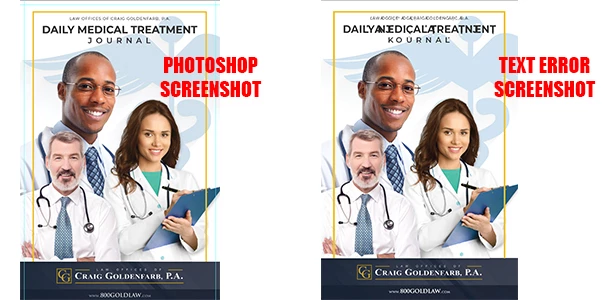
Here's some background:

  1. I am saving as PDF, high quality print. I haven't modified any other export settings.
  2. It exports to other file formats OK, such as JPG.
  3. Photoshop is updated.
  4. For whatever it's worth, the file is pretty big at 249MB.
  5. The font families are downloaded just fine.
  6. This also happens when I open a new Photoshop file, copy the same text block over, and export it into a plain PDF.

Because of that last point, I'm now wondering if I have some kind of errant default settings on my text box that are causing this to happen. Oddly enough, my text preferences for "Choose Text Engine Options" has only two options, "East Asian" and "Middle Eastern and South Asian". I'm in the U.S., so I don't quite understand that, and maybe it has something to do with this problem.

Any help is appreciated. Thanks.

This topic has been closed for replies.
Correct answer c.pfaffenbichler

A work-around would be

Type > Convert to Shape

Otherwise you may want to check this out

https://helpx.adobe.com/photoshop/kb/troubleshoot-fonts-photoshop.html

3 replies

Known Participant
June 28, 2022

I have same problem now with my Photoshop / Adobe acrobat - all latest version (photoshop CC 23.4.1) This is really painful to work with! Convert fonts to outlines is not go for me! Did anyone has suistainable solution? 

Thanks! 

mglush
Community Expert
Community Expert
June 29, 2022

Hi!

Did you try deactivating and reactivating the font family? If so, what happened? What font is giving you trouble?

Michelle

Known Participant
July 20, 2022

Hi Sorry for super late reply. Eventually I fixed the issue with with two steps: 

1. deleted Photoshop font cache

2. deactive all active adobe fonts and installed them "hard way" to my PC. 


This helped! 

Participant
June 10, 2020

For decades I exported PDFs for print etc from Photoshop with zero problems, now with Photoshop 2020 many words have their letters jumbled up. This is beyond belief. I was only forced to stop using CS5 when I upgraded my Mac. Now I have to double-check everything in the PDF too. Ridiculous...

c.pfaffenbichler
Community Expert
c.pfaffenbichlerCommunity ExpertCorrect answer
Community Expert
June 12, 2019

A work-around would be

Type > Convert to Shape

Otherwise you may want to check this out

https://helpx.adobe.com/photoshop/kb/troubleshoot-fonts-photoshop.html

Participant
June 12, 2019

Thanks. It looks like de-activating and re-activating the font family fixed it.