Participant
March 25, 2024
Question

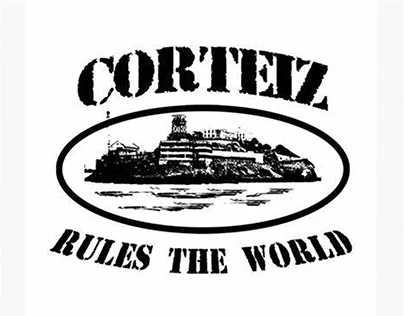
Corteiz Effect

  • March 25, 2024
  • 4 replies
  • 942 views

hi, does anyone know, how to create this effect in Photoshop? I mean the effect on the island. Like this sketch.
I am happy about feedback! 
This topic has been closed for replies.

4 replies

Trevor.Dennis
Community Expert
Community Expert
March 26, 2024

I wish your example had a bunch more pixels. We can see the B&W aspect, but not how the distortion looks in any detail.

I would start by making your island a Smart Object so you can go back and fine tune.

The start with an Image > Adjust > Threshold.  This allows you to set tonal value at which each pixel will be black or white, and allows you to go back in at any stage, and fine tune.  I think I used a value of 120, so a touch less than 50%


I've added Filter Gallery > Artistic > Rough Pastels for this

Changed that to Angled Strokes, which gives a nice cross hatch effect.  There is a Cross Hatch filter, but it lacks subtlety IMO.

Also try Srayed strokes and spatter.  Remember, it's a Smart Object, so you can double click to go back in and change it.


c.pfaffenbichler
Community Expert
Community Expert
March 26, 2024

Plese post the image you want to edit thusly. 

Bojan Živković11378569
Community Expert
Community Expert
March 26, 2024

If the previous suggestion fails to reproduce effect or look of CORTEIZ, create a layer mask from the transparency of the type layer, then experiment with various filters from the Filter Gallery on the layer mask, not on the Type layer itself.

Kevin Stohlmeyer
Community Expert
Community Expert
March 25, 2024

@Bent36311806h4uw use a filter to convert the image to a bitmap (black and white)?
