Participant
October 24, 2022
Question

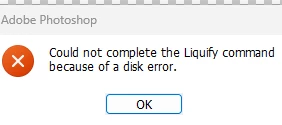
Could not complete the liquify command due to a disk error in Photoshop version 24 (Windows)
  • October 24, 2022
  • 1 reply
  • 2184 views

This is happening when I try to use the Liquify Smart Filter on a windows 11 PC with Photoshop v 24.0


{Title edited by Moderator}

 

This topic has been closed for replies.

1 reply

Ranjisha Sengupta
Legend
October 25, 2022

Hi there,


Thanks for reaching out. 

Could you please share the system info of Photoshop from Help > System info? How much of free space is available on the device? Are your graphic drivers up to date? Please re-download and re-install them. Did you try any troubleshooting steps so far?


You can try to reset the preferences of Photoshop using the steps mentioned here: https://helpx.adobe.com/photoshop/using/preferences.html#reset_preferences.

Please back up your settings prior to resetting the preferences.

You can check https://helpx.adobe.com/photoshop/using/preferences.html#BackupPhotoshoppreferences.


Let us know how it goes.


Thanks! 

Ranjisha

Known Participant
October 27, 2022

Similar for me.

Windows 10

V 24.0.0

Worked fine (yesterday) before the update to V 24.

I've updated graphics driver and reset preferences today.

(My old NVIDIA graphics card is now not supported (Quadro K600) so I appreciate I have no GPU acceleration, but Liquify doesn't require this, or at  least didn't yesterday)I

It worked yesterday, before this latest update and update process removed V.23 I too am stuck with work to be done today.

Thanks.

Ged_Traynor
Community Expert
Community Expert
October 28, 2022

Many thanks for suggestions. 


I had tried all of these ideas with no success. However, as I am writing this I am not sure if I have tried both native canvas and old gpu together. I think I did, but to sure 100%. I'll try it later.


This does seem to be a bug, or at least it is an intended change that has not been documented. If it is a bug, does it get noticed by posting here?


Photoshop requires a GPU with a minimum of 1.5 GB of VRAM, your GPU has only 1 GB of VRAM

https://helpx.adobe.com/ie/photoshop/system-requirements.html

https://www.techpowerup.com/gpu-specs/quadro-k600.c1839

It might be time to consider upgrading your GPU if you want to continue using Photoshop