
Participant
September 27, 2022
Question

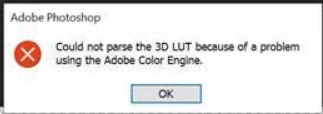
Could Not Parse 3D LUT because of a Problem with Adobe Color Engine

  • September 27, 2022
  • 6 replies
  • 2271 views

One of my users is getting this error when importing a .cube 3D LUT. Is there anything I can check either in Photoshop or by opening the .cube file in a text editor that can solve this issue?


6 replies

Participant
June 12, 2023

Holo friends , 

I solved this.  That's all there is to do.  You  Change the extension of the file of cube extension to .3DL extension.  Success is certain.. no requirement any updates 

keitheseymour
Participating Frequently
January 17, 2025

Hello, thanks for this. But it didn't work for me! Any other suggestions?

Participant
September 27, 2022

Ok an update. The user tried to open a new project with a different frame and the same error above appeared.

Participant
September 27, 2022

It is a 16 bit LUT. It works when applied to other scenes. Just not the one we need it for. The LUT settings:

Participant
September 27, 2022

It is a 16 bit LUT. When they load the LUT with a different scene it works fine. Here are some more settings of the LUT:


PECourtejoie
Community Expert
Community Expert
September 27, 2022

Hi, just to refine the search for a solution, are they on a RGB document, is it in 8 or 16 bits, in Ps 23.5.1? 

Can they open the default .CUBE luts? In which app was that LUT created? 

Participant
September 27, 2022

This is on a Windows 10 system with Adobe Photoshop 2021. The LUT opens in Nuke and DaVinci Resolve just fine. It is only Photoshop where it has the issue.