Known Participant
January 6, 2021
Answered

Could You Select All Layers Sequentially

  • January 6, 2021
  • 2 replies
  • 21975 views

I Wish Select All Layer One By One Sequentially. Like 1,2,3,4 so on. 

Thanks in Advance
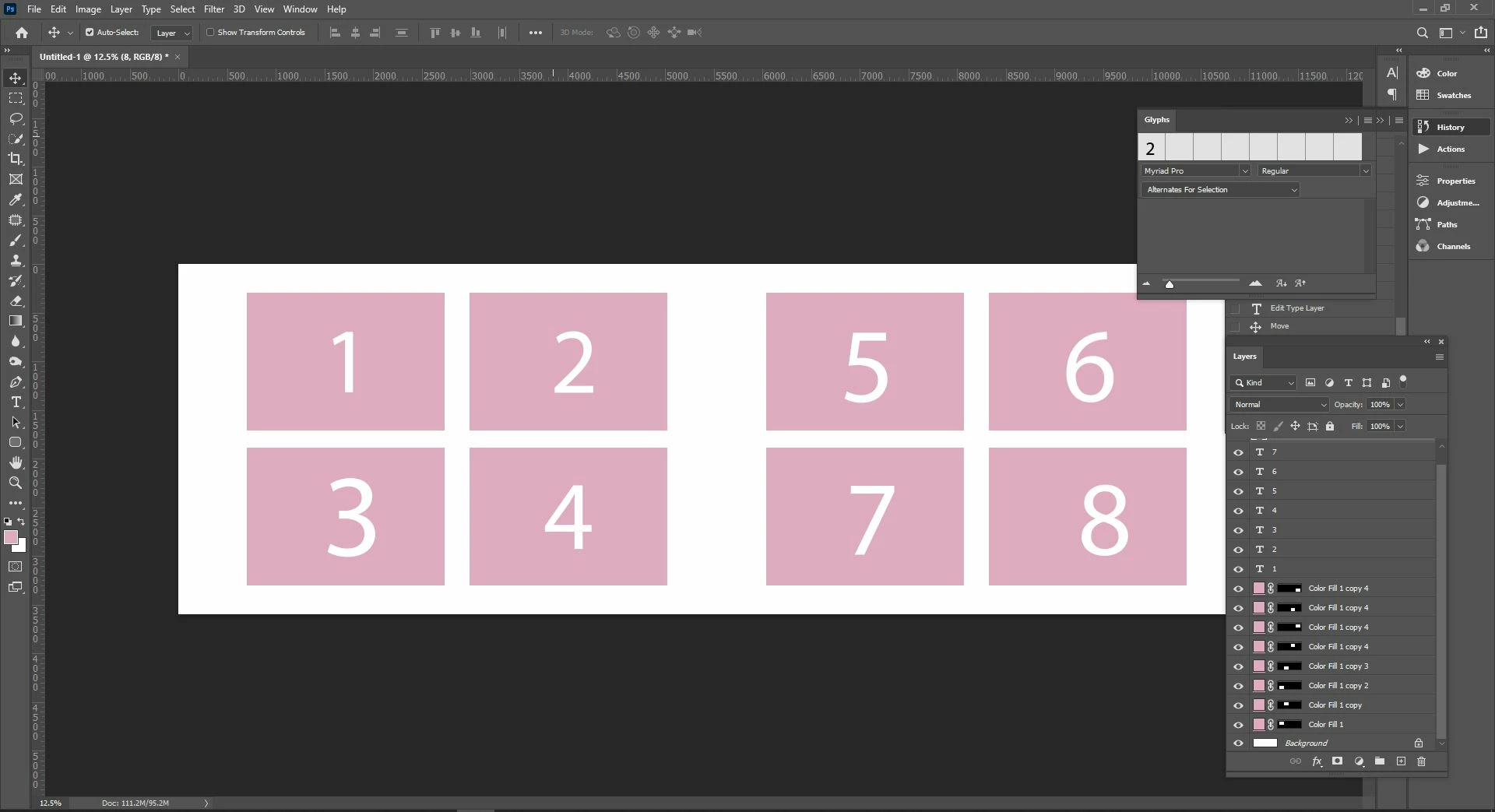
Correct answer Chuck Uebele

I want to rename the layer left to right form. I have show the image. check it
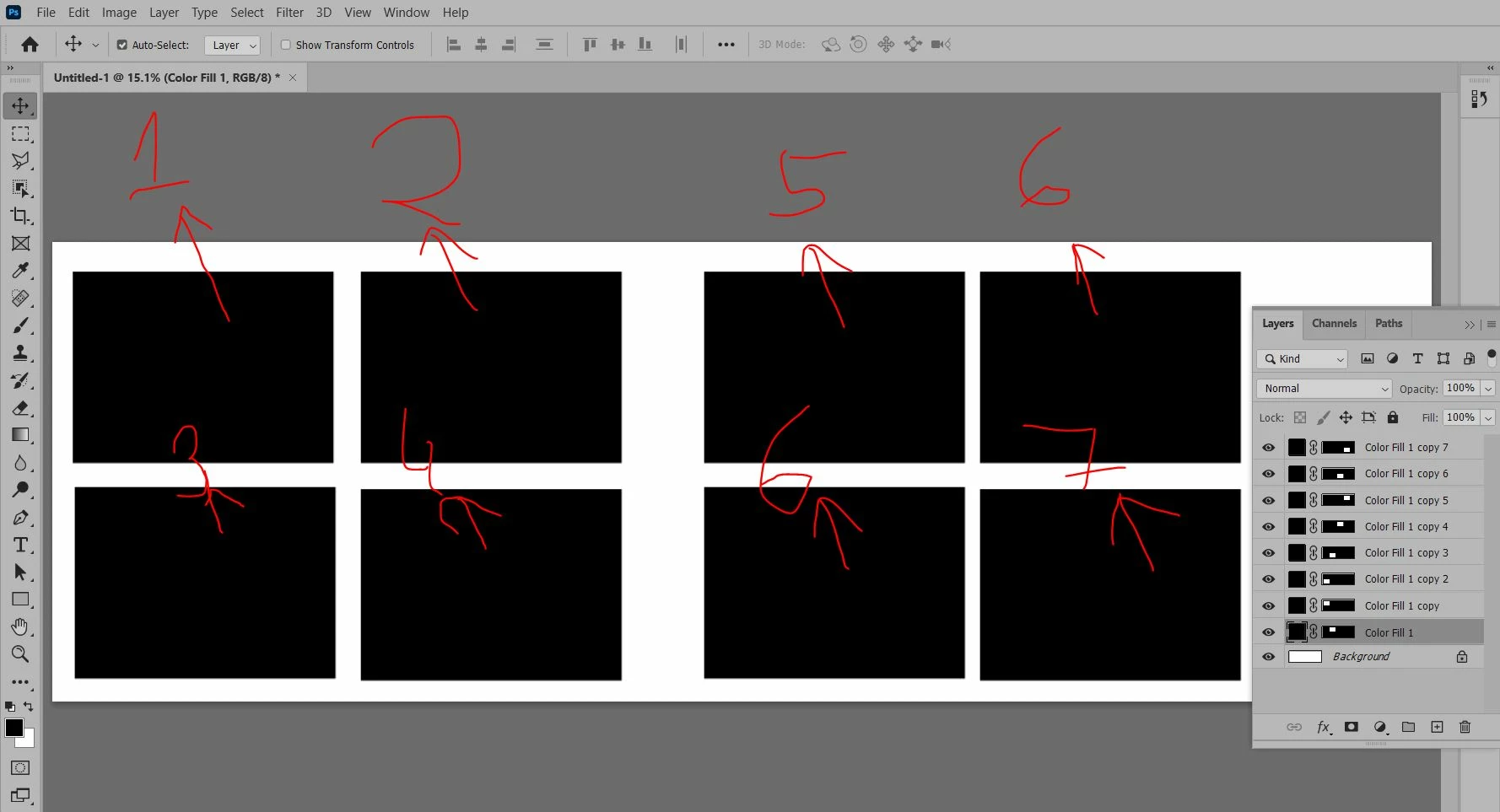

Your first screen shot showed that you wanted the artboard numbered top to bottom then left to right, which the previous script that I posted did. You're second screen shot shows left to right then top to bottom. So this script does that:


#target photoshop
var doc = activeDocument;
var artArray = [];
var count = 0;
for(var i=0;i<doc.layers.length;i++){
    doc.activeLayer = doc.layers[i];
    if(isArtBoard ()){
        var dimArt = getArtboardDimensions ()
        artArray.push([dimArt[0],dimArt[1],doc.activeLayer])
        count++
        }
    }

artArray.sort(function(a,b){return (a[1]-b[1]) || (a[0]-b[0])});

for (i=0;i<artArray.length;i++){
    artArray[i][2].name = 'Artboard ' + (i+1);
    }

function isArtBoard()
{
    var ref = new ActionReference();
    ref.putEnumerated(charIDToTypeID("Lyr "), charIDToTypeID("Ordn"), charIDToTypeID("Trgt"));
    return executeActionGet(ref).getBoolean(stringIDToTypeID("artboardEnabled"));
}; // end of isArtBoard()

function getArtboardDimensions()
{
    var ref = new ActionReference();
    ref.putEnumerated(charIDToTypeID("Lyr "), charIDToTypeID("Ordn"), charIDToTypeID("Trgt"));
    var desc = executeActionGet(ref).getObjectValue(stringIDToTypeID("artboard")).getObjectValue(stringIDToTypeID("artboardRect"));
    var left = desc.getDouble(stringIDToTypeID("left"));
    var top = desc.getDouble(stringIDToTypeID("top"));
    return [left, top]
}; // end of getArtboardDimensions()


2 replies

PECourtejoie
Community Expert
Community Expert
September 10, 2021

Hello, the merging of the threads made it very difficult to follow.

@MXKS could you maybe post the explanation in your native language?


The way I understand, you would like to have a script that would 1) name layers from a given order 2) change the layers position from top to bottom?

MXKSAuthor
Known Participant
September 10, 2021

@PECourtejoie Yes, I want top to bottom layer 

MXKSAuthor
Known Participant
September 10, 2021

You then need to change the sorting of the selected layers by their position over the canvas.  Right now the sort is  from the left to right and bottom to top.  You want the sort to be from left to  right  and top to  bottom. You need to modify script's  Sort compare function to sort the array of selected layer in the order you want to rename them in.


You need to modify the scripts code in  "function cmp(a, b)" 


I do not know how to do that. I do not understand how   javascript  .sort() method works.   When I change it to.


function cmp(a, b)
    {
    try {
        var r = new ActionReference();
        r.putProperty(stringIDToTypeID("property"), stringIDToTypeID("bounds"));
        r.putIdentifier(stringIDToTypeID("layer"), a);
        var b1 = executeActionGet(r).getObjectValue(stringIDToTypeID("bounds"));

        var l1 = b1.getUnitDoubleValue(stringIDToTypeID("left"));

        var r = new ActionReference();
        r.putProperty(stringIDToTypeID("property"), stringIDToTypeID("bounds"));
        r.putIdentifier(stringIDToTypeID("layer"), b);
        var b2 = executeActionGet(r).getObjectValue(stringIDToTypeID("bounds"));

        var l2 = b2.getUnitDoubleValue(stringIDToTypeID("left"));

		return l1 + l2;
        }
    catch (e) { throw(e); }
    }


The layers were sorted into the order I populated the template which surprised me I expected the center image would be sorted to the middle of the group.  I clearly do not know how sort works.  My change may have just killed the sort the layer array order was not changed.  Layer were renamed layer stack order as shown.  I have no idea what the function should return to .sort() its time to hits the references books for me. I know it should retun an indicator   yes or no to change order.

JavaScript Array sort: Sorting Array Elements 


Yesn But I don't know how to modify the "function cmp(a, b)" 

Could you mofidy the script please @JJMack 

Lots of time waste for me just one thing please solve the problem

Ro Hackett
Inspiring
January 6, 2021

You can select multiple individual layers by holding the CTRL key and clicking each layer... ? ...

but not really sure what you mean? 🤔 🤔😮

Stephen Marsh
Community Expert
Community Expert
January 7, 2021

Ro Hackett It's a scripting question.


Kailash0D4D what should happen after Layer 1 is selected, before Layer 2 is selected?


There are actually two layers per "visual layer set", one being a color fill layer and one a text layer. The layer index order is not sequential. All of the fill layers come first, then the text layers (not fill then text, fill then text etc).


So which exact layer should be selected "sequentually"?

MXKSAuthor
Known Participant
January 10, 2021
  • In this script I want to select left to right layer sequentially. Like 1,2,3,4 etc. When fill the image in layer. The images fill in sequentially 1,2,3,4...
