
Exit
  • Global community
    • Language:
      • Deutsch
      • English
      • Español
      • Français
      • Português
  • 日本語コミュニティ
  • 한국 커뮤니티
2

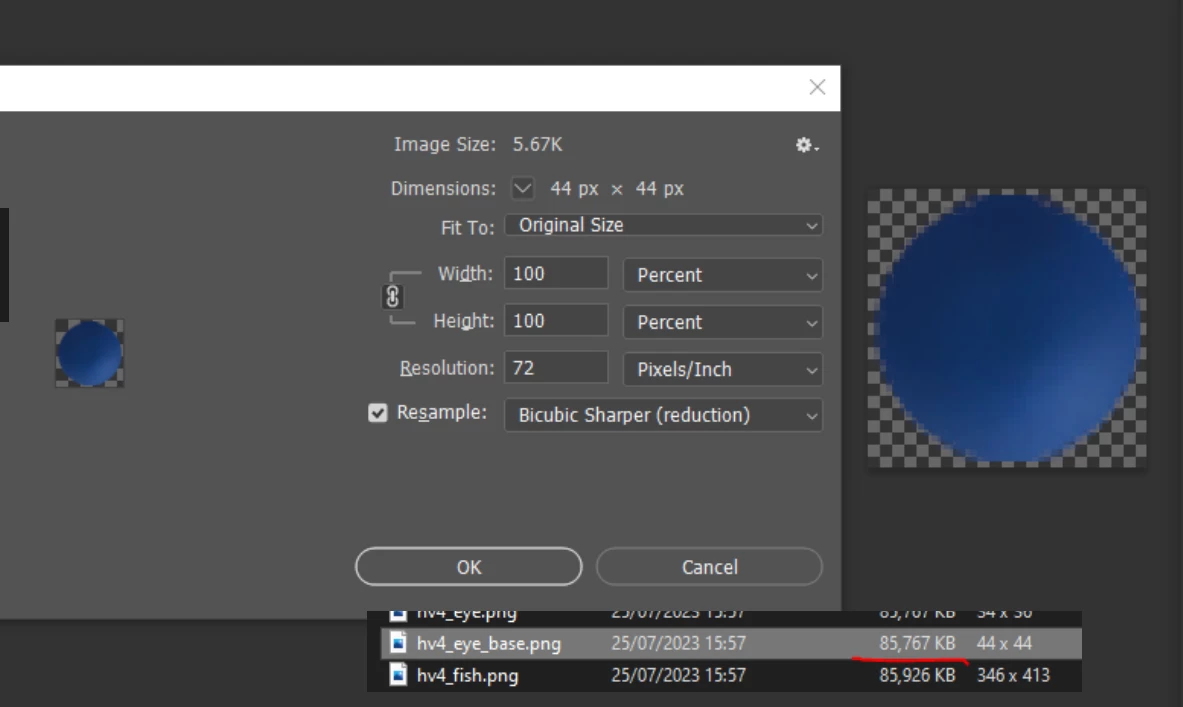
Crazy 90mb file size for a 44x44px image? Help!
Community Beginner ,
Jul 25, 2023 Jul 25, 2023

CrazyFileSize.png

Hi All, I received an art package today and some of the files have crazy sizes - see the example image. Re-saving the asset (save as png - smallest file size) doesn't work. As you can see on the image, it's only 44x44x pixels, 8-bit, If I copy the layer to another file, the file size does NOT reduce. If I index Colour the image, the file size does NOT reduce.
The file size only reduces if I use the external program PNGoo which indexed the png (reducing the quality - which is not something I want to do), but at least that does bring the file size down to 2.29kb.
Any ideas what is causing this and how to fix it without reducing the quality of images?
TOPICS
Windows
522
Translate
Report
Community guidelines
Be kind and respectful, give credit to the original source of content, and search for duplicates before posting. Learn more
community guidelines
Adobe
Community Expert ,
Jul 25, 2023 Jul 25, 2023

Hi @DanielBlokland the culprit is most likely metadata bloat coming from the creator saving history. Copy the image to a new file and save again.

Translate
Report
Community guidelines
Be kind and respectful, give credit to the original source of content, and search for duplicates before posting. Learn more
community guidelines
Community Expert ,
Jul 25, 2023 Jul 25, 2023

The DocumntAncestors metadata, which is what this is, will actually follow along with the paste and be embedded in the new file. In fact, that's the whole purpose: to be a complete record of all copy/paste/place operations.


To get rid of it, you need to Save For Web or Export the file.


There are also scripts that can remove it.

Translate
Report
Community guidelines
Be kind and respectful, give credit to the original source of content, and search for duplicates before posting. Learn more
community guidelines
Community Expert ,
Jul 25, 2023 Jul 25, 2023

@D Fosse I was thinking along the lines of the Photoshop metadata field - the history log which can bloat files pretty easily. Copy and pasting the image breaks that link and removes the metadata. Is the Document Ancestors data shown (or not if too much) in the Raw Data metadata field? I've never seen metadata transfer between files with a copy and paste before.

Translate
Report
Community guidelines
Be kind and respectful, give credit to the original source of content, and search for duplicates before posting. Learn more
community guidelines
Community Expert ,
Jul 25, 2023 Jul 25, 2023
Translate
Report
Community guidelines
Be kind and respectful, give credit to the original source of content, and search for duplicates before posting. Learn more
community guidelines
Community Beginner ,
Jul 26, 2023 Jul 26, 2023

The raw meta data was 'too large' to display. So it does seem to be in this area - still 90mb makes me worry about viruses and such - I've asked the artist to look into it. thanks.

Translate
Report
Community guidelines
Be kind and respectful, give credit to the original source of content, and search for duplicates before posting. Learn more
community guidelines
Community Expert ,
Jul 26, 2023 Jul 26, 2023

The most common reason for this is using templates. Templates will be used and reused and recycled ad infinitum - and so the metadata piles up to unbelievable sizes over time. Each copy/paste instance adds another chunk.

Translate
Report
Community guidelines
Be kind and respectful, give credit to the original source of content, and search for duplicates before posting. Learn more
community guidelines
Community Expert ,
Jul 26, 2023 Jul 26, 2023
quote
The file size only reduces if I use the external program PNGoo which indexed the png (reducing the quality - which is not something I want to do), but at least that does bring the file size down to 2.29kb.
Any ideas what is causing this and how to fix it without reducing the quality of images?

By @DanielBlokland


You could use File > Export As or Save for Web to get rid of the metadata.

In Save for Web, make sure that Metadata is not set to All.

Edit: I see now that this has already been suggested by @D Fosse 

Translate
Report
Community guidelines
Be kind and respectful, give credit to the original source of content, and search for duplicates before posting. Learn more
community guidelines
Community Expert ,
Jul 26, 2023 Jul 26, 2023

@DanielBlokland its not a virus - its literally bloated with metadata. Copy the layers to a new image to break the cycle.

Translate
Report
Community guidelines
Be kind and respectful, give credit to the original source of content, and search for duplicates before posting. Learn more
community guidelines
Community Expert ,
Jul 26, 2023 Jul 26, 2023
LATEST

Further to Kevin's reply, Layer > Duplicate Layer > New Document doesn't include metadata, whereas copy/paste can.

Translate
Report
Community guidelines
Be kind and respectful, give credit to the original source of content, and search for duplicates before posting. Learn more
community guidelines