
Participant
May 27, 2017
Answered

Create Frame Animation issue

  • May 27, 2017
  • 1 reply
  • 416 views

reinstalled Photoshop CC 2017

rest workspace

reset preferences

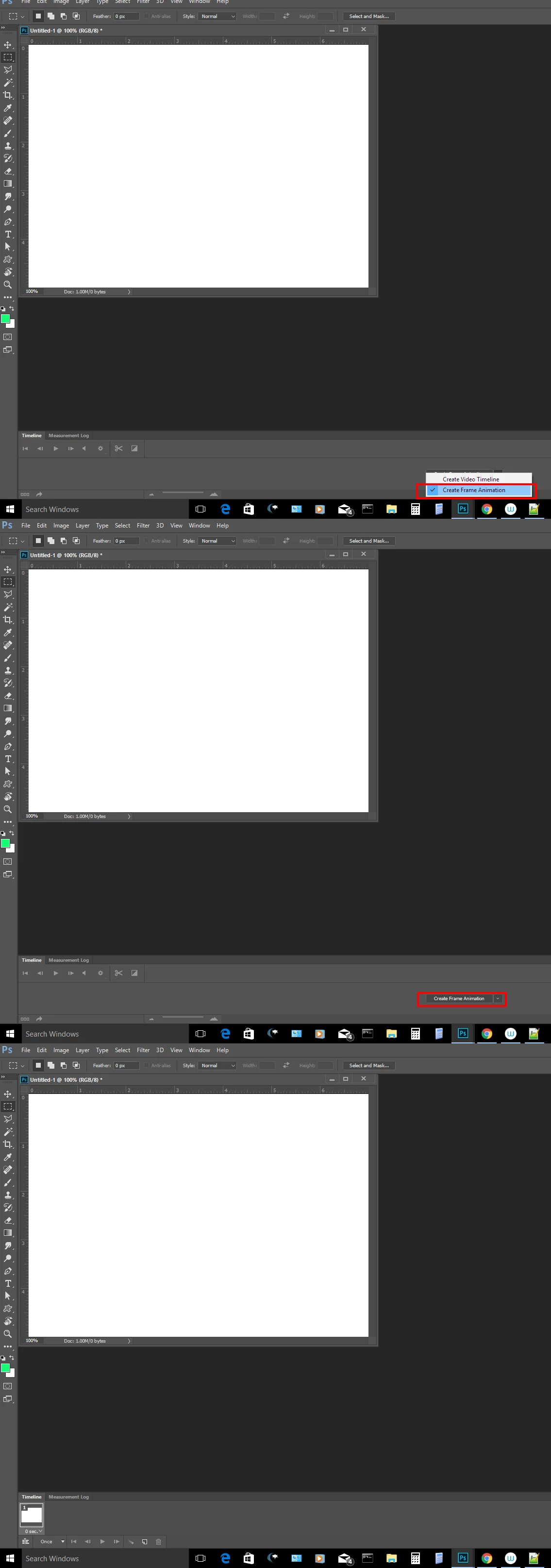
Still not seeing 1st frame when I go to Window-Timeline-Create Frame Animation

(FYI, I'm using 4 layers, 1080p x 1080p , 200ppi. Loaded through Scripts-Load files to stack as recommended)

Help! Please!
This topic has been closed for replies.
Correct answer JJMack

You need a document open.  The select the create frame animation int the timeline button pull-down then you need to click on the create frame Animation button.  The Frame animation Timeline should then open with the First frame added...

1 reply

JJMack
Community Expert
JJMackCommunity ExpertCorrect answer
Community Expert
May 27, 2017

You need a document open.  The select the create frame animation int the timeline button pull-down then you need to click on the create frame Animation button.  The Frame animation Timeline should then open with the First frame added...

JJMack
Fundi CubAuthor
Participant
May 28, 2017

wow! it worked. Thanks!

Most annoying drop down menu ever!