
KazuT
Inspiring
December 11, 2016
Answered

create New Document with alpha channel Photoshop CC

  • December 11, 2016
  • 4 replies
  • 1548 views

When I create a New Document in Photoshop CC, it doesn't give me the option of having the background be a transparent alpha channel. How do I do this?

    This topic has been closed for replies.
    Correct answer Jeff Arola

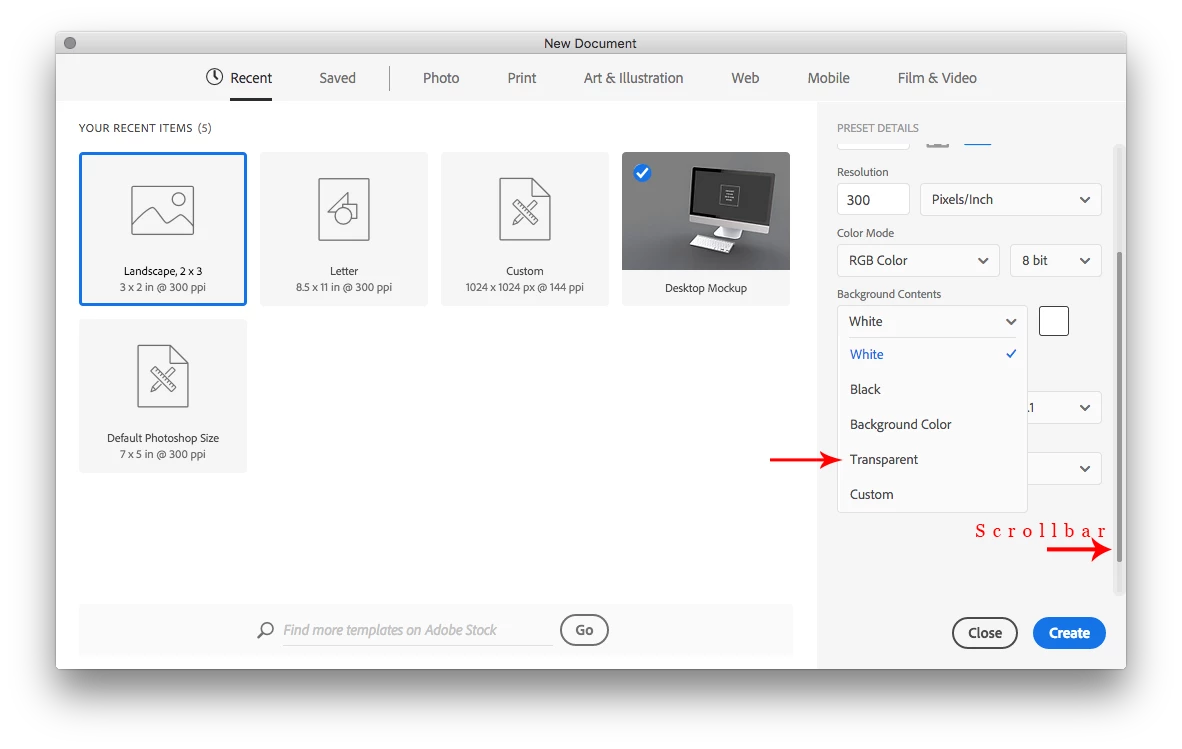
    In the New Document dialog after clicking on the drop-down menu beside Background contents, use the scrollbar to reveal the other options including Transparent.
    4 replies

    KazuT
    KazuTAuthor
    Inspiring
    December 18, 2016

    I didn't see the scroll bar. Confusing. Thank you, Trevor.Dennis​!

    Jeff Arola
    Community Expert
    Jeff ArolaCommunity ExpertCorrect answer
    Community Expert
    December 11, 2016

    In the New Document dialog after clicking on the drop-down menu beside Background contents, use the scrollbar to reveal the other options including Transparent.

    Silkrooster
    Legend
    December 11, 2016

    OK, I found it, yeah I didn't scroll down. I could see how that could be confusing, especially if you don't see the scroll bar.

    Silkrooster
    Legend
    December 11, 2016

    For some reason transparent is missing in the new dialog box.

    However if you access the preferences (ctrl-k for windows or cmd-k for Mac) you can enable the legacy new dialog box. Then you can create a new document with a transparent background.

    Edit:

    Trevor.Dennis
    Community Expert
    Community Expert
    December 11, 2016

    I got a bit confused about this one, because I thought I'd seen Transparent as a background option, and when I checked it wasn't there!  It turns out that you have to twirl out Advanced Options

    And it is there after that

    I'm kind of surprised that it isn't hidden behind a secret, non documented, Alt/Opt key option, but it is doable.

    Silkrooster
    Legend
    December 11, 2016

    Scroll bar is still there if you don't twirl open the advanced options.

    mytaxsite
    Inspiring
    December 11, 2016

    The way I create a transparent layer from the background is to first convert the background to a layer by double clicking on the background in the layers panel.  Then I select "All" by pressing CTRL+A.  Now press DEL button and you'll get a transparent layer.

    Is this what you are after?

    You could also try this Video to see if it is suitable for you.

    <Save selections and alpha channel masks in Adobe Photoshop >