
Participant
January 17, 2017
Answered

Create thick wavy line (like skid mark from traction control light on cars)

  • January 17, 2017
  • 1 reply
  • 1495 views

Hi,

I'm new to Photoshop and trying to figure out how exactly to create think wavy lines that look like the traction control skid marks from the traction control light on a cars dashboard. It puzzles me that I can't seem to increase the thickness of lines to make this easier.

Thanks in advance
    This topic has been closed for replies.
    Correct answer c.pfaffenbichler

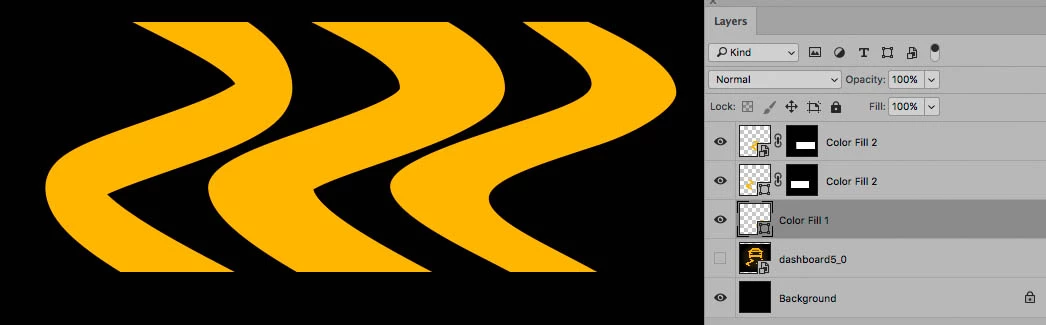
    Several options exist.

    One could simply create a Shape Layer with the Pen Tool.

    One could create a path along the center, apply a Stroke and cut the upper and lower edges horizontally with a Layer Mask.

    One could Crete a path, stretch it vertically, apply a Stroke, convert to Smart Object, transform to a lesser height and cut the upper and lower edges horizontally with a Layer Mask.

    Naturally the first option seems like the best for customisability.

    1 reply

    c.pfaffenbichler
    Community Expert
    Community Expert
    January 17, 2017

    Could you post (a link to) an example?

    P4ttyAuthor
    Participant
    January 17, 2017
    c.pfaffenbichler
    Community Expert
    c.pfaffenbichlerCommunity ExpertCorrect answer
    Community Expert
    January 17, 2017

    Several options exist.

    One could simply create a Shape Layer with the Pen Tool.

    One could create a path along the center, apply a Stroke and cut the upper and lower edges horizontally with a Layer Mask.

    One could Crete a path, stretch it vertically, apply a Stroke, convert to Smart Object, transform to a lesser height and cut the upper and lower edges horizontally with a Layer Mask.

    Naturally the first option seems like the best for customisability.