
mrmurray
Known Participant
March 10, 2022
Answered

Creating New Group with an open dialogue box

  • March 10, 2022
  • 1 reply
  • 348 views

Hi,

I Photoshop use N Command Shift to create a new layer with an open dialogue box that I can type the name of the layer into before pressing rteurn to close.  Is here no such keyboard command /short cut to create a New Group with an open dialogue box ?  Asking for a stupid friend 😉


Many thanks


Ian


This topic has been closed for replies.
Correct answer Stephen Marsh

You can alt/opt click the new group icon...


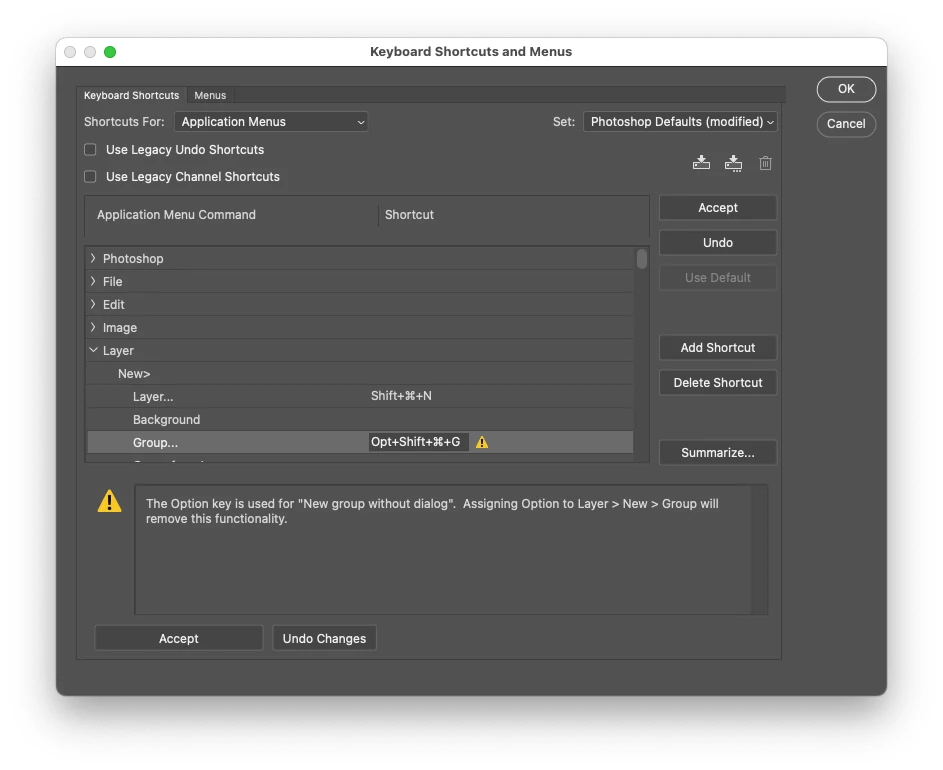
Or assign a custom keyboard shortcut as per this image:


1 reply

Stephen Marsh
Community Expert
Stephen MarshCommunity ExpertCorrect answer
Community Expert
March 11, 2022

You can alt/opt click the new group icon...


Or assign a custom keyboard shortcut as per this image:


mrmurray
mrmurrayAuthor
Known Participant
March 11, 2022

Many thanks, again, for this Stephen. 😉

Stephen Marsh
Community Expert
Community Expert
March 11, 2022

Your welcome!


I was originally going to suggest a script, then assigning a keyboard shortcut to the script, until I realised that it was possible to directly assign the keyboard shortcut without a script! 🙂


Here is the redundant script, just in case it is needed for use in another script...


newGroupDialog();

function newGroupDialog() {
	var s2t = function (s) {
		return app.stringIDToTypeID(s);
	};
	var descriptor = new ActionDescriptor();
	var reference = new ActionReference();
	reference.putEnumerated( s2t( "menuItemClass" ), s2t( "menuItemType" ), s2t( "layerSection" ));
	descriptor.putReference( s2t( "null" ), reference );
	executeAction( s2t( "select" ), descriptor, DialogModes.NO );
}


The menu command can also be inserted into an action.