

Laura Foulds Moody
Participant
November 22, 2022
Question

Creating simple text in Photoshop

  • November 22, 2022
  • 2 replies
  • 627 views

Creating text

  1. In the Tools Panel select the T tool
  2. Right-click on the T tool to show the hidden tools
  3. From the drop-down menu select Horizontal Type Tool
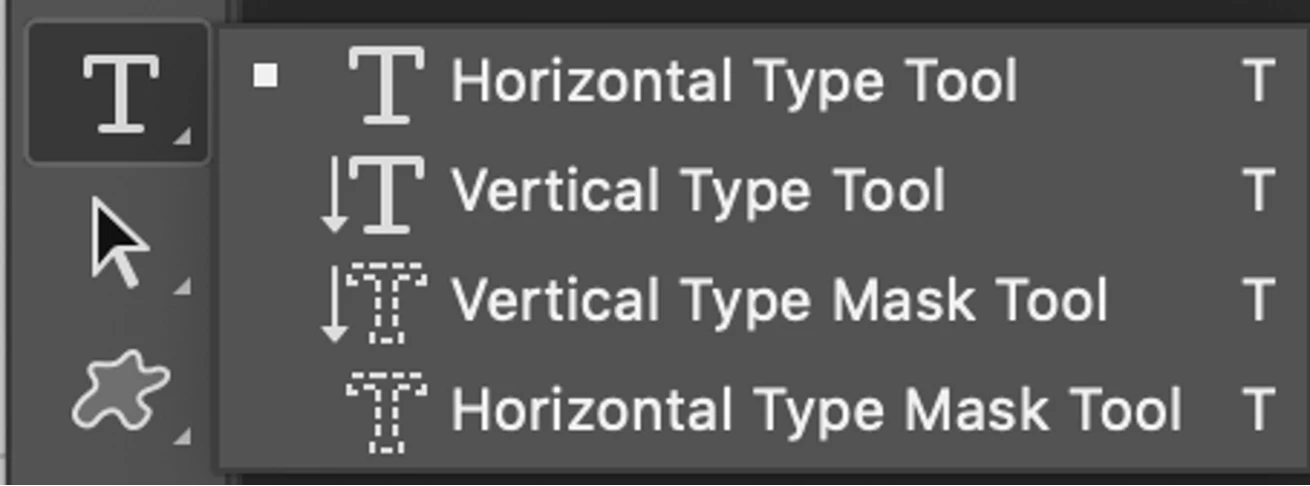
  4. Click inside the document window and start typing
  5. In the layers panel, re-name the layer
This topic has been closed for replies.

2 replies

Derek Cross
Community Expert
Community Expert
November 23, 2022

The OP should also mention the other way of including horizontal text into a document by having blocks of text.

Participant
November 22, 2022

I am a noob here. Thanks for this information. Guide me on how can i learn more and more about photoshop online.

Bojan Živković11378569
Community Expert
Community Expert
November 23, 2022

There is quality help online Adobe Photoshop Learn & Support

Here is Jesus Ramirez channel on YouTube (154) Photoshop Training Channel - YouTube

Here is Colin Smith with photoshopcaffe channel (154) photoshopCAFE - YouTube

Another good place, although not free is LinkedIn learning platform Photoshop Online Training Courses | LinkedIn Learning, formerly Lynda.com