
Participant
March 8, 2018
Answered

Creative Cloud Library Menu Panel Doesn't Match Others

  • March 8, 2018
  • 2 replies
  • 489 views

Hi everyone,

I'm newb to PS and just started to appreciate the convenience CC Library brings. But my menu panel doesn't look quite right:
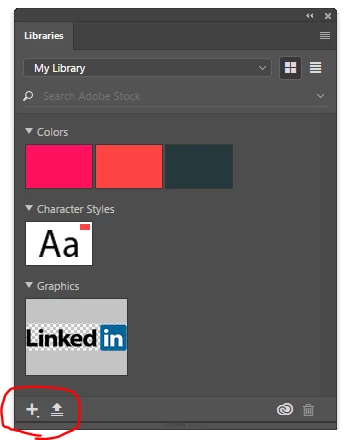
The only way I can add a new color/character style/graphic is to click that plus button and select what and what not to include:

It certainly isn't efficient to click multiple times in order to add to the library if the general option I see people use is to just click once:
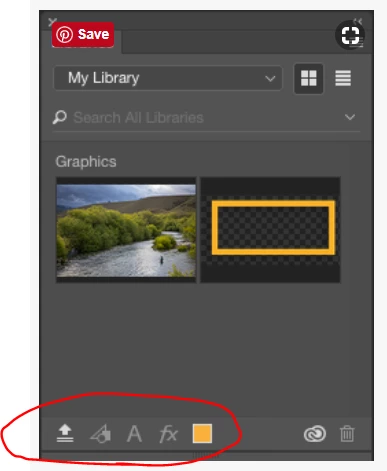
I couldn't find any setting regarding this change of menu panel so I'm seeking for advice here Thank you!

This topic has been closed for replies.
Correct answer Theresa J

Shashama,

My Libraries panel looks just like yours. All of the icons are nested under the Plus. I think this change was made quite awhile ago, and the screen capture you reference showing all the icons along the bottom of the panel is old. Where did you find that from?

Do you know that it's possible to drag content into the library? The icons in the Library panel aren't absolutely required. The drag and drop method is the easiest.

2 replies

Theresa J
Community Expert
Theresa JCommunity ExpertCorrect answer
Community Expert
April 18, 2018

Shashama,

My Libraries panel looks just like yours. All of the icons are nested under the Plus. I think this change was made quite awhile ago, and the screen capture you reference showing all the icons along the bottom of the panel is old. Where did you find that from?

Do you know that it's possible to drag content into the library? The icons in the Library panel aren't absolutely required. The drag and drop method is the easiest.

shashamaAuthor
Participant
May 16, 2018

Hi Theresa,

I found it somewhere from the Adobe forum so it might be a while ago. Yes I've been doing the drag and it seems to be the most convenient way at this point, but it'd be also great to add specific parameters from an asset, feels more controllable. Anyhow, thanks for your advice!

Mohit Goyal
Community Manager
Community Manager
March 8, 2018

Hi shashama,

Please refer the below article to know briefly about Creative Cloud libraries and how to add assets to it.

Creative Cloud Libraries in Photoshop

Regards,

Mohit

Participant
March 27, 2018

you didnt answer his question at all... he asked for the VIEW of the panel window not how they work...

i have same problem and this link you provided didn't help at all...

shashamaAuthor
Participant
April 17, 2018

I know right... Hope someone could find us a solution in the future