Adobe Community


Copy link to clipboard
Copied
Hello,
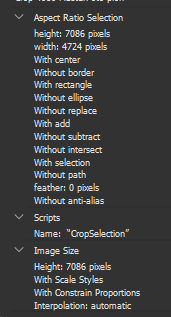
Does anyone know how to "Crop to Selection" within an action so that each time the "Crop" step takes place, it crops to the specific selection of the document? Currently this step works only by remembering the dimensions of the selection which were currently selected during the recording of the action.
In a nutshell, I have hundreds of files which contain paths of the object within the document. These objects are a range of different items so therefore, their paths and thus selections, will have varying dimensions. I would like to crop each file down to the selection of said object quickly and save before running add'l actions.
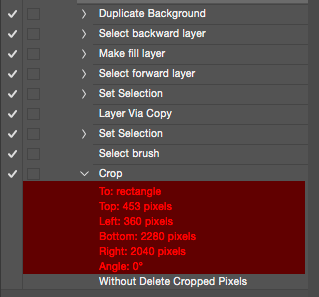
I would like the "Crop" step within the action to perform independently of the dimensions that were originally recorded. again, my action only works on the file i recorded it on. once i apply the same action to a different file, it crops with the previously recorded selection settings and not the current selection.
any insight would be greatly appreciated.
here are my steps already in place (Photoshop CC):
1) duplicate background
2) select backward layer
3) make fill
4) select forward layer
5) set selection from "path1"
6) Layer via copy
7) set selection
8) select brush
9) crop (w/out delete crop pixels)
JP
Message was edited by: Jinda Phommavongsa


 1 Correct answer


try adding this script to your action. Just make sure you have a selection for it to crop.
...var doc = activeDocument;
try{
var bound = doc.selection.bounds
cropToSelection (bound[1], bound[0], bound[3], bound[2])
}
catch(e){}
function cropToSelection(top, left, bottom, right){
var idCrop = charIDToTypeID( "Crop" );
var desc11 = new ActionDescriptor();
var idT = charIDToTypeID( "T " );
var desc12 = new ActionDescriptor();
var idTop = charIDToTypeID( "Top "

Explore related tutorials & articles
 20
Replies
20
20
Replies
20


Copy link to clipboard
Copied
Maybe do somethink like this:
1-8 - would be same
9 - use Image>Crop command instead using Crop Tool
it works fine in my example
Pawel
Copy link to clipboard
Copied
Hi Macpawel,
you're right that option does work, but i need retain the pixels outside the crop bounds because i'd like to run actions afterword which fit the image into set canvas size rules so each image, regardless of the selection dimensions, is placed into the same "pixel padding" specs. i think using Image>Crop kills that by removing the pixels so that when i expand the canvas back out there are missing areas to my images.
To further clarify, here is a screenshot of the settings i'd like removed from the Crop step within my action. is there any way that the Photoshop Crop tool can crop automatically to what the current selection is without remembering what was recorded?
Copy link to clipboard
Copied
OK, it's possible!
Repeat 1-8 steps and then
Go to Crop Tool (C) use Crop Settings Top-left corner and select Front Image option there
Thats all - I hope
Pawel
Copy link to clipboard
Copied
Hi macpawel,
that didn't work either, all that did was crop it back to the files original spec. this one's got me stumped for sure. i didn't have this issue when working with CS6. this is a completely new issue since updating to CC.
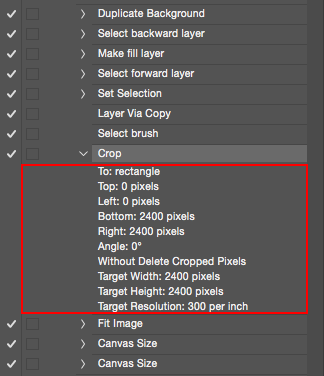
The only work around i've found so far is to add the dialog box to the Crop step, but that's defeating the point of my action if i have to manually go in there and move the crop around to fit each image. would this be something that would need to be applescripted? like i mentioned, i've done this before in older versions no problem.

Copy link to clipboard
Copied
Any progress on this? I've made a script that does roughly what you're trying to do, but still have the issue of destructive cropping...otherwise it works great. has anyone figured out that issue?

Copy link to clipboard
Copied
When I do this the crop it automatically deletes the cropped pixels - is there away to change this option?

Copy link to clipboard
Copied
Goodness!! Thank you so much!! 🙏🙏🙏
Copy link to clipboard
Copied
try adding this script to your action. Just make sure you have a selection for it to crop.
var doc = activeDocument;
try{
var bound = doc.selection.bounds
cropToSelection (bound[1], bound[0], bound[3], bound[2])
}
catch(e){}
function cropToSelection(top, left, bottom, right){
var idCrop = charIDToTypeID( "Crop" );
var desc11 = new ActionDescriptor();
var idT = charIDToTypeID( "T " );
var desc12 = new ActionDescriptor();
var idTop = charIDToTypeID( "Top " );
var idPxl = charIDToTypeID( "#Pxl" );
desc12.putUnitDouble( idTop, idPxl, top );
var idLeft = charIDToTypeID( "Left" );
var idPxl = charIDToTypeID( "#Pxl" );
desc12.putUnitDouble( idLeft, idPxl,left );
var idBtom = charIDToTypeID( "Btom" );
var idPxl = charIDToTypeID( "#Pxl" );
desc12.putUnitDouble( idBtom, idPxl, bottom );
var idRght = charIDToTypeID( "Rght" );
var idPxl = charIDToTypeID( "#Pxl" );
desc12.putUnitDouble( idRght, idPxl, right );
var idRctn = charIDToTypeID( "Rctn" );
desc11.putObject( idT, idRctn, desc12 );
var idAngl = charIDToTypeID( "Angl" );
var idAng = charIDToTypeID( "#Ang" );
desc11.putUnitDouble( idAngl, idAng, 0.000000 );
var idDlt = charIDToTypeID( "Dlt " );
desc11.putBoolean( idDlt, false );
var idcropAspectRatioModeKey = stringIDToTypeID( "cropAspectRatioModeKey" );
var idcropAspectRatioModeClass = stringIDToTypeID( "cropAspectRatioModeClass" );
var idtargetSize = stringIDToTypeID( "targetSize" );
desc11.putEnumerated( idcropAspectRatioModeKey, idcropAspectRatioModeClass, idtargetSize );
executeAction( idCrop, desc11, DialogModes.NO );
}
Copy link to clipboard
Copied
hmm..this IS non-destructive, but when I tried this with a selection active it crops a 15x15 px square in the upper-left corner of the image but I can't seem to figure out why
Copy link to clipboard
Copied
Are your document units set to pixels? If not, they need to be, of some lines of code need to be added to change the to pixels then back to whatever you were using.
Copy link to clipboard
Copied
Looks interesting.
In the time I've been away I've been doing this work manually.
Ill try the script. Wish me luck.

Copy link to clipboard
Copied
Further to Chuck's reply:
Add this before the code in post #7:
var savedRuler = app.preferences.rulerUnits;
app.preferences.rulerUnits = Units.PIXELS;
Then add this after the code in post #7:
app.preferences.rulerUnits = savedRuler;

Copy link to clipboard
Copied

Copy link to clipboard
Copied
I just found this years after you posted it. This worked great on 3 of the 4 I processed - Thank you! This is a breakthrough for me. But on only one, the crop was off-center and disappeared from the active image area. I had to reveal all to find it. I tried a handful of things, since I assume it's something in this particular file that is causing it. I'm not keen enough on Javascript to find where this is happening in the script. If you have any insights for me regarding what I can adjust in my file, please let me know!
And many thanks, again! This issue has been bothering me for a while.

Copy link to clipboard
Copied
Is there any way to make it deleting cropped pixels?
Copy link to clipboard
Copied
Sure there is, this was covered at the beginning of th topic thread (image menu > crop).
It would be helpful to have more background info...
* Is this for manual use one image at a time, or would this be required for unattended batch automation?
* Where does the selection come from? An alpha channel, a path, a layer – or something else? If a channel, path or layer, does it always have the same name or same position in the panel?
* Any other background info which would help somebody creating an action or script to help you?
Copy link to clipboard
Copied
My action will be used for a single document with only one layer. The selection comes from another script by JJMack I found in Cropping to a fixed ratio as an action.
What I already did is created an action that:
1. uses JJMack's script and makes a selection based on aspect ratio.
2. crops the image using script from this topic.
I can't figure out how to make it deleting cropped pixels. I need that to continue working on my action (and create more steps).
Thank you in advance!
Copy link to clipboard
Copied
If the aspect selection script from JJMack positions the crop where needed, then I don't understand why you need the crop script, what else does it bring to the party?
Just remove the crop script, then in your action, simply record the Image > Crop command on a temp file with a selection, then stop recording:

You could alternatively use the insert menu item command in the action panel to insert the Image > Crop command, which will do the same thing (even if it does not mention delete cropped pixels).
It will crop to the selection, deleting pixels outside of the selection. This is what you want, yes? What am I missing?
Copy link to clipboard
Copied
Thank you! I forgot about the Image > Crop thing. You're a lifesaver.
Copy link to clipboard
Copied
@BQ5EF6 wrote:
Thank you! I forgot about the Image > Crop thing. You're a lifesaver.
In Chuck's script, you can also have the following change applied so that it is a descructive crop:
desc11.putBoolean( idDlt, false );
to
desc11.putBoolean( idDlt, true );


 AdChoices