

sportsphotoguy
Participant
August 14, 2021
Answered

Crop tool creates new layer?

  • August 14, 2021
  • 1 reply
  • 2319 views

I often use a simple JPG workflow, making quick crop and tone adjustments then saving.  I've noticed that in 22.4.3, the crop tool turns my background into layer 0, forcing me to flatten in order to save as a JPG.  What a PITA.  Anyone know how to return the tool to its normal behavior?  I don't see any tool settings that seem to apply to this.
This topic has been closed for replies.
Correct answer Jeff Arola

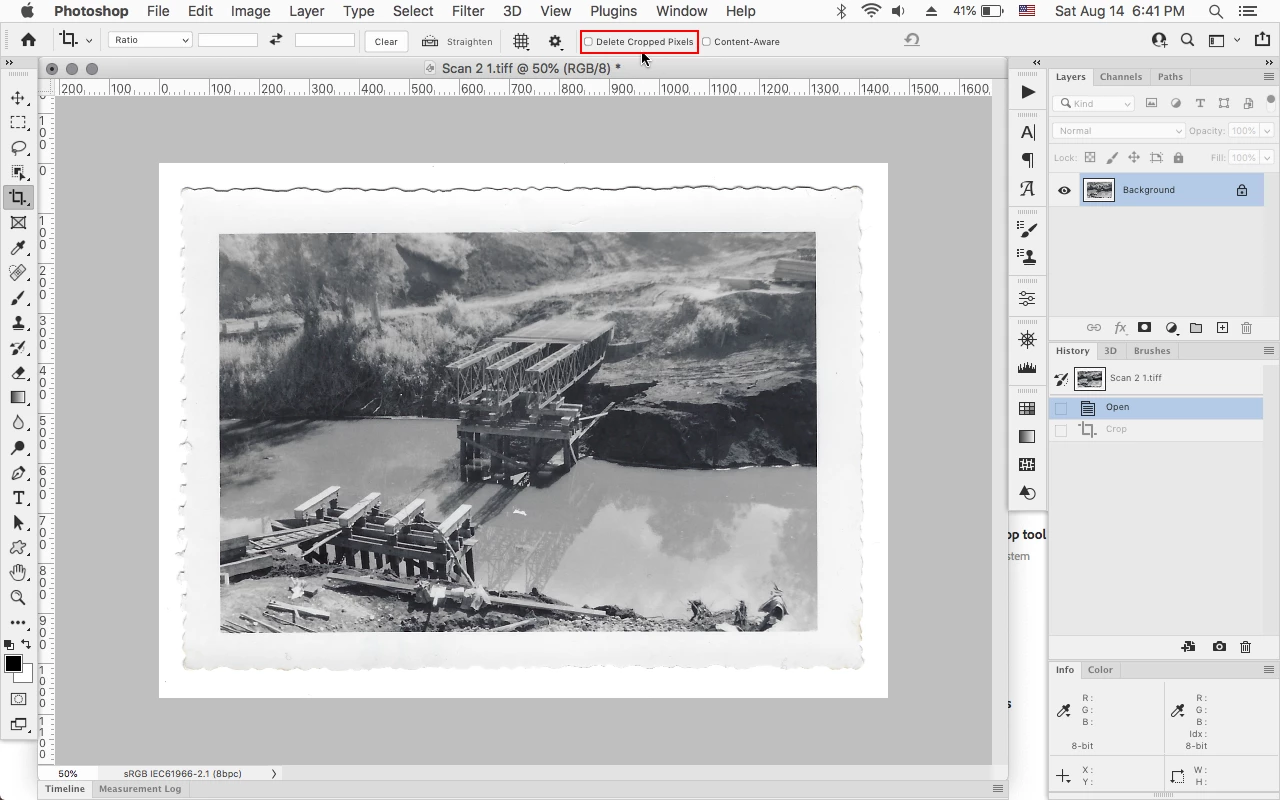
Do you have Delete Cropped Pixels unchecked in the tool options for the Crop Tool?


1 reply

Jeff Arola
Community Expert
Jeff ArolaCommunity ExpertCorrect answer
Community Expert
August 14, 2021

Do you have Delete Cropped Pixels unchecked in the tool options for the Crop Tool?


sportsphotoguy
Participant
August 15, 2021
Yes, it's unchecked.
c.pfaffenbichler
Community Expert
Community Expert
August 15, 2021

Have you tried checking it?