
Participant
September 26, 2023
Answered

Crop tool not working on photoshop 2024

  • September 26, 2023
  • 5 replies
  • 4974 views

App version 25.0.0

Mac Mini M1
MacOS Ventura 13.6

Just updated few days ago to v25 and noticed that the crop tool is not working. It lets me define the crop area but when I hit "enter" to confirm the choice the image disappears.


Correct answer Derek Cross

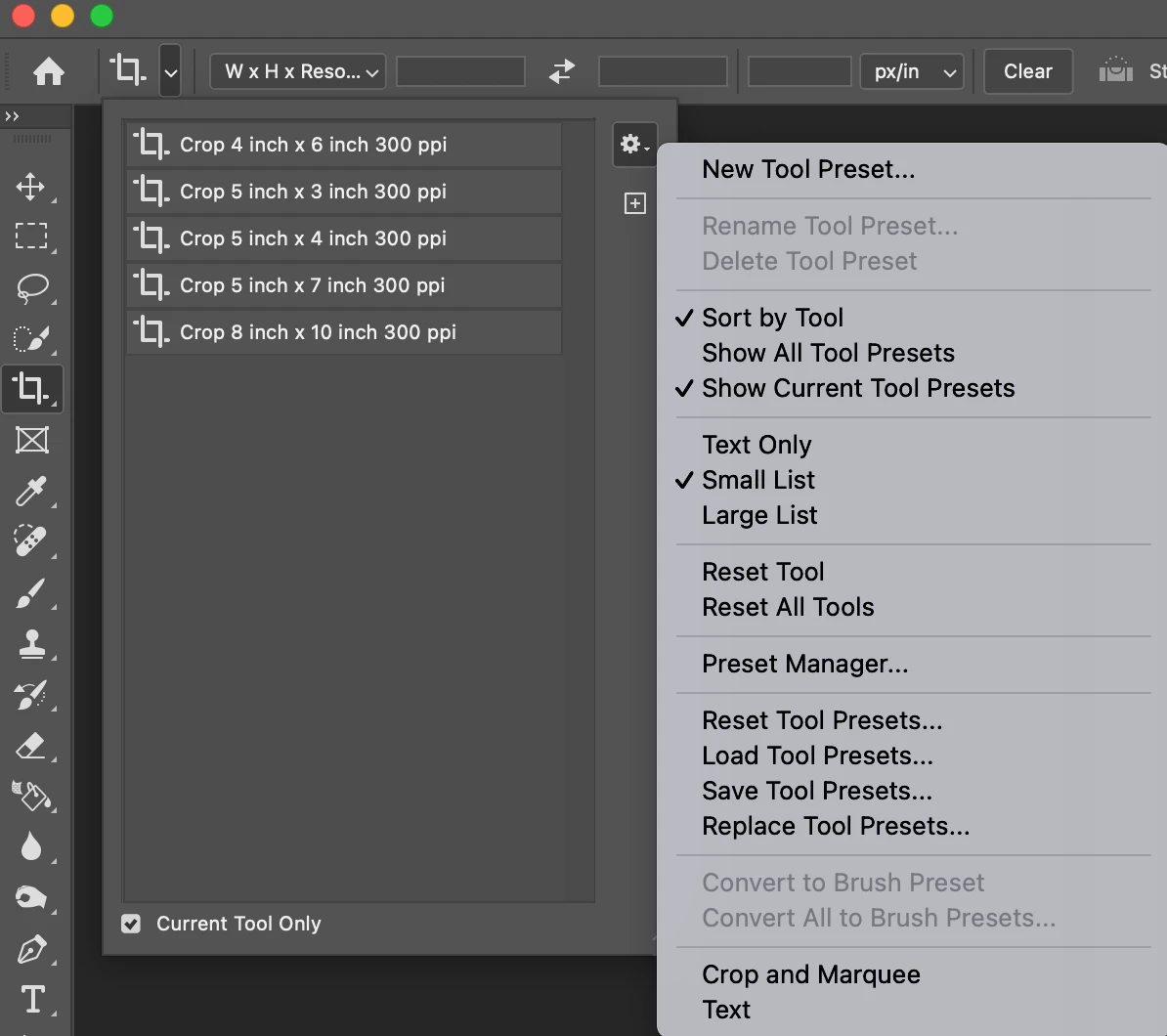
Try Reset Tool to see if that sorts out the issue.

5 replies

Inspiring
October 17, 2024

Only resetting Photoshop preferences worked for me

https://helpx.adobe.com/photoshop/using/preferences.html#reset-preferences

Participant
June 4, 2024

My crop tool is not working either. I've tried to reset the crop tool and it still is not working.Any other tricks to resolve?

c.pfaffenbichler
Community Expert
Community Expert
June 5, 2024

What have you done for all-purpose trouble-shooting so far?
Restoring Preferences after making sure all customized presets like Actions, Patterns, Brushes etc. have been saved might be a good starting point:
https://helpx.adobe.com/photoshop/using/preferences.html
https://helpx.adobe.com/photoshop/kb/basic-trouble-shooting-steps.html
https://helpx.adobe.com/photoshop/kb/troubleshoot-gpu-graphics-card.html

Participant
April 3, 2024

try to use a different mouse

I had a problem trying to crop in 2000

installed 2024 and still had the problem

but when i tried a  mouse  i use for a different copmuter it crops fine

bought a new mouse and it also works.

no clue why

Participant
September 26, 2023

It worked! Thanks very much Derek!

Derek Cross
Community Expert
Derek CrossCommunity ExpertCorrect answer
Community Expert
September 26, 2023

Try Reset Tool to see if that sorts out the issue.

Participating Frequently
January 19, 2025

Derek, can you please help me understand where to find this tool reset option? The image doesn't really tell me, and even the help option in PhotoShop gives me nothing. I just updated to 2025, and still have the same issue. I can only get original ratio or square. On other settings it incorrectly defaults to one of those two.

Derek Cross
Community Expert
Community Expert
January 19, 2025

Select the Crop tool then the crop drop down, then the gear icon and choose Reset Tool from the drop down menu.