leannep35685603
Participant
September 19, 2017
Answered

Cross hair Brush Cursor - Cannot see circle cursor

  • September 19, 2017
  • 1 reply
  • 2708 views

Currently using Photoshop CC on an iMac

MacOS Sierra

Photoshop will suddenly change my cursors to only display Crosshair.

Cap locks are turned off.

Photoshop cursor preference is: normal brush tip and cursor is set to standard.

If I click on the caps lock I get a circle but the minute I start using it, it will switch straight back to crosshair.

That is the only time I can see a circle.

Caps lock is currently turned off, I still have the problem of only having a crosshair brush.

I have quit photoshop, restarted my mac, yet the problem is still there.

The problem is displayed on paint brush, clone stamp, eraser, etc...

Any ideas what I can do to fix it?

Thank you
    This topic has been closed for replies.
    Correct answer gener7

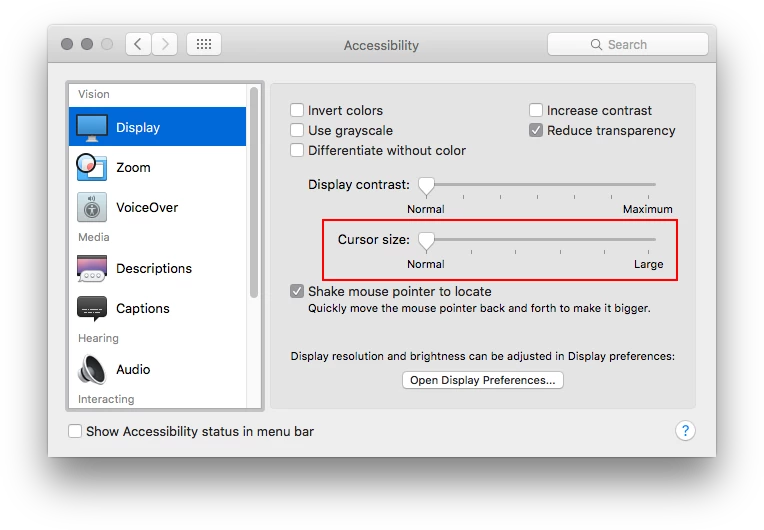
    If you recently adjusted cursor size in System Preferences > Accessibility, set it here:

    If you are using a tablet, check to see that your drivers are up to date.

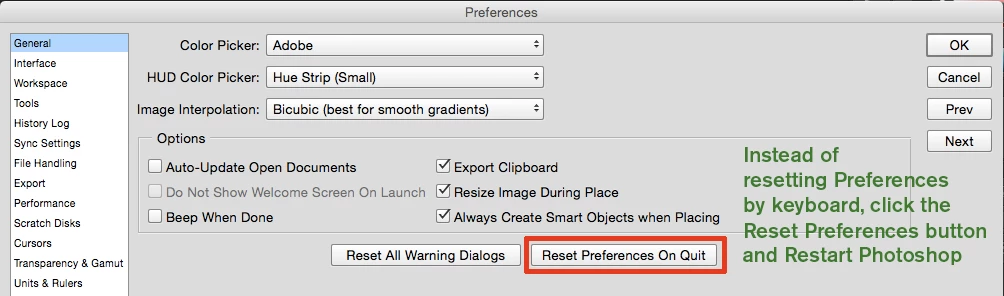
    If not and this just started happening, reset Preferences.

    1 reply

    gener7
    Community Expert
    gener7Community ExpertCorrect answer
    Community Expert
    September 19, 2017

    If you recently adjusted cursor size in System Preferences > Accessibility, set it here:

    If you are using a tablet, check to see that your drivers are up to date.

    If not and this just started happening, reset Preferences.