
[CS5] Changing bit depth of ACR SmartObjects via script?
I'm new to PS scripting, but not to programming or JavaScript, so I've generally been able to piece together code for the simple tasks I need to run on my files. I'm stumped on this one, though -- I imagine there's a good chance it can't be done, but hopefully one of you wizzes here can help.
Background: I'm a photographer who shoots RAW and opens my RAWs as ACR SmartObject layers, then saves my edited files as TIFs with said layers. For years, I ignorantly chose to do 8-bit conversions in ACR, rather than 16-bit. I've accumulated somewhere close to 1000 edited TIF files now which contain ACR SmartObject layers whose conversion settings are set to 8-bit.
Task: For all these files, I need to change the bit depth within ACR on the SmartObjects to 16-bit. Note that this is not simply changing the document bit depth within PS. Here's what I mean:
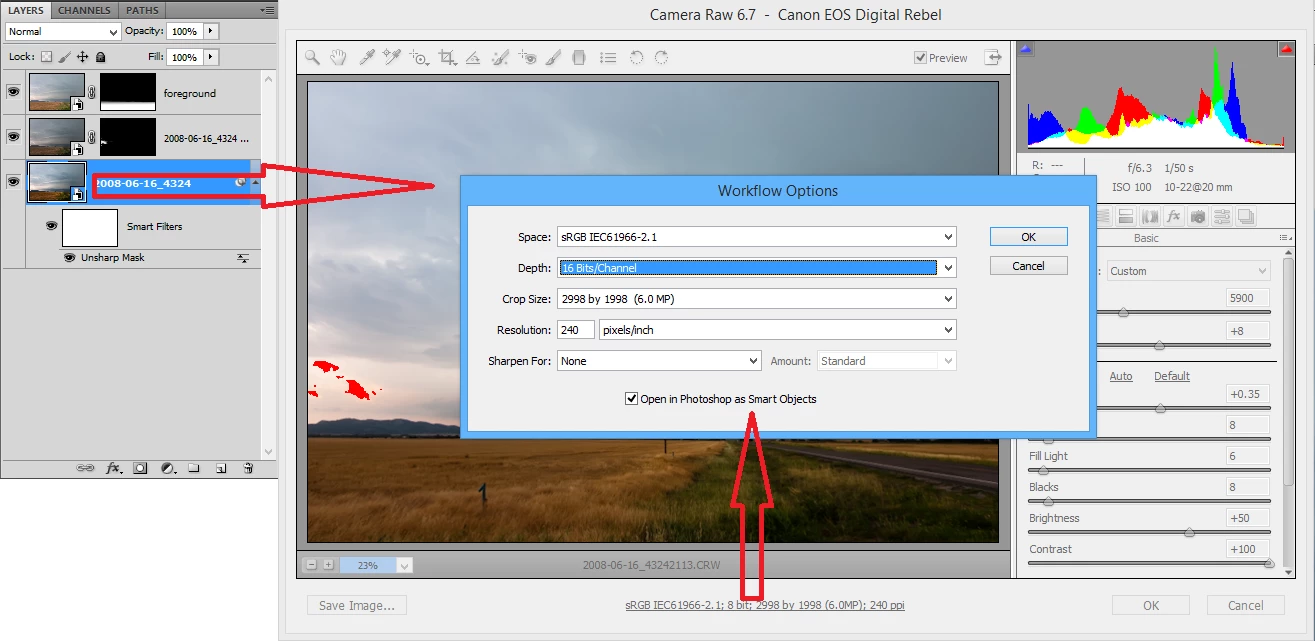
After searching this forum, I found this thread which cleverly addresses how to script ACR image edits (such as exposure, color temp, etc.) by manipulating XMP data. Unfortunately for me, it looks like the parameters set via the ACR "Workflow Options" dialog -- color space, bit depth, size, and resolution -- are not actually stored in XMP.
According to the thread I linked, it is not possible to script anything within the ACR interface, which doesn't bode well for my task. Naturally, if I use the ScriptListener plugin and perform the actions shown in the image above, it doesn't have any record of what I did within the ACR dialog -- just that it was opened and changes were made to the layer.
Still, this seems like such a simple task that there has got to be some way of automating it. If not, I will likely have to spend over a dozen hours manually opening 1000+ large TIFs with multiple SmartObject layers apiece and changing each layer's bit depth.
 AdChoices