
Participant
April 19, 2015
Question

[CS5] Changing bit depth of ACR SmartObjects via script?

  • April 19, 2015
  • 1 reply
  • 629 views

I'm new to PS scripting, but not to programming or JavaScript, so I've generally been able to piece together code for the simple tasks I need to run on my files. I'm stumped on this one, though -- I imagine there's a good chance it can't be done, but hopefully one of you wizzes here can help.

Background: I'm a photographer who shoots RAW and opens my RAWs as ACR SmartObject layers, then saves my edited files as TIFs with said layers. For years, I ignorantly chose to do 8-bit conversions in ACR, rather than 16-bit. I've accumulated somewhere close to 1000 edited TIF files now which contain ACR SmartObject layers whose conversion settings are set to 8-bit.

Task: For all these files, I need to change the bit depth within ACR on the SmartObjects to 16-bit. Note that this is not simply changing the document bit depth within PS. Here's what I mean:
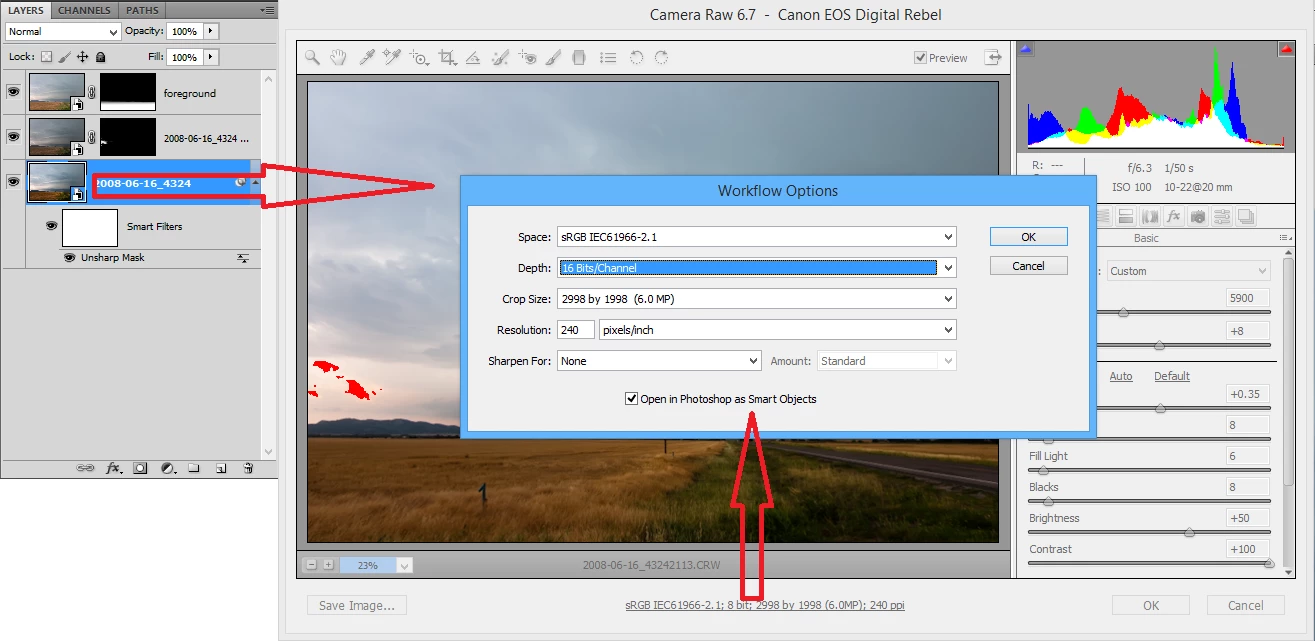
After searching this forum, I found this thread which cleverly addresses how to script ACR image edits (such as exposure, color temp, etc.) by manipulating XMP data. Unfortunately for me, it looks like the parameters set via the ACR "Workflow Options" dialog -- color space, bit depth, size, and resolution -- are not actually stored in XMP.

According to the thread I linked, it is not possible to script anything within the ACR interface, which doesn't bode well for my task. Naturally, if I use the ScriptListener plugin and perform the actions shown in the image above, it doesn't have any record of what I did within the ACR dialog -- just that it was opened and changes were made to the layer.

Still, this seems like such a simple task that there has got to be some way of automating it. If not, I will likely have to spend over a dozen hours manually opening 1000+ large TIFs with multiple SmartObject layers apiece and changing each layer's bit depth.

This topic has been closed for replies.

1 reply

JJMack
Community Expert
Community Expert
April 19, 2015

I don't think you would accomplish much if you do change the objects color bit depth. For a document can not have different bit depth layers.  The Pixels generated for the smart object layers would will be for the color depth the document has.

JJMack
brettjrobAuthor
Participant
April 19, 2015

Hi JJ, thanks for the reply. Actually, I've experimented with ACR SmartObjects quite a bit and have concluded that the selection of ACR bit depth *does* affect the final product.

For example, suppose one opens a RAW file in ACR after choosing 8-bit under ACR Workflow Options. Then, after the file is open in PS, change the document color depth to 16-bit and save. This still results in a low-quality image wherein even though your PS document is 16-bit, the actual pixel RGB values will only come from the set of 2^8 values rendered by ACR. In effect, you have a "fake" 16-bit image with a large file size but limited information and potentially posterization.

The only way to obtain a "real" 16-bit image in the scenario I just described is to make sure your PS document is 16-bit *and* change the ACR SmartObject bit depth to 16-bit. For me, as soon as I do the latter, the image is re-rendered (it takes 5-10 seconds to do, so I know something is happening).

To be clear: I've verified all this by comparing the pixel-by-pixel difference of images generated using various combinations of options between PS and ACR.

  • For my "control" image, I opened the RAW file in ACR, selected 16-bit in Workflow Options, and this was placed into a 16-bit PS document. Clearly, this is a "real" 16-bit image.
  • (Test #1) I re-opened the RAW in ACR, but selected 8-bit in Workflow Options. Once in PS, I changed the document to 16-bit and saved. The resulting image was not pixel-identical to the control image.
  • (Test #2) I opened image #1 and manually edited the ACR SmartObject layer, changing to 16-bit in Workflow Options. After re-rendering and saving, the resulting image was pixel-identical to the control image.

Hope that makes some sense! The takeaway is that I'm fairly certain changing the bit depth in Workflow Options for my ACR SmartObject layers will improve image quality and reduce the chances for posterization.

JJMack
Community Expert
Community Expert
April 19, 2015

Yes if you change the mode to 16bit before reprocessing the smart object and the smart object the color can be improved if the object is a RAW.  I would wander about control I think it would be interactive and require human interaction.

The image processor script does have a RAW option. It can open the first RAW file through ACR and its UI. Where the following  RAW file will be processed using the setting you created for the first RAW file  so settings can be passed to ACR opening a RAW file.  However I do not think you would be able to get into control like The image Process which process files and is in control before the files are open. When a smart object layer in the layers palette contents gets doubled clicked on. If the object is an embedded RAW File Photoshop will copy the raw file to your temp folder the open it if its will be opened via ACR and the ACR GUI will open in it there will only be an OK and Cancel button. You can not save the image all you can do is changes the ACR setting via OK or leave them be VIA cancel. Photoshop will save the smart object layers ACR settings if you click OK and generate new pixels for the smart object layer the documents bit depth will not change.


You also may not have to change the ACR bit depth they may have been 16bit but  the smart object  layers pixels generated by Photoshop were 8bit because  of the documents current bit depth,

JJMack